ApsakashAbhinandan Sharma
Created July 13, 2020

Warns you about risk by heavily vibrating your cell phone

A small wearable device to warn you when someone near you has fever & stops you from accidentally touching your face with dirty hands.

13
Warns you about risk by heavily vibrating your cell phone

Things used in this project

Story

Read more

Schematics

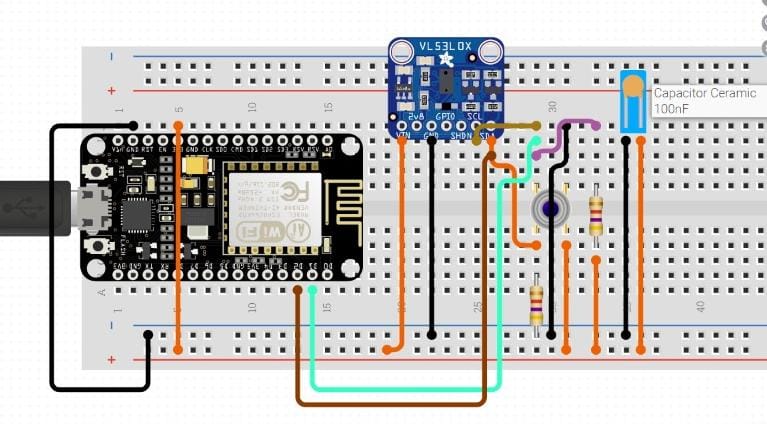
Connection of Arduino & sensors

Code

Code to send data through wifi to App

C/C++
Collect data from sensors & send it to App via Wifi module
This does not innclude pin mapping. It will be decided based on the specific connections
#include <Wire.h>
#include <Adafruit_MLX90614>;
#include <ESP8266WiFi.h>;
#include <BlynkSimpleEsp8266.h>;
#include <SimpleTimer.h>;
#include "Adafruit_VL53L0X.h"

Adafruit_VL53L0X lox = Adafruit_VL53L0X();

#define BLYNK_PRINT Serial // Comment this out to disable prints and save space

// Auth Token in the Blynk App (Project Settings)
char auth[] = "YOUR_BLYNK_AUTH_KEY";

// Your WiFi credentials.
char ssid[] = "WIFI_SSID";
char pass[] = "WIFI_PASSWORD";

#define DHTPIN 2 // What digital pin we're connected to

SimpleTimer timer;

// This function sends Arduino's up time every second to Virtual Pin (5, 6, 7 &amp;amp;amp;amp;amp;amp; 8).
// In the app, Widget's reading frequency should be set to PUSH.
  void sendSensor()
  { 
    float t = mlx.readObjectTempC();
    float k = measure.RangeMilliMeter
    if (isnan(t))
    { Serial.println("Failed to read from DHT sensor!");
      return;
    }
    // Sending value to blynk
    Blynk.virtualWrite(V6, t); // Temperature for gauge
    Blynk.virtualWrite(V8, t); // Temperature for graph
    Blynk.virtualWrite(V5, k); // Temperature for gauge
   
    // http://help.blynk.cc/en/articles/512056-how-to-display-any-sensor-data-in-blynk-app
    // guide to using blynk
  }

  void setup()
  { Serial.begin(9600); // See the connection status in Serial Monitor
    Blynk.begin(auth, ssid, pass);
    mlx.begin();
    // Setup a function to be called every second
    timer.setInterval(500, sendSensor);// L indicates long(mandatory for this func)
    //3600000ms (1 hr) is the interval time and other arg is the func name
  }

  void loop()
  {
    VL53L0X_RangingMeasurementData_t measure;
    lox.rangingTest(&measure, false);
    Blynk.run(); // Initiates Blynk
    timer.run(); // Initiates SimpleTimer
  }

Credits

Apsakash
1 project • 0 followers
Abhinandan Sharma
0 projects • 0 followers

Comments