



Hardware components | ||||||
 |
| × | 1 | |||
_ztBMuBhMHo.jpg?auto=compress%2Cformat&w=48&h=48&fit=fill&bg=ffffff) |
| × | 1 | |||
Software apps and online services | ||||||
 |
| |||||
Introduction
Read moreThis project demonstrates how to interface an HC-SR04 ultrasonic sensor with an Arduino Uno to measure distance accurately. Ultrasonic sensors are widely used in robotics, obstacle avoidance, parking systems, and IoT applications. The setup is simple, low-cost, and ideal for beginners.
Components Required- Arduino Uno
- HC-SR04 Ultrasonic Sensor
- Breadboard
- Jumper Wires
- USB Cable (for Arduino programming)
- The Arduino sends a short pulse to the Trig pin of the ultrasonic sensor.
- The sensor emits ultrasonic waves.
- These waves bounce back after hitting an object.
- The Echo pin sends the time taken back to the Arduino.
- Arduino calculates distance using the speed of sound.
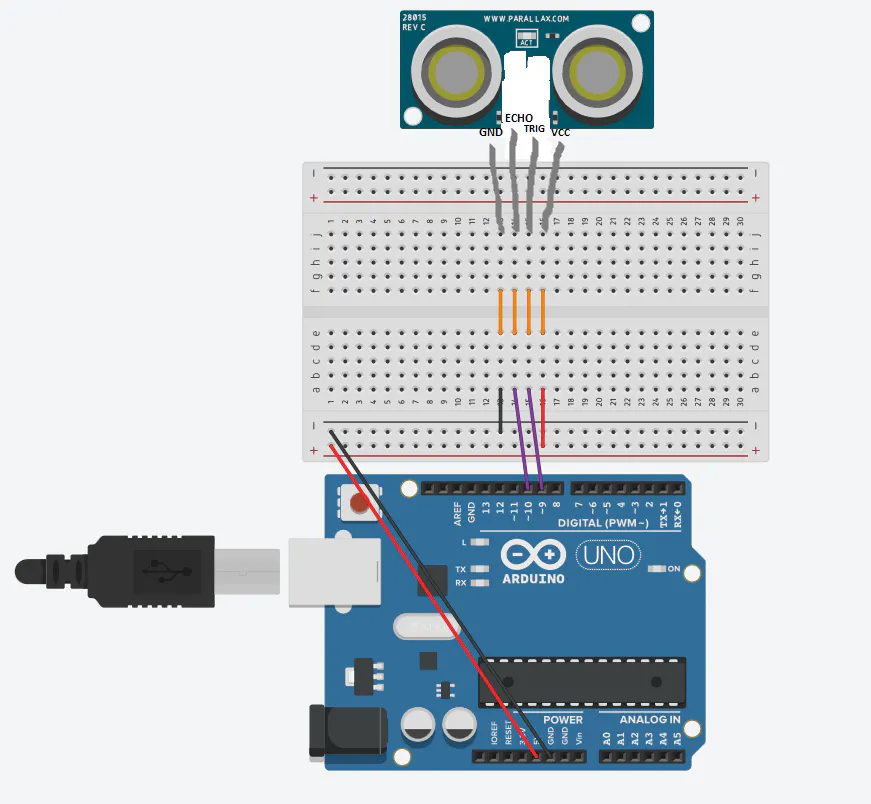
1 / 3 • CONNECTION
Arduino Code
#define trigPin 9
#define echoPin 10

long duration;
int distance;

void setup() {
  pinMode(trigPin, OUTPUT);
  pinMode(echoPin, INPUT);
  Serial.begin(9600);
}

void loop() {
  digitalWrite(trigPin, LOW);
  delayMicroseconds(2);

  digitalWrite(trigPin, HIGH);
  delayMicroseconds(10);
  digitalWrite(trigPin, LOW);

  duration = pulseIn(echoPin, HIGH);

  distance = duration * 0.034 / 2;

  Serial.print("Distance: ");
  Serial.print(distance);
  Serial.println(" cm");

  delay(500);
}- Open Serial Monitor (9600 baud rate).
- Distance from the object will be displayed in centimeter.
- Move an object closer or farther to see real-time changes.
- Obstacle detection robots
- Smart parking systems
- Distance-based alarms
- IoT sensing projects
This project shows a clean and practical way to measure distance using Arduino and an ultrasonic sensor. It forms a strong foundation for robotics and automation-based projects on Hackster.

10 projects • 7 followers
Aspiring hardware engineer focused on embedded systems, high‑reliability circuit design, and PCB layout for IoT and robotics projects.


Comments