/*
 * Project RoadRunnerSecurity
 * Author: Ronald G. Romo
 * Date: 04/07/2026
 * For comprehensive documentation and examples, please visit:
 * https://docs.particle.io/firmware/best-practices/firmware-template/
 */

// Include Particle Device OS APIs
#include "Particle.h"
#include <Adafruit_MQTT.h>//install this library only
#include "Adafruit_MQTT/Adafruit_MQTT_SPARK.h"
#include "Adafruit_MQTT/Adafruit_MQTT.h"
#include "credentials.h"
#include "application.h"
// The Photon has 9 PWM pins: D0, D1, D2, D3, A4, A5, A7, RX and TX.
//
// EXAMPLE USAGE
// Plays a melody - Connect small speaker to speakerPin
int speakerPin = D0;

// Notes defined in microseconds (Period/2)
// from note C to B, Octaves 3 through 7
int notes[] =
{0,
/* C,  C#,   D,  D#,   E,   F,  F#,   G,  G#,   A,  A#,   B */
3817,3597,3401,3205,3030,2857,2703,2551,2404,2273,2146,2024,   // 3 (1-12)
1908,1805,1701,1608,1515,1433,1351,1276,1205,1136,1073,1012,   // 4 (13-24)
 956, 903, 852, 804, 759, 716, 676, 638, 602, 568, 536, 506,   // 5 (25-37)
 478, 451, 426, 402, 379, 358, 338, 319, 301, 284, 268, 253,   // 6 (38-50)
 239, 226, 213, 201, 190, 179, 169, 159, 151, 142, 134, 127 }; // 7 (51-62)

#define NOTE_G3  2551
#define NOTE_G4  1276
#define NOTE_C5  956
#define NOTE_E5  759
#define NOTE_G5  638
#define RELEASE  20
#define BPM      100

// Let Device OS manage the connection to the Particle Cloud
SYSTEM_MODE(SEMI_AUTOMATIC); // this will change when we add your dashboard
TCPClient TheClient;

// Setup the MQTT client class by passing in the WiFi client and MQTT server and login details.
Adafruit_MQTT_SPARK mqtt(&TheClient,AIO_SERVER,AIO_SERVERPORT,AIO_USERNAME,AIO_KEY);

/****************************** Feeds ***************************************/
// Setup Feeds to publish or subscribe
// Notice MQTT paths for AIO follow the form: <username>/feeds/<feedname>
Adafruit_MQTT_Subscribe securitysnap =Adafruit_MQTT_Subscribe(&mqtt, AIO_USERNAME "/feeds/securitysnap");
//Adafruit_MQTT_Publish randomNumber = Adafruit_MQTT_Publish(&mqtt, AIO_USERNAME "/feeds/randomNumber");

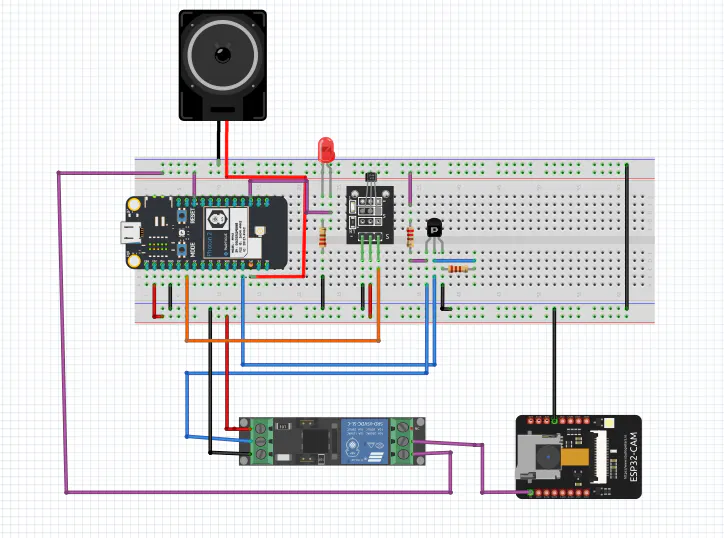
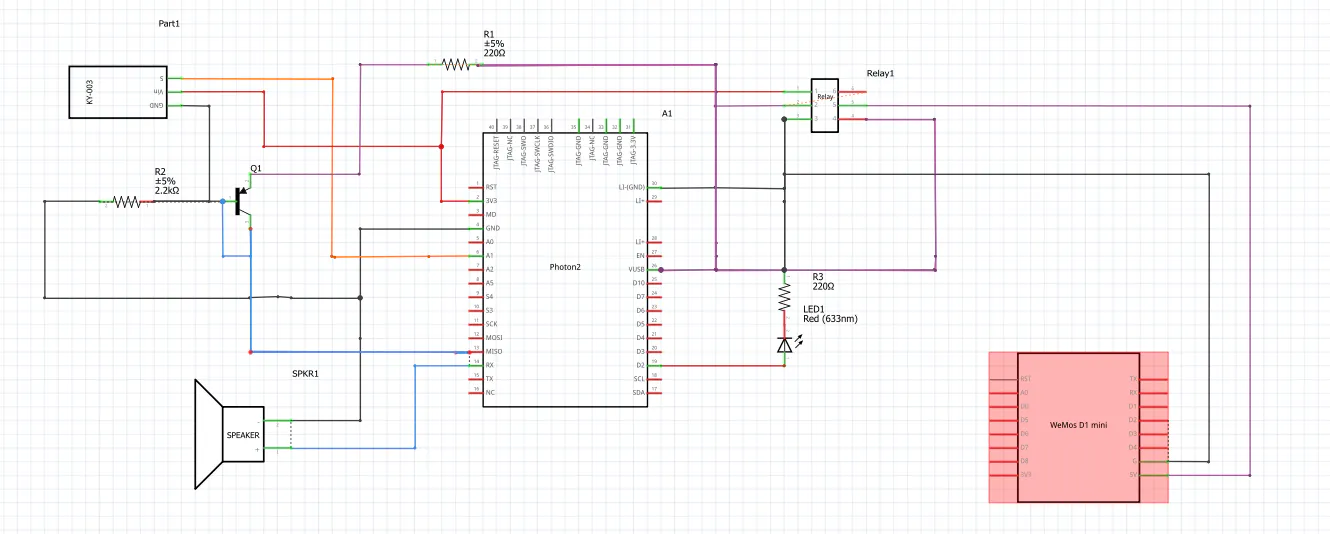
const int RELAYPIN = D16;
const int LEDPIN = D2;
const int HALSEN = A1;
const int SPEAKER = A4;
int hallState;
bool onOff;

void MQTT_connect();
bool MQTT_ping();

void setup() {
  Serial.begin(9600);
  waitFor(Serial.isConnected,10000);

  WiFi.on();
  WiFi.connect();
  while(WiFi.connecting()) {
    Serial.printf(".");
  }
  Serial.printf("\n\n");

   // Setup MQTT subscription
  mqtt.subscribe(&securitysnap);
  pinMode(RELAYPIN, OUTPUT);
  pinMode(HALSEN,INPUT );
  pinMode(SPEAKER,OUTPUT);

}

void loop() {
  MQTT_connect();
  MQTT_ping();

     Adafruit_MQTT_Subscribe *subscription;

  while ((subscription = mqtt.readSubscription(100)))
  {
    if (subscription == &securitysnap)
    {
      onOff= atoi((char *)securitysnap.lastread);


    }
  }
   hallState = digitalRead(HALSEN);
   if (hallState == 1){
     digitalWrite(RELAYPIN, HIGH); //take a picture of the bad guy
     tone(SPEAKER,550,2703);
  }
  if (hallState == 0){
    digitalWrite(RELAYPIN, LOW);
  }
}

void MQTT_connect() {
  int8_t ret;

  // Return if already connected.
  if (mqtt.connected()) {
    return;
  }

  Serial.print("Connecting to MQTT... ");

  while ((ret = mqtt.connect()) != 0) { // connect will return 0 for connected
       Serial.printf("Error Code %s\n",mqtt.connectErrorString(ret));
       Serial.printf("Retrying MQTT connection in 5 seconds...\n");
       mqtt.disconnect();
       delay(5000);  // wait 5 seconds and try again
  }
  Serial.printf("MQTT Connected!\n");
}

bool MQTT_ping() {
  static unsigned int last;
  bool pingStatus;

  if ((millis()-last)>120000) {
      Serial.printf("Pinging MQTT \n");
      pingStatus = mqtt.ping();
      if(!pingStatus) {
        Serial.printf("Disconnecting \n");
        mqtt.disconnect();
      }
      last = millis();
  }
  return pingStatus;
}






_3u05Tpwasz.png?auto=compress%2Cformat&w=40&h=40&fit=fillmax&bg=fff&dpr=2)

Comments