



Hardware components | ||||||
| × | 2 | ||||
| × | 1 | ||||
Software apps and online services | ||||||
 |
| |||||
| ||||||
| ||||||
| ||||||
Hand tools and fabrication machines | ||||||
 |
| |||||
 |
| |||||
 |
| |||||
| ||||||
| ||||||
| ||||||
There was a wetland pond behind our backyard, alive with wildlife — herons, ducks, turtles, and the occasional deer coming down to drink at the water’s edge. We had a Wyze Cam 3 mounted above the shed, pointed at the pond, so we could watch whenever curiosity struck.
The problem was power. The camera ran from a 10, 000 mAh power bank. On a good day, it lasted about 24 hours of continuous streaming before the bank ran dry and needed swapping. Running it around the clock made no sense — most of the time nobody was watching, and the camera was just burning power into the void.
What I really wanted was simple: the camera should only be on when someone actually wants to watch. Turn it on when a viewer clicks the live feed link on my website. Turn it off when they’re done. No wasted power, no constant battery swaps.
The catch was the shed had no mains power. Everything had to run on battery. And the receiver that would switch the camera on and off needed to be listening for a signal at all times — which, for a battery-powered device, is usually a death sentence for battery life.
That’s the problem this project solves. Using a LoRa Wake-on-Radio (WOR) system with the Ebyte EoRa-S3-900TB — an ESP32-S3 + SX1262 dev board — the receiver sits in deep sleep, drawing only ~174 µA on average, listening for a signal. When someone clicks the video feed link, a LoRa transmitter sends a wake packet across the yard. The receiver wakes up, switches the power bank on, and the camera comes to life. Two minutes later, it powers back down automatically and returns to deep sleep.
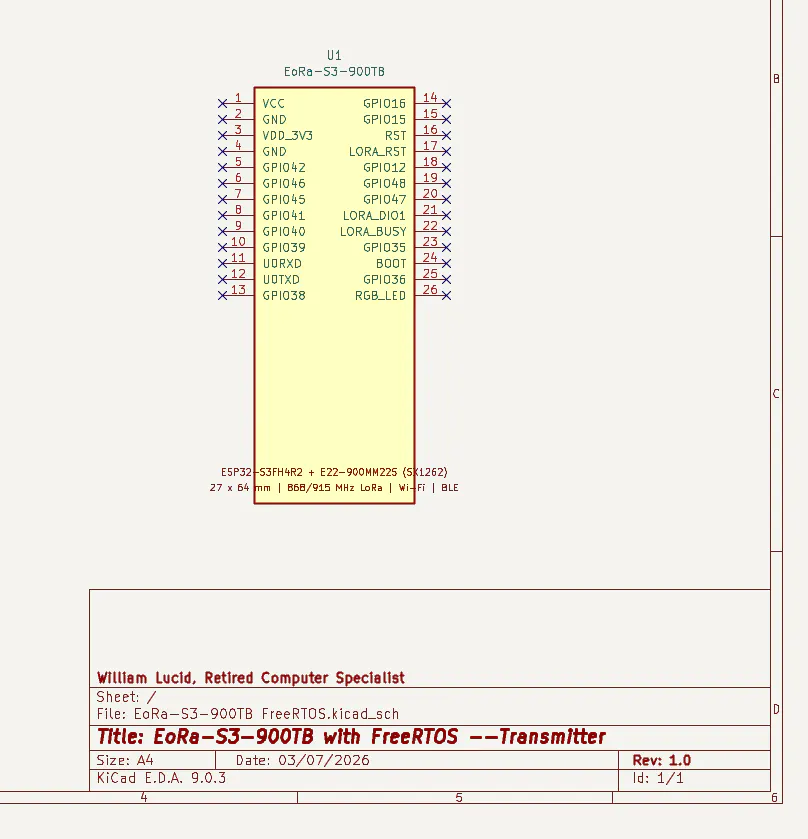
How It WorksThe system has two parts: a Transmitter (TX) connected to mains power inside the house, and a battery-powered Receiver (RX) out at the shed.
The Web Trigger
The TX runs a small web server. When a visitor to the hosted website clicks the “videofeed” link, an HTTP request hits the TX’s /relay route. This sets a flag that tells the TX to send a LoRa command. Clicking the Observations II link returns the viewer to the main menu.
The LoRa SignalThe TX sends two packets over LoRa. First, a wake packet (0xAA) — this is the WOR preamble that rouses the sleeping receiver. Then a command packet (0xBB) carrying the command and a timestamp. The SX1262 radio on the receiver is configured in autoDutyCycle mode: it wakes briefly every 9 ms to listen for a preamble, then goes back to sleep. This is what keeps average current so low.
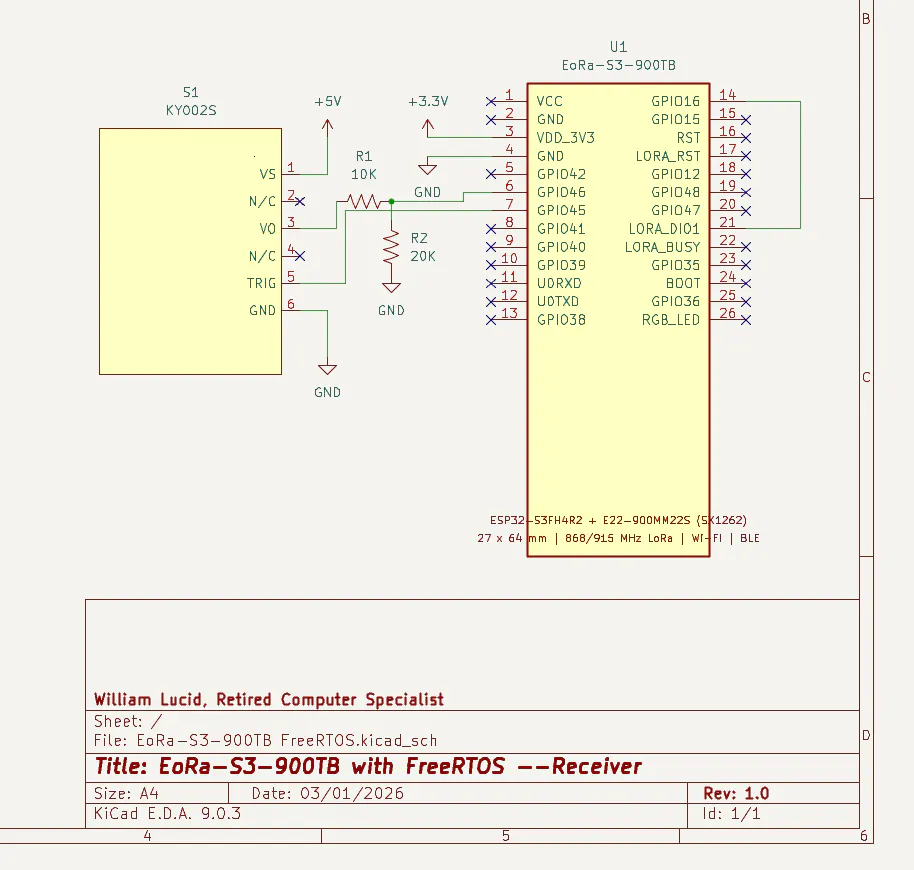
The Receiver Wakes UpWhen the preamble is detected, the ESP32-S3’s EXT0 interrupt fires on GPIO_NUM_16 (wired directly from DIO1). The ESP32 wakes from deep sleep, receives the command packet, sends an ACK back to the TX, and pulses the KY-002S bi-stable latching switch to turn the power bank on. The camera powers up and begins streaming.
The Viewing WindowAfter switching the camera on, the receiver calls radio.sleep() to power down the LoRa radio, sets a 120-second timer, and goes back into deep sleep. The camera streams live video for the full two-minute window. When the timer fires, the ESP32 wakes, pulses the switch off, resets the LoRa radio, and returns to EXT0 deep sleep — waiting quietly at 174 µA for the next request.
Project Video
The DIO1 / RTC GPIO Problem
The first significant gotcha: DIO1 on the EoRa-S3-900TB is wired to GPIO33, which is not an RTC-capable GPIO. EXT0 deep sleep wakeup requires an RTC-capable pin. The solution turned out to be remarkably simple — a single jumper wire from the DIO1 pad to GPIO_NUM_16, which is RTC-capable. No inverter, no extra components. Just a wire.
TIP
GPIO_NUM_16 is RTC-capable on the ESP32-S3 and works perfectly as an EXT0 wakeup source for the DIO1 interrupt from the SX1262.
Stale Timer WakeupsThe ESP32’s esp_sleep_enable_timer_wakeup() persists across deep sleep cycles and cannot be reliably disabled once set. This creates a subtle bug: if the ESP32 resets or power-cycles mid-session, the timer fires on the next boot with no valid context, potentially toggling the camera switch incorrectly.
The solution is the cameraTimerArmed RTC_DATA_ATTR flag. The timer wakeup handler only acts — cutting camera power — if this flag is set. It’s only set when a genuine cmd 1 is received and acted upon. Stale timer wakeups are silently ignored and the system returns to EXT0 sleep.
Radio State After Deep SleepAfter radio.sleep() followed by ESP32 deep sleep, the SX1262 wakes in an indeterminate state. Simply calling initRadio() on timer wakeup was not reliable. The fix is to always call radio.reset() first on timer wakeup — a hardware RST pin pulse (10 ms low, 10 ms high) — before re-initializing. On cold boot the chip is already clean so reset is skipped.
Getting StartedPut the EoRa-S3-900TB into Download ModeBefore uploading a sketch, the ESP32-S3 must be in bootloader mode:
1. Connect the board to your PC via USB-C.
1. Press and hold the BOOT button.
1. While holding BOOT, press and release RST.
1. Release BOOT. The board is now in download mode.
NOTE
On Windows, the COM port may change when entering download mode. Check Device Manager if your port disappears.
Cold Boot to SyncAfter flashing both the Transmitter and Receiver, perform a cold boot (full power cycle) on both units. This is required after every fresh flash to synchronize the two devices.
Arduino IDE SetupStep 1 — Install Arduino IDE 2.xDownload from arduino.cc/en/software.
Step 2 — Add ESP32 Board Manager URLGo to File → Preferences and add the following to Additional Board Manager URLs:
https://raw.githubusercontent.com/espressif/arduino-esp32/gh-pages/package_esp32_index.json
Step 3 — Install ESP32 Board PackageGo to Tools → Board → Boards Manager, search for esp32, and install esp32 by Espressif Systems.
Step 4 — Install LibrariesGo to Tools → Manage Libraries and install: RadioLib (Jan Gromes), ESPAsyncWebServer (me-no-dev), AsyncTCP (me-no-dev).
Step 5 — Tools Menu SettingsSelect ESP32S3 Dev Module and configure as follows:
Documentation & References
Hardware Reference📄 Why use the EoRa-S3-900TB? (MD)
📄 Complete EoRa-S3-900TB Pin Mapping Guide (PDF)
📄 KY002S MOSFET Switch Module Specification (PDF)
Pin Definitions🖼️ EoRa-S3-900TB Pin Definition
Project Photos🖼️ EoRa-S3-900TB Developement Board
Power Analysis📊 NPPK II Battery Life Analysis (PDF)
Source Code💻 GitHub Repository — Tech500/EoRa-S3-900TB-with-FreeRTOS
Credits & Acknowledgements• William Lucid — Founder & Developer
• OpenAI ChatGPT — Engineering Assistant & Debugging Partner
• Claude — Lead Programmer & Debugger, Battery Analysis, EoRa_PI_WOR_Receiver.ino
• Copilot — DIO1 re-routing and contributions to coding
• Gemini — Support, debugging, and contributions to coding
• Community testers and contributors
MIT License — Copyright © 2026 William Lucid
73 de AB9NQ (Tech500)


Comments