



Hardware components | ||||||
 |
| × | 2 | |||
 |
| × | 1 | |||
| × | 1 | ||||
 |
| × | 1 | |||
 |
| × | 2 | |||
 |
| × | 2 | |||
 |
| × | 2 | |||
 |
| × | 16 | |||
Software apps and online services | ||||||
 |
| |||||
Restaurants often face problems during busy hours because communication between customers, waiters, kitchen staff, and cleaning staff takes time.
Customers may need to wait for a waiter to place an order. Kitchen staff need to manage food preparation for multiple tables, while restaurant staff also need to know when customers have finished eating and when tables need cleaning.
For ServeSync, the XIAO ESP32-S3 is particularly valuable because its wireless capability enables direct ESP-NOW communication, while its GPIO resources allow us to interface the LEDs, push buttons, and rotary encoder required for the restaurant workflow. This gives us a compact, responsive, and scalable hardware node that can be replicated across tables while keeping the physical footprint small. The XIAO's Arduino compatibility also allowed rapid development and testing of the prototype.
This makes the XIAO ESP32-S3 more than just the controller of the project—it acts as the communication and interaction layer connecting the customer table with restaurant staff.
ServeSync is a smart restaurant automation prototype designed to improve this workflow.
The project combines:
- 📱 Software-based food ordering
- 📡 ESP-NOW wireless communication
- 🎛️ Rotary encoder table selection
- 💡 LED notifications
- 🔘 Customer interaction buttons
- 🧹 Table cleaning alerts
The system creates a communication link between customers and restaurant staff.
💡 In spirationThe main inspiration behind ServeSync was the problem of inefficient communication inside restaurants.
In a traditional restaurant:
This process can create delays and increase the workload of restaurant staff.
We wanted to create a smarter workflow where technology helps communicate important information automatically.
ServeSync allows:
- Customers to place orders digitally.
- Staff to manage food preparation status.
- Customers to receive visual status notifications.
- Customers to notify staff when they have finished eating.
- Staff to receive a cleaning alert.
ServeSync is a smart restaurant management system designed to improve the interaction between customers and kitchen staff. The system combines a web-based food ordering interface with XIAO ESP32-S3 boards communicating through ESP-NOW.
For this demonstration, the system is configured for one customer table. A customer can place an order through the web interface, while the kitchen/staff side receives the order and can provide status updates. The system also supports service-related notifications, such as requesting table cleaning.
Traditional restaurant ordering can require customers to wait for staff to take their orders. This can result in delays, communication errors, and additional workload for restaurant employees.
There is also a need for a simple way for customers to notify staff when they require assistance, such as requesting table cleaning or service.
ServeSync addresses these problems by combining a web-based ordering interface with wireless communication between XIAO ESP32-S3 devices.
3. Our SolutionServeSync provides a simple digital ordering and restaurant service system.
Customers use a digital interface to:
- View the menu.
- Select food.
- Select quantity.
- Place an order.
with:
- HTML – webpage structure
- CSS – interface design and styling
- JavaScript – ordering functionality and interaction
The hardware side uses XIAO ESP32-S3 boards. Communication between the customer-side and kitchen/staff-side boards is handled using ESP-NOW, allowing the devices to communicate wirelessly without requiring a traditional Wi-Fi network connection between them.
Hardware Communication SystemESP32 boards communicate wirelessly using ESP-NOW.
The hardware system handles:
- Table selection.
- Cooking status.
- Ready status.
- Customer notification.
- Finished eating notification.
- Cleaning alerts.
For the one-table demonstration, the system consists of two XIAO ESP32-S3 boards:
The basic workflow is:
- The customer accesses the ordering webpage.
- The customer selects food items and places an order.
- The order information is processed by the system.
- The customer-side XIAO ESP32-S3 communicates with the kitchen/staff XIAO ESP32-S3 using ESP-NOW.
- The kitchen/staff side receives the order notification.
- Staff can monitor the order and respond to customer/service requests.
- The system can also provide notifications for table service or cleaning.
5. Demo Configuration
This project is presented as a working prototype demonstration using one table (Table 1).
The full concept can be expanded to support multiple tables, but the current demonstration intentionally uses only one customer table to keep the prototype simple and easy to demonstrate.
Demo hardware- 2 × Seeed Studio XIAO ESP32-S3
- 2× Tactile push button
- 2× Generic LED
- 2× Resistor
- 2× Breadboard
- Jumper wires
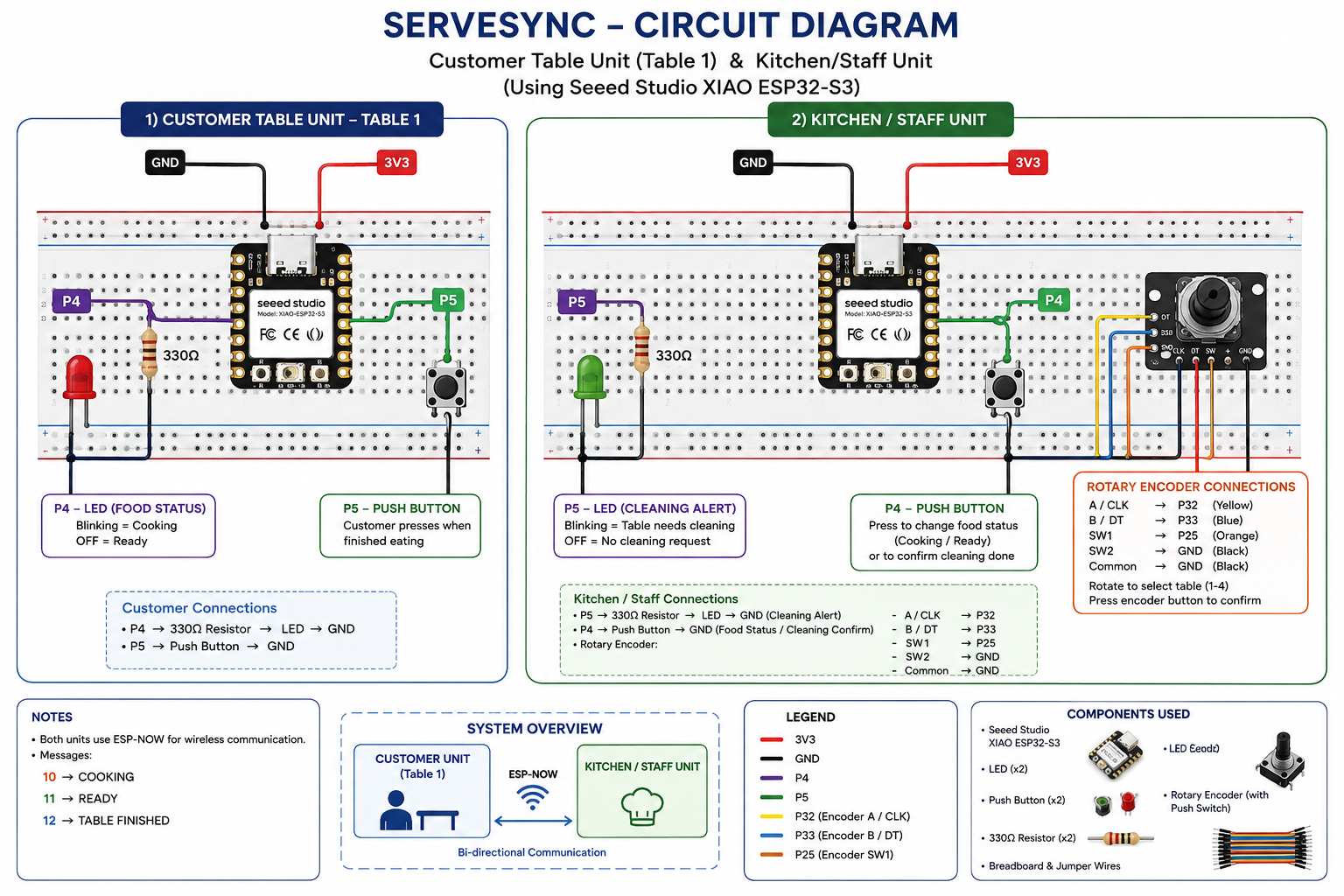
ServeSync is built as a two-node restaurant communication system using Seeed Studio XIAO ESP32-S3 boards and ESP-NOW wireless communication. For this demonstration, one Customer Unit (Table 1) and one Staff/Kitchen Unit are used.
Customer Unit — Table 1The customer-side XIAO ESP32-S3 handles the table's order-status indication and the Finished button.
P4 → 330Ω resistor → LED positive (+) → LED negative (−) → GND
- The LED provides visual feedback for the customer/order status.
- A 330Ω resistor is used to limit the LED current.
- P4 → 330Ω resistor → LED positive (+) → LED negative (−) → GNDThe LED provides visual feedback for the customer/order status.A 330Ω resistor is used to limit the LED current.
P5 → tactile push button → GND
- The button allows the customer to signal that the order has been finished/collected.
- P5 → tactile push button → GNDThe button allows the customer to signal that the order has been finished/collected.
The staff-side XIAO ESP32-S3 receives customer notifications and provides controls for food status and table-cleaning alerts.
P5 → 330Ω resistor → LED positive (+) → LED negative (−) → GND
- The LED indicates the relevant staff/table alert status.
- A 330Ω current-limiting resistor is connected in series with the LED.
- P5 → 330Ω resistor → LED positive (+) → LED negative (−) → GNDThe LED indicates the relevant staff/table alert status.A 330Ω current-limiting resistor is connected in series with the LED.
P4 → tactile push button → GND
- Used by staff to update the food/order status.
- P4 → tactile push button → GNDUsed by staff to update the food/order status.
A rotary encoder is connected to the Staff/Kitchen XIAO ESP32-S3:
Encoder Pin XIAO ESP32-S3
A (CLK) P32
B (DT) P33
Common GND
SW1 P25
SW2 GND
The encoder provides an additional physical control interface for the staff unit.
Breadboard & WiringBoth units are assembled on standard solderless breadboards for easy prototyping and testing. Jumper wires are used to connect the XIAO ESP32-S3 boards, LEDs, 330Ω resistors, tactile switches, rotary encoder, and ground connections.
The demonstration uses one customer table, so only two XIAO ESP32-S3 boards are required: one for the Customer Unit and one for the Staff/Kitchen Unit.
Wireless CommunicationThe two XIAO ESP32-S3 boards communicate wirelessly using ESP-NOW, allowing customer and staff notifications to be exchanged without requiring a conventional Wi-Fi connection between the two nodes.
How It WorksServeSync combines a QR-code-based restaurant ordering system with two XIAO ESP32-S3 boards communicating through ESP-NOW.
Each restaurant table has its own unique QR code. When a customer scans the QR code at their table, they are taken directly to the digital ordering interface for that table.
Step 1 – Customer Places an Order
Each table in the restaurant is assigned a unique QR code.
The customer scans the QR code using their smartphone. The QR code opens the restaurant's web-based ordering system and identifies the table from which the order is being placed.
For example:
TABLE 1 → TABLE 1 QR CODETABLE 2 → TABLE 2 QR CODETABLE 3 → TABLE 3 QR CODETABLE 4 → TABLE 4 QR CODE
For this prototype demonstration, Table 1 is used.
After scanning the QR code, the customer can:
- View available food items
- Select food
- Select quantity
- Review the order
- Place the order
The ordering interface is developed using HTML, CSS, and JavaScript.
📱 QR-CODE ORDERING SYSTEM- Unique QR code for each table
- Digital food menu
- Food selection
- Quantity selection
- Order placement
- Table identification through QR code
- Reduced dependency on manual order taking
The Kitchen/Staff XIAO ESP32-S3 contains a rotary encoder.
The encoder allows staff to select the table they want to manage:
TABLE 1TABLE 2TABLE 3TABLE 4
The selected table is shown in the Serial Monitor.
Example:
TABLE 1
TABLE 1
Rotating the encoder changes the active table.
Pressing the encoder button confirms the selection.
Example:
SELECTED TABLE 2
SELECTED TABLE 2After selecting the required table, the staff presses the P4 button.
The food status changes to:
COOKING
The Staff XIAO ESP32-S3 sends:
MSG_COOKING = 10
MSG_COOKING = 10
The message contains:
[Message Type, Table Number]
[Message Type, Table Number]
Example:
[10, 1]
[10, 1]
This means:
TABLE 1 → COOKING
🔥 COOKING STATUSThe Customer XIAO ESP32-S3 receives the ESP-NOW message.
If the received table number matches its configured table number, the customer notification LED connected to P4 starts blinking.
Example:
TABLE 1
FOOD STATUS = COOKING
CUSTOMER P4 LED = BLINKING
TABLE 1
FOOD STATUS = COOKING
CUSTOMER P4 LED = BLINKING
This gives the customer a visual indication that their order is currently being prepared.
📸 COOKING NOTIFICATIONWhen the food is prepared, the staff presses the food-status button again.
The status changes:
COOKING
   ↓
READY
COOKING
   ↓
READY
The Staff XIAO ESP32-S3 sends:
MSG_READY = 11
MSG_READY = 11
Example:
[11, 1]
[11, 1]
The Customer XIAO ESP32-S3 receives the message.
The customer notification LED turns OFF.
Example:
TABLE 1
FOOD STATUS = READY
CUSTOMER P4 LED = OFF
TABLE 1
FOOD STATUS = READY
CUSTOMER P4 LED = OFFWhen the Staff XIAO ESP32-S3 receives the Finished message:
TABLE 1 NEEDS CLEANING
TABLE 1 NEEDS CLEANING
The system stores the cleaning request:
tableNeedsCleaning[1] = true;
tableNeedsCleaning[1] = true;
The Staff LED connected to P5 starts blinking.
Example Serial Monitor output:
==============================
CUSTOMER FINISHED - TABLE 1 NEEDS CLEANING
STAFF P5 LED = BLINKING
==============================
==============================
CUSTOMER FINISHED - TABLE 1 NEEDS CLEANING
STAFF P5 LED = BLINKING
==============================The staff rotates the encoder and selects the table that requires cleaning.
Example:
SELECTED TABLE 1
SELECTED TABLE 1
After cleaning the table, the staff presses the P4 button to acknowledge that cleaning has been completed.
The system then:
- Removes the cleaning request
- Resets the table status
- Stops the cleaning alert when there are no remaining cleaning requests
Example:
==============================
TABLE 1 CLEANED
STAFF P5 LED = OFF
==============================
==============================
TABLE 1 CLEANED
STAFF P5 LED = OFF
==============================
The table is now ready for the next customer.
🔄 Complete ServeSync Workflow
📌 Communication Overview


Comments