



Hardware components | ||||||
| × | 1 | ||||
 |
| × | 1 | |||
| × | 1 | ||||
 |
| × | 1 | |||
 |
| × | 1 | |||
 |
| × | 1 | |||
 |
| × | 1 | |||
 |
| × | 1 | |||
 |
| × | 1 | |||
 |
| × | 12 | |||
 |
| × | 12 | |||
 |
| × | 4 | |||
 |
| × | 2 | |||
Software apps and online services | ||||||
 |
| |||||
 |
| |||||
 |
| |||||
| ||||||
| ||||||
| ||||||
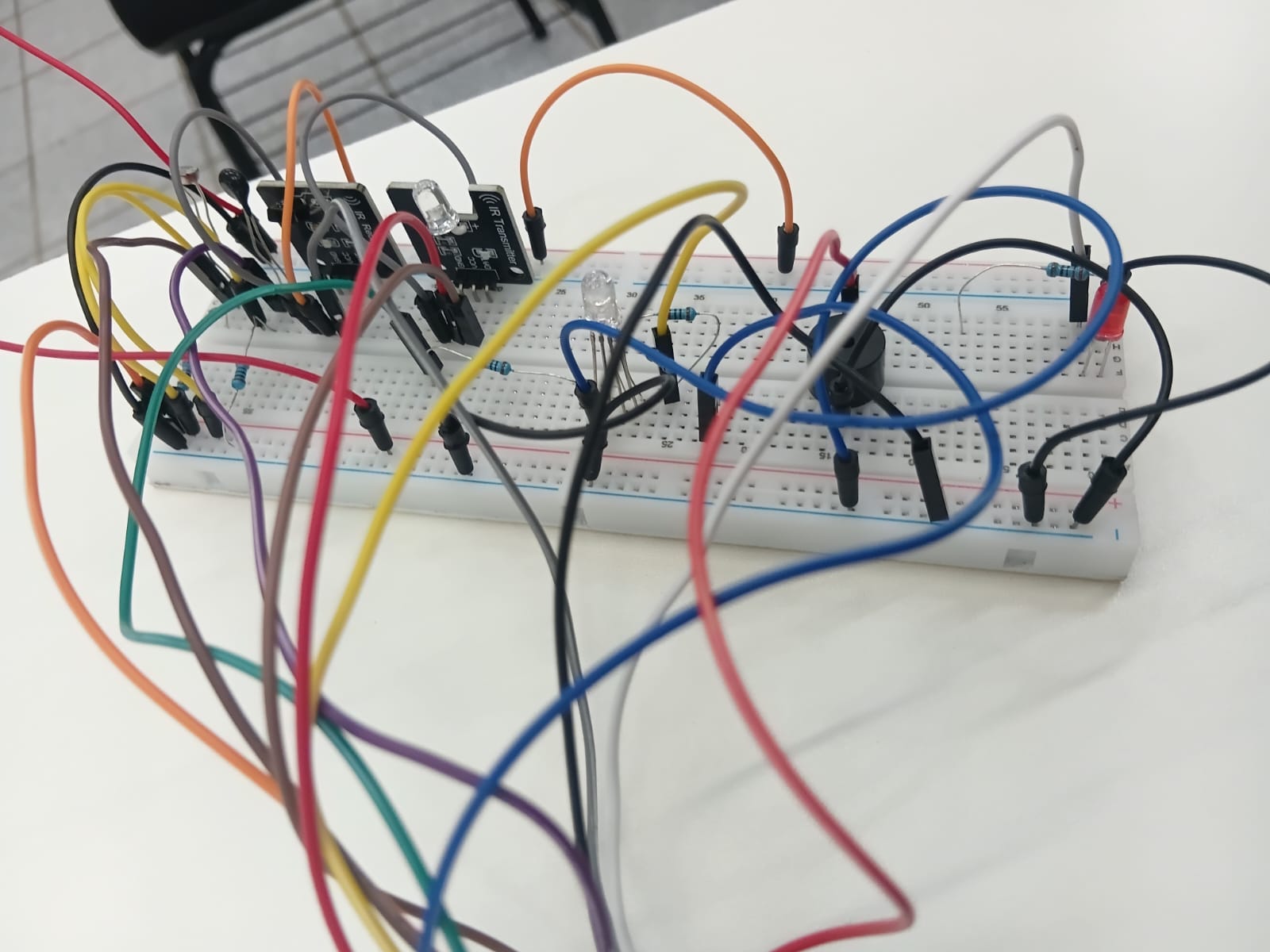
This project connects an ESP32 to Firebase Realtime Database and a custom web dashboard to create a centralized smart room controller. The system reads environmental data, publishes sensor values online, controls LEDs, RGB lighting, and a buzzer, and sends infrared commands to real devices such as a Carrier air conditioner and a projector.
A key feature is IR learning: unknown remote-control signals can be captured, saved to Firebase, and replayed later from the web interface.
ProblemMany rooms have separate controls for lighting, alerts, projectors, and air conditioning. Physical remotes get lost, IR protocols are often device-specific, and simple automation becomes messy when devices do not expose Wi-Fi or Bluetooth APIs.
SolutionThe ESP32 acts as the bridge between the physical room and the cloud. It reads sensors, listens for commands from Firebase, and controls local hardware. For IR devices, it can capture raw IR signals from the original remote and replay them later, even when the protocol is detected as UNKNOWN.
- ESP32 connected to Firebase Realtime Database
- Web dashboard hosted with Firebase Hosting
- Real-time temperature and light monitoring
- LED control
- RGB LED color control
- Buzzer test/alert output
- IR remote control for projector
- IR remote control for Carrier air conditioner
- Raw IR learning mode for unsupported/unknown protocols
- Saved AC commands such as power, temperature, fan, mode, swing/louver, and power off
How It WorksThe ESP32 periodically reads the room sensors and publishes the values to Firebase. The web dashboard listens to those values and updates the interface in real time.
When the user presses a button on the dashboard, the command is written to Firebase. The ESP32 polls the command path, executes the action locally, then clears the command.
For infrared devices, the ESP32 can either send known IR codes or replay raw captured signals. This was especially useful for the air conditioner, because the real remote was decoded as UNKNOWN. Instead of depending on protocol decoding, the project saves the full raw timing sequence and replays it at 38 kHz.
- Open the AC remote panel in the dashboard.
- Press
Record. - Choose the command to learn, such as Power, Temp+, Temp-, Fan, Mode, or Louver.
- Point the original remote at the IR receiver and press the real button.
- The ESP32 captures the raw IR signal and saves it to Firebase.
- Future clicks on the dashboard replay that saved signal through the IR LED.
What I LearnedThe biggest lesson was that not every IR remote can be handled cleanly by protocol name. Some devices, especially air conditioners, send long state-based signals and may appear as UNKNOWN. Capturing and replaying raw timing data made the system much more reliable.
I also learned how useful Firebase can be as a lightweight command bus between an embedded device and a web interface.
Challenges- Handling unknown IR protocols
- Making AC power on and power off work as separate learned signals
- Keeping the web dashboard, Firebase state, and real device state synchronized
- Sending long AC IR messages reliably from the ESP32
- Avoiding repeated commands by clearing Firebase command fields after execution
- Add authentication to the dashboard
- Add mobile-friendly remote layouts
- Store multiple AC profiles
- Add automatic climate rules based on temperature
- Add scheduling for AC and projector control
- Create a PCB version of the circuit
- Add OTA firmware updates

<!DOCTYPE html>
<html lang="pt-BR">
<head>
<meta charset="UTF-8">
<meta name="viewport" content="width=device-width, initial-scale=1.0">
<title>Ambiente Inteligente</title>
<style>
:root {
color-scheme: dark;
--bg: #0f1115;
--panel: #181c24;
--panel-2: #202633;
--text: #f4f7fb;
--muted: #a8b3c7;
--line: #303848;
--blue: #2ea8ff;
--green: #33c481;
--red: #ff5c73;
--yellow: #ffd166;
--orange: #ff9f1c;
}
* {
box-sizing: border-box;
}
body {
margin: 0;
min-height: 100vh;
background: var(--bg);
color: var(--text);
font-family: Arial, Helvetica, sans-serif;
}
main {
width: min(980px, calc(100% - 32px));
margin: 0 auto;
padding: 28px 0;
}
header {
display: flex;
align-items: center;
justify-content: space-between;
gap: 16px;
margin-bottom: 20px;
}
h1,
h2,
p {
margin: 0;
}
h1 {
font-size: clamp(1.6rem, 4vw, 2.4rem);
font-weight: 800;
}
.status {
min-width: 122px;
padding: 8px 12px;
border: 1px solid var(--line);
border-radius: 999px;
color: var(--muted);
text-align: center;
font-size: 0.9rem;
}
.status.online {
color: var(--green);
border-color: rgba(51, 196, 129, 0.45);
}
.status.warning {
color: var(--orange);
border-color: rgba(255, 159, 28, 0.5);
}
.status.error {
color: var(--red);
border-color: rgba(255, 92, 115, 0.5);
}
.grid {
display: grid;
grid-template-columns: repeat(3, minmax(0, 1fr));
gap: 14px;
}
.card {
min-height: 138px;
padding: 18px;
border: 1px solid var(--line);
border-radius: 8px;
background: var(--panel);
}
.card h2 {
color: var(--muted);
font-size: 0.95rem;
font-weight: 700;
letter-spacing: 0;
}
.value {
margin-top: 14px;
font-size: 2.2rem;
font-weight: 800;
line-height: 1.1;
}
.hint {
margin-top: 8px;
color: var(--muted);
font-size: 0.92rem;
}
.message {
margin-top: 14px;
min-height: 22px;
color: var(--muted);
font-size: 0.95rem;
}
.message.ok {
color: var(--green);
}
.message.error {
color: var(--red);
}
.controls {
display: grid;
grid-template-columns: 1.3fr 1fr;
gap: 14px;
margin-top: 14px;
}
.row {
display: flex;
align-items: center;
gap: 10px;
flex-wrap: wrap;
margin-top: 16px;
}
button {
min-width: 112px;
height: 42px;
border: 1px solid transparent;
border-radius: 8px;
background: var(--panel-2);
color: var(--text);
font: inherit;
font-weight: 700;
cursor: pointer;
}
button:hover {
border-color: var(--blue);
}
button:disabled {
cursor: not-allowed;
opacity: 0.55;
}
.primary {
background: var(--blue);
color: #06111d;
}
.danger {
background: var(--red);
color: #21030a;
}
.warning {
background: var(--yellow);
color: #1b1300;
}
input[type="color"] {
width: 72px;
height: 42px;
padding: 2px;
border: 1px solid var(--line);
border-radius: 8px;
background: var(--panel-2);
cursor: pointer;
}
/* Estilos do Modal do Controle Remoto */
.modal-overlay {
position: fixed;
top: 0; left: 0; right: 0; bottom: 0;
background: rgba(0, 0, 0, 0.7);
display: flex;
justify-content: center;
align-items: center;
z-index: 1000;
opacity: 0;
pointer-events: none;
transition: opacity 0.3s;
}
.modal-overlay.active {
opacity: 1;
pointer-events: auto;
}
.remote-modal {
background: #181c24;
border: 1px solid var(--line);
border-radius: 20px;
padding: 24px;
width: 320px;
box-shadow: 0 10px 30px rgba(0,0,0,0.5);
position: relative;
}
.btn-close-modal {
position: absolute;
top: 10px; right: 10px;
background: none;
border: none;
color: var(--muted);
font-size: 1.5rem;
cursor: pointer;
min-width: auto;
height: auto;
}
.remote-title {
text-align: center;
margin-bottom: 20px;
color: var(--text);
}
/* Layout dos botes do controle */
.remote-row {
display: flex;
justify-content: space-around;
margin-bottom: 15px;
}
.remote-btn {
width: 50px; height: 50px;
min-width: 50px;
border-radius: 50%;
background: #e0e5ec;
color: #333;
font-weight: bold;
display: flex;
justify-content: center;
align-items: center;
font-size: 0.9rem;
}
.remote-btn:hover { border-color: var(--blue); }
.remote-btn.power { background: var(--red); color: white; }
/* D-Pad Direcional */
.d-pad {
display: grid;
grid-template-areas:
". up ."
"left ok right"
". down .";
gap: 5px;
justify-content: center;
margin: 20px 0;
}
.d-pad .remote-btn { background: #d0d7e0; }
.d-pad .up { grid-area: up; }
.d-pad .down { grid-area: down; }
.d-pad .left { grid-area: left; }
.d-pad .right { grid-area: right; }
.d-pad .ok {
grid-area: ok;
background: #444 !important;
color: white;
}
/* Botes Pill-shaped (Largos) */
.remote-btn.pill {
border-radius: 25px;
width: 70px;
}
@media (max-width: 760px) {
header,
.controls {
grid-template-columns: 1fr;
}
header {
align-items: flex-start;
flex-direction: column;
}
.grid {
grid-template-columns: 1fr;
}
button {
flex: 1 1 130px;
}
}
</style>
</head>
<body>
<main>
<header>
<div>
<h1>Ambiente Inteligente</h1>
<p class="hint">Dashboard IoT</p>
</div>
<div id="firebaseStatus" class="status">Conectando</div>
</header>
<section class="grid" aria-label="Leituras">
<article class="card">
<h2>Temperatura</h2>
<p id="temp" class="value">--</p>
<p class="hint">Limite: 35 C</p>
</article>
<article class="card">
<h2>Luminosidade</h2>
<p id="lum" class="value">--</p>
<p class="hint">Limite: 2100</p>
</article>
<article class="card">
<h2>LED principal</h2>
<p id="ledStatus" class="value">--</p>
<p id="modoStatus" class="hint">Modo: --</p>
</article>
</section>
<section class="controls" aria-label="Controles">
<article class="card">
<h2>Controle do LED</h2>
<div class="row">
<button id="ledOn" class="primary" type="button">Ligar</button>
<button id="ledOff" class="danger" type="button">Desligar</button>
<button id="buzzer" class="warning" type="button">Testar buzzer</button>
</div>
<p class="hint">O modo manual volta ao automatico em 5 segundos.</p>
<p id="commandStatus" class="message"></p>
</article>
<article class="card">
<h2>LED RGB</h2>
<div class="row">
<input id="colorPicker" type="color" value="#000000" aria-label="Cor do LED RGB">
<button id="applyColor" class="primary" type="button">Aplicar</button>
</div>
<p id="rgbStatus" class="hint">RGB: 0, 0, 0</p>
</article>
<article class="card">
<h2>Controle IR (Sala)</h2>
<div class="row">
<button id="btnAbrirModalProjetor" class="primary" type="button">Controle do Projetor</button>
<button id="btnAbrirModalAc" class="primary" type="button">Controle do Ar Condicionado</button>
</div>
<p class="hint">Dispara sinais infravermelhos gravados no ESP32.</p>
</article>
</section>
</main>
<!-- Modal do Controle Remoto -->
<div class="modal-overlay" id="modalOverlay">
<div class="remote-modal">
<button class="btn-close-modal" id="btnFecharModal">×</button>
<h2 class="remote-title">Projetor</h2>
<div class="remote-row">
<button class="remote-btn power" data-cmd="power"></button>
<button class="remote-btn" data-cmd="mute"></button>
</div>
<div class="remote-row">
<button class="remote-btn" data-cmd="play"></button>
<button class="remote-btn pill" data-cmd="source">SRC</button>
<button class="remote-btn pill" data-cmd="menu">MENU</button>
</div>
<div class="d-pad">
<button class="remote-btn up" data-cmd="up"></button>
<button class="remote-btn left" data-cmd="left"></button>
<button class="remote-btn ok" data-cmd="ok">OK</button>
<button class="remote-btn right" data-cmd="right"></button>
<button class="remote-btn down" data-cmd="down"></button>
</div>
<div class="remote-row">
<button class="remote-btn" data-cmd="rewind"></button>
<button class="remote-btn" data-cmd="forward"></button>
<button class="remote-btn" data-cmd="back"></button>
</div>
<div class="remote-row" style="background: #e0e5ec; border-radius: 25px; padding: 5px;">
<button class="remote-btn pill" style="background:none;" data-cmd="prev"></button>
<button class="remote-btn pill" style="background:none;" data-cmd="next"></button>
</div>
</div>
</div>
<div class="modal-overlay" id="modalOverlayAc">
<div class="remote-modal" style="background: #e8ebd9; border: 1px solid #c2c5b6;">
<button class="btn-close-modal" id="btnFecharModalAc" style="color: #555;">×</button>
<h2 class="remote-title" style="color: #2b4970; font-weight: 800;">Carrier</h2>
<div class="remote-row">
<button class="remote-btn pill" id="btnAcLearn" type="button" style="background: #f4c95d; color: #332400;">Gravar</button>
</div>
<div class="remote-row" style="margin-top: 30px;">
<button class="remote-btn pill" data-cmd-ac="fan" style="background: #a9b3a7; color: white;">Fan</button>
<button class="remote-btn" data-cmd-ac="power" style="background: #7ca8d9; color: white; border-radius: 20px;"></button>
</div>
<div class="d-pad" style="background: #a9b3a7; border-radius: 50%; padding: 10px; width: 120px; margin: 20px auto;">
<button class="remote-btn up" data-cmd-ac="tempUp" style="background: #e8ebd9; color: #555;"></button>
<div style="grid-area: ok; display: flex; align-items: center; justify-content: center; color: white; font-weight: bold; font-size: 0.8rem;">TEMP</div>
<button class="remote-btn down" data-cmd-ac="tempDown" style="background: #e8ebd9; color: #555;"></button>
</div>
<div class="remote-row">
<button class="remote-btn pill" data-cmd-ac="sleep" style="background: #a9b3a7; color: white;">Sleep</button>
<button class="remote-btn pill" data-cmd-ac="mode" style="background: #a9b3a7; color: white;">Mode</button>
</div>
<div class="remote-row">
<button class="remote-btn pill" data-cmd-ac="sweep" style="background: #a9b3a7; color: white;">Sweep</button>
<button class="remote-btn pill" data-cmd-ac="louver" style="background: #a9b3a7; color: white;">Louver</button>
</div>
</div>
</div>
<script type="module">
import { initializeApp } from "https://www.gstatic.com/firebasejs/12.14.0/firebase-app.js";
import { getDatabase, onValue, ref, set, update } from "https://www.gstatic.com/firebasejs/12.14.0/firebase-database.js";
const firebaseConfig = {
apiKey: "AIzaSyBKX09qG0tWc3lz1I-vrC3l_Nzu6SIQZyU",
authDomain: "sistemaambienteinteligente.firebaseapp.com",
databaseURL: "https://sistemaambienteinteligente-default-rtdb.firebaseio.com",
projectId: "sistemaambienteinteligente",
storageBucket: "sistemaambienteinteligente.firebasestorage.app",
messagingSenderId: "384427074485",
appId: "1:384427074485:web:3b93bd244f6ce6c93caffc",
measurementId: "G-79W4NJSJJS"
};
const app = initializeApp(firebaseConfig);
const database = getDatabase(app);
const firebaseStatus = document.getElementById("firebaseStatus");
const tempEl = document.getElementById("temp");
const lumEl = document.getElementById("lum");
const ledStatusEl = document.getElementById("ledStatus");
const modoStatusEl = document.getElementById("modoStatus");
const rgbStatusEl = document.getElementById("rgbStatus");
const colorPicker = document.getElementById("colorPicker");
const commandStatus = document.getElementById("commandStatus");
const commandButtons = [
document.getElementById("ledOn"),
document.getElementById("ledOff"),
document.getElementById("buzzer"),
document.getElementById("applyColor"),
document.getElementById("btnAbrirModalProjetor"), // NOVO
document.getElementById("btnAbrirModalAc"), // NOVO
document.getElementById("btnAcLearn")
];
let firebaseConnected = false;
let recebeuSensores = false;
let recebeuEstado = false;
let acLearning = false;
let acPower = false;
function setStatus(texto, tipo = "") {
firebaseStatus.textContent = texto;
firebaseStatus.className = `status ${tipo}`.trim();
}
function atualizarStatusGeral() {
if (!firebaseConnected) {
setStatus("Offline", "error");
return;
}
if (!recebeuSensores || !recebeuEstado) {
setStatus("Sem ESP32", "warning");
return;
}
setStatus("Online", "online");
}
function setCommandStatus(texto, tipo = "") {
commandStatus.textContent = texto;
commandStatus.className = `message ${tipo}`.trim();
}
async function enviarComando(acao, textoSucesso) {
commandButtons.forEach((button) => button.disabled = true);
setCommandStatus("Enviando comando...");
try {
await acao();
setCommandStatus(textoSucesso, "ok");
} catch (error) {
console.error(error);
setCommandStatus(`Erro no Firebase: ${error.message}`, "error");
} finally {
commandButtons.forEach((button) => button.disabled = false);
}
}
function colorToRgb(hex) {
return {
r: parseInt(hex.slice(1, 3), 16),
g: parseInt(hex.slice(3, 5), 16),
b: parseInt(hex.slice(5, 7), 16)
};
}
function rgbToColor({ r = 0, g = 0, b = 0 }) {
return "#" + [r, g, b]
.map((value) => Number(value).toString(16).padStart(2, "0"))
.join("");
}
onValue(ref(database, ".info/connected"), (snapshot) => {
firebaseConnected = snapshot.val() === true;
atualizarStatusGeral();
});
onValue(ref(database, "ambiente/sensores"), (snapshot) => {
if (!snapshot.exists()) {
recebeuSensores = false;
tempEl.textContent = "--";
lumEl.textContent = "--";
atualizarStatusGeral();
return;
}
recebeuSensores = true;
const dados = snapshot.val();
const temperatura = Number(dados.temperatura);
tempEl.textContent = Number.isFinite(temperatura)
? `${temperatura.toFixed(1)} C`
: "--";
lumEl.textContent = dados.luminosidade ?? "--";
atualizarStatusGeral();
}, (error) => {
console.error(error);
setStatus("Erro RTDB", "error");
});
onValue(ref(database, "ambiente/estado"), (snapshot) => {
if (!snapshot.exists()) {
recebeuEstado = false;
ledStatusEl.textContent = "--";
modoStatusEl.textContent = "Aguardando ESP32";
rgbStatusEl.textContent = "RGB: --";
atualizarStatusGeral();
return;
}
recebeuEstado = true;
const estado = snapshot.val();
const rgb = estado.rgb || {};
const ac = estado.ac || {};
acPower = Boolean(ac.power);
ledStatusEl.textContent = estado.led ? "LIGADO" : "DESLIGADO";
modoStatusEl.textContent = `Modo: ${estado.modoAutomatico ? "automatico" : "manual"}`;
rgbStatusEl.textContent = `RGB: ${rgb.r ?? 0}, ${rgb.g ?? 0}, ${rgb.b ?? 0}`;
colorPicker.value = rgbToColor(rgb);
atualizarStatusGeral();
}, (error) => {
console.error(error);
setStatus("Erro RTDB", "error");
});
document.getElementById("ledOn").addEventListener("click", async () => {
await enviarComando(
() => update(ref(database, "ambiente/comandos"), {
led: true,
ledManual: true
}),
"Comando enviado: ligar LED"
);
});
document.getElementById("ledOff").addEventListener("click", async () => {
await enviarComando(
() => update(ref(database, "ambiente/comandos"), {
led: false,
ledManual: true
}),
"Comando enviado: desligar LED"
);
});
document.getElementById("buzzer").addEventListener("click", async () => {
await enviarComando(
() => set(ref(database, "ambiente/comandos/buzzer"), true),
"Comando enviado: testar buzzer"
);
});
document.getElementById("applyColor").addEventListener("click", async () => {
await enviarComando(
() => update(ref(database, "ambiente/comandos/rgb"), colorToRgb(colorPicker.value)),
"Comando enviado: atualizar RGB"
);
});
// Lgica do Modal do Projetor
const modalOverlay = document.getElementById("modalOverlay");
document.getElementById("btnAbrirModalProjetor").addEventListener("click", () => {
modalOverlay.classList.add("active");
});
document.getElementById("btnFecharModal").addEventListener("click", () => {
modalOverlay.classList.remove("active");
});
// Mapeia todos os botes do controle remoto
document.querySelectorAll(".remote-btn").forEach(btn => {
btn.addEventListener("click", async (e) => {
const comando = e.currentTarget.getAttribute("data-cmd");
if(comando) {
await enviarComando(
() => set(ref(database, "ambiente/comandos/projetorCmd"), comando),
`Comando enviado: Projetor ${comando.toUpperCase()}`
);
}
});
});
// Lgica do Modal do Ar Condicionado
const modalOverlayAc = document.getElementById("modalOverlayAc");
document.getElementById("btnAbrirModalAc").addEventListener("click", () => {
modalOverlayAc.classList.add("active");
});
document.getElementById("btnFecharModalAc").addEventListener("click", () => {
modalOverlayAc.classList.remove("active");
});
const btnAcLearn = document.getElementById("btnAcLearn");
btnAcLearn.addEventListener("click", () => {
acLearning = !acLearning;
btnAcLearn.style.background = acLearning ? "#33c481" : "#f4c95d";
btnAcLearn.style.color = acLearning ? "#062015" : "#332400";
setCommandStatus(acLearning ? "Gravando AC" : "");
});
// Mapeia todos os botes do controle do Ar Condicionado
document.querySelectorAll("[data-cmd-ac]").forEach(btn => {
btn.addEventListener("click", async (e) => {
const comando = e.currentTarget.getAttribute("data-cmd-ac");
if(comando) {
const aprendendo = acLearning;
const path = aprendendo ? "ambiente/comandos/acLearnCmd" : "ambiente/comandos/acCmd";
const comandoFirebase = aprendendo && comando === "power" && acPower ? "powerOff" : comando;
await enviarComando(
() => set(ref(database, path), comandoFirebase),
aprendendo ? `Gravao selecionada: ${comando.toUpperCase()}` : `Comando enviado: AC ${comando.toUpperCase()}`
);
if (aprendendo) {
acLearning = false;
btnAcLearn.style.background = "#f4c95d";
btnAcLearn.style.color = "#332400";
}
}
});
});
</script>
</body>
</html>
#include <Arduino.h>
#include <WiFi.h>
#include <HTTPClient.h>
#include <ArduinoJson.h>
#include <IRremoteESP8266.h>
#include <IRrecv.h>
#include <IRsend.h>
#include <IRutils.h>
#include <ir_Carrier.h>
#include <receptor.cpp>

const char *WIFI_SSID = "your-WiFi-SSID-here";
const char *WIFI_PASSWORD = "Your-WiFi-Password-here";

#define API_KEY "Your-API-Key-here"
#define DATABASE_URL "Your-Firebase-Realtime-Database-URL-here"
#define DNS_PRIMARY IPAddress(8, 8, 8, 8)
#define DNS_SECONDARY IPAddress(1, 1, 1, 1)

// ================= PINOS =================

#define LED_PIN 18
#define LDR_PIN 34
#define THERM_PIN 35
#define BUZZER_PIN 16

#define RED_PIN 25
#define GREEN_PIN 26
#define BLUE_PIN 27

const uint16_t kRecvPin = 19;
const uint16_t kIrLed = 4;

// Configurao avanada para capturar ar-condicionado (buffer maior e timeout longo)
const uint16_t kCaptureBufferSize = 1024;
const uint8_t kTimeout = 50;
IRrecv irrecv(kRecvPin, kCaptureBufferSize, kTimeout, true);

IRsend irsend(kIrLed);
IRCarrierAc64 ac(kIrLed);
decode_results results;

// ================= INSTRUES PARA CAPTURAR CDIGO DO AC =================
// 1. Faa upload deste cdigo no ESP32
// 2. Abra o Monitor Serial (115200 baud)
// 3. Aponte o controle remoto do CARRIER para o receptor IR (pino 19)
// 4. Pressione o boto "LIGAR" do controle
// 5. No Monitor Serial, voc ver algo como:
//
//    === SINAL IR RECEBIDO ===
//    Tipo: UNKNOWN
//    Cdigo HEX: 0x33CDDA66
//    Bits: 32
//
//    Copie o cdigo abaixo:
//    uint16_t rawData[68] = { 9020, 4500, 560, 560, ... };
//    ========================
//
// 6. Copie a linha "uint16_t rawData[X] = { ... };"
// 7. Cole no lugar de `codigoACRaw` abaixo
// 8. Crie a vriavel com o tamanho: `const uint16_t codigoACRawLen = X;`
// 9. Descomente as linhas e faa novo upload
// ============================================================================

// ================= FIREBASE =================

const char *FIREBASE_HOST = "https://sistemaambienteinteligente-default-rtdb.firebaseio.com";

HTTPClient http;

const char *SENSORES_PATH = "/ambiente/sensores";
const char *ESTADO_PATH = "/ambiente/estado";
const char *COMANDOS_PATH = "/ambiente/comandos";
const char *IR_CAPTURE_PATH = "/ambiente/ir/ultimo";
const char *AC_RAW_PATH = "/ambiente/acRaw";

String caminhoComando(const char *subPath)
{
  String path(COMANDOS_PATH);
  path.concat(subPath);
  return path;
}

String caminhoAcRaw(const String &cmd, const char *subPath)
{
  String path(AC_RAW_PATH);
  path.concat("/");
  path.concat(cmd);
  path.concat(subPath);
  return path;
}

// ================= VARIAVEIS =================

bool ledStatus = false;
bool modoAutomatico = true;
bool buzzerLigado = false;
bool alertaTemperaturaAnterior = false;

int luminosidade = 0;
float temperatura = 0;

unsigned long ultimoComandoManual = 0;
unsigned long ultimoEnvioFirebase = 0;
unsigned long ultimaLeituraComandos = 0;
unsigned long ultimoDebugSerial = 0;
unsigned long buzzerManualAte = 0;
String comandoAcAprendizado = "";

const unsigned long TEMPO_MANUAL = 5000;
const unsigned long INTERVALO_FIREBASE = 3000; // 1000
const unsigned long INTERVALO_COMANDOS = 2000; // 500
const unsigned long INTERVALO_DEBUG = 2000;
const int LIMITE_LUMINOSIDADE = 2100;
const float LIMITE_TEMPERATURA = 35.0;
const uint16_t AC_IR_REPEATS = 2;

int redValue = 0;
int greenValue = 0;
int blueValue = 0;

// ================= CDIGOS IR DO PROJETOR (BPC-1080P M18-W) =================
// Substitua 0x0 pelo cdigo HEX capturado no Monitor Serial
uint64_t projPower = 0xFB38C7;
uint64_t projMute = 0xFB10EF;
uint64_t projPlayPause = 0xFB807F;
uint64_t projSource = 0xFBDA25;
uint64_t projMenu = 0xFB827D;

uint64_t projUp = 0xFB58A7;
uint64_t projDown = 0xFB12ED;
uint64_t projLeft = 0xFBE21D;
uint64_t projRight = 0xFBE01F;
uint64_t projOk = 0xFB609F;

uint64_t projRewind = 0xFB18E7;
uint64_t projForward = 0xFBC03F;
uint64_t projBack = 0xFB50AF;

uint64_t projPrev = 0xFBF20D;
uint64_t projNext = 0xFBD22D;
// ============================================================================

// ================= AR CONDICIONADO (CARRIER) =================

const uint16_t acPowerOnRaw[] = {
  9006, 4452, 528, 602, 532, 578, 554, 1678, 556, 578, 554, 1678, 580,
  578, 532, 600, 554, 574, 576, 580, 532, 1682, 550, 602, 530, 578,
  554, 1678, 556, 578, 554, 602, 530, 598, 552, 580, 554, 602, 530,
  602, 532, 580, 552, 602, 532, 580, 552, 578, 556, 596, 554, 580,
  554, 580, 552, 578, 554, 578, 556, 580, 552, 578, 556, 576, 556,
  594, 556, 578, 554, 578, 554, 580, 554, 578, 554, 576, 556, 578,
  554, 578, 556, 598, 556, 1678, 556, 578, 554, 578, 556, 1666, 556
};
const uint16_t acPowerOnRawLen = sizeof(acPowerOnRaw) / sizeof(acPowerOnRaw[0]);
const uint16_t AC_RAW_FREQUENCY_KHZ = 38;
const uint16_t AC_RAW_MAX_LENGTH = 300;

String uint64ParaHex(uint64_t valor)
{
  String texto = "0x";
  texto += String((uint32_t)(valor >> 32), HEX);
  String parteBaixa = String((uint32_t)valor, HEX);

  while (parteBaixa.length() < 8)
  {
    parteBaixa = "0" + parteBaixa;
  }

  texto += parteBaixa;
  texto.toUpperCase();
  return texto;
}

const char *modoAcTexto(uint8_t modo)
{
  if (modo == kCarrierAc64Cool) return "cool";
  if (modo == kCarrierAc64Fan) return "fan";
  if (modo == kCarrierAc64Heat) return "heat";
  return "unknown";
}

const char *fanAcTexto(uint8_t fan)
{
  if (fan == kCarrierAc64FanAuto) return "auto";
  if (fan == kCarrierAc64FanLow) return "low";
  if (fan == kCarrierAc64FanMedium) return "medium";
  if (fan == kCarrierAc64FanHigh) return "high";
  return "unknown";
}

void preencherEstadoAc(JsonObject estadoAc)
{
  estadoAc["power"] = ac.getPower();
  estadoAc["temp"] = ac.getTemp();
  estadoAc["mode"] = modoAcTexto(ac.getMode());
  estadoAc["fan"] = fanAcTexto(ac.getFan());
  estadoAc["swingV"] = ac.getSwingV();
  estadoAc["sleep"] = ac.getSleep();
  estadoAc["raw"] = uint64ParaHex(ac.getRaw());
}

void enviarComandoAc(const String &cmdAc)
{
  Serial.print("Enviando AC: ");
  Serial.println(cmdAc);
  Serial.println(ac.toString());
  Serial.print("Raw CarrierAc64: ");
  Serial.println(uint64ParaHex(ac.getRaw()));

  ac.send(AC_IR_REPEATS);
}

void enviarRawAc(const String &cmdAc, const uint16_t rawData[], uint16_t rawLen)
{
  Serial.print("Enviando AC RAW: ");
  Serial.print(cmdAc);
  Serial.print(" | len=");
  Serial.print(rawLen);
  Serial.print(" | freq=");
  Serial.print(AC_RAW_FREQUENCY_KHZ);
  Serial.println("kHz");

  irsend.sendRaw(rawData, rawLen, AC_RAW_FREQUENCY_KHZ);
}

bool csvParaRaw(const String &rawCsv, uint16_t rawData[], uint16_t &rawLen)
{
  rawLen = 0;
  uint32_t valor = 0;
  bool lendoNumero = false;

  for (uint16_t i = 0; i <= rawCsv.length(); i++)
  {
    char c = (i < rawCsv.length()) ? rawCsv[i] : ',';

    if (c >= '0' && c <= '9')
    {
      lendoNumero = true;
      valor = (valor * 10) + (c - '0');
      if (valor > UINT16_MAX)
      {
        return false;
      }
    }
    else if (c == ',' || c == ' ' || c == '\n' || c == '\r' || c == '\t')
    {
      if (lendoNumero)
      {
        if (rawLen >= AC_RAW_MAX_LENGTH)
        {
          return false;
        }

        rawData[rawLen++] = (uint16_t)valor;
        valor = 0;
        lendoNumero = false;
      }
    }
    else
    {
      return false;
    }
  }

  return rawLen > 0;
}

// ================= RGB =================

void atualizarRGB()
{
  ledcWrite(0, redValue);
  ledcWrite(1, greenValue);
  ledcWrite(2, blueValue);
}

int limitarCor(int valor)
{
  return constrain(valor, 0, 255);
}

// ================= BUZZER =================

void definirBuzzer(bool ligar)
{
  if (buzzerLigado == ligar)
  {
    return;
  }

  buzzerLigado = ligar;
  digitalWrite(BUZZER_PIN, ligar ? HIGH : LOW);
}

// ================= WIFI =================

void conectarWifi()
{
  WiFi.mode(WIFI_STA);
  WiFi.config(INADDR_NONE, INADDR_NONE, INADDR_NONE, DNS_PRIMARY, DNS_SECONDARY);

  Serial.print("WiFi SSID: ");
  Serial.println(WIFI_SSID);
  WiFi.begin(WIFI_SSID, WIFI_PASSWORD);

  Serial.print("Conectando ao WiFi");

  int tentativas = 0;
  while (WiFi.status() != WL_CONNECTED && tentativas < 20)
  {
    delay(500);
    Serial.print(".");
    tentativas++;
  }

  Serial.println();

  if (WiFi.status() == WL_CONNECTED) {
    Serial.print("WiFi conectado! IP: ");
    Serial.println(WiFi.localIP());

    // Testar DNS
    IPAddress firebaseIp;
    if (WiFi.hostByName(DATABASE_URL, firebaseIp))
    {
      Serial.print("DNS OK - Firebase IP: ");
      Serial.println(firebaseIp);
    }
    else
    {
      Serial.println("ERRO: DNS falhou para Firebase");
    }
  } else {
    Serial.println("ERRO: Falha ao conectar WiFi");
  }
}

// ================= FIREBASE =================

void conectarFirebase()
{
  Serial.println("Firebase via REST API pronto");
}

bool enviarParaFirebase(const String &path, const String &payload)
{
  if (WiFi.status() != WL_CONNECTED)
  {
    return false;
  }

  String url = String(FIREBASE_HOST) + path + ".json";

  http.begin(url);
  http.addHeader("Content-Type", "application/json");

  int httpResponseCode = http.PUT(payload);

  if (httpResponseCode != 200)
  {
    Serial.print("ERRO: HTTP ");
    Serial.print(httpResponseCode);
    Serial.print(" - ");
    Serial.println(url);
  }

  http.end();
  return (httpResponseCode == 200);
}

String lerDoFirebase(const String &path)
{
  if (WiFi.status() != WL_CONNECTED)
  {
    return "";
  }

  String url = String(FIREBASE_HOST) + path + ".json";

  http.begin(url);
  http.addHeader("Content-Type", "application/json");

  int httpResponseCode = http.GET();
  String response = "";

  if (httpResponseCode == 200)
  {
    response = http.getString();
  }
  else
  {
    Serial.print("ERRO ao ler: HTTP ");
    Serial.println(httpResponseCode);
  }

  http.end();
  return response;
}

String rawCapturadoParaCsv(const decode_results &captura, uint16_t &rawLenCorrigido)
{
  String rawCsv;
  rawLenCorrigido = getCorrectedRawLength(&captura);
  rawCsv.reserve(rawLenCorrigido * 7);

  uint16_t pos = 0;
  for (uint16_t i = 1; i < captura.rawlen; i++)
  {
    uint32_t usecs = captura.rawbuf[i] * kRawTick;

    while (usecs > UINT16_MAX)
    {
      if (pos > 0) rawCsv += ',';
      rawCsv += String(UINT16_MAX);
      rawCsv += ",0";
      pos += 2;
      usecs -= UINT16_MAX;
    }

    if (pos > 0) rawCsv += ',';
    rawCsv += String(usecs);
    pos++;
  }

  return rawCsv;
}

bool publicarRawAcAprendido(const String &cmdAc, const decode_results &captura, const String &rawCsv, uint16_t rawLen)
{
  if (cmdAc.length() == 0 || rawCsv.length() == 0)
  {
    return false;
  }

  String payload;
  payload.reserve(rawCsv.length() + 180);
  payload += "{\"protocol\":\"";
  payload += typeToString(captura.decode_type, captura.repeat);
  payload += "\",\"bits\":";
  payload += String(captura.bits);
  payload += ",\"value\":\"";
  payload += uint64ParaHex(captura.value);
  payload += "\",\"rawlen\":";
  payload += String(rawLen);
  payload += ",\"raw\":\"";
  payload += rawCsv;
  payload += "\",\"atualizadoEm\":";
  payload += String(millis());
  payload += "}";

  return enviarParaFirebase(caminhoAcRaw(cmdAc, ""), payload);
}

void publicarCapturaIr(const decode_results &captura)
{
  if (WiFi.status() != WL_CONNECTED)
  {
    return;
  }

  uint16_t rawLenCorrigido = 0;
  String rawCsv = rawCapturadoParaCsv(captura, rawLenCorrigido);

  String payload;
  payload.reserve(rawCsv.length() + 180);
  payload += "{\"protocol\":\"";
  payload += typeToString(captura.decode_type, captura.repeat);
  payload += "\",\"bits\":";
  payload += String(captura.bits);
  payload += ",\"value\":\"";
  payload += uint64ParaHex(captura.value);
  payload += "\",\"rawlen\":";
  payload += String(rawLenCorrigido);
  payload += ",\"raw\":\"";
  payload += rawCsv;
  payload += "\",\"atualizadoEm\":";
  payload += String(millis());
  payload += "}";

  enviarParaFirebase(IR_CAPTURE_PATH, payload);

  if (comandoAcAprendizado.length() > 0)
  {
    Serial.print("Salvando RAW aprendido para AC: ");
    Serial.println(comandoAcAprendizado);

    if (publicarRawAcAprendido(comandoAcAprendizado, captura, rawCsv, rawLenCorrigido))
    {
      enviarParaFirebase(caminhoComando("/acLearnCmd"), "\"\"");
      comandoAcAprendizado = "";
    }
  }
}

void exibirCapturaIr(const decode_results &captura)
{
  Serial.println("\n=== SINAL IR RECEBIDO ===");
  Serial.print("Tipo: ");
  Serial.println(typeToString(captura.decode_type, captura.repeat));
  Serial.print("Codigo HEX: ");
  Serial.println(uint64ParaHex(captura.value));
  Serial.print("Bits: ");
  Serial.println(captura.bits);
  Serial.print("Raw length: ");
  Serial.println(getCorrectedRawLength(&captura));

  Serial.println("\nCopie o codigo abaixo:");
  Serial.println(resultToSourceCode(&captura));
  Serial.println("========================\n");
}

bool firebaseDisponivel()
{
  return WiFi.status() == WL_CONNECTED;
}

void publicarEstadoInicial()
{
  if (!firebaseDisponivel())
  {
    return;
  }

  Serial.println("Publicando estado inicial...");

  StaticJsonDocument<256> doc;
  doc["ledManual"] = false;
  doc["led"] = false;
  doc["buzzer"] = false;
  JsonObject rgb = doc.createNestedObject("rgb");
  rgb["r"] = redValue;
  rgb["g"] = greenValue;
  rgb["b"] = blueValue;

  String payload;
  serializeJson(doc, payload);

  enviarParaFirebase(COMANDOS_PATH, payload);
}

void publicarDadosFirebase()
{
  if (!firebaseDisponivel())
  {
    return;
  }

  // Publicar sensores
  StaticJsonDocument<256> sensores;
  sensores["luminosidade"] = luminosidade;
  sensores["temperatura"] = temperatura;
  sensores["atualizadoEm"] = millis();

  String sensorPayload;
  serializeJson(sensores, sensorPayload);
  enviarParaFirebase(SENSORES_PATH, sensorPayload);

  // Publicar estado
  StaticJsonDocument<512> estado;
  estado["led"] = ledStatus;
  estado["modoAutomatico"] = modoAutomatico;
  estado["buzzer"] = buzzerLigado;
  JsonObject rgbState = estado.createNestedObject("rgb");
  rgbState["r"] = redValue;
  rgbState["g"] = greenValue;
  rgbState["b"] = blueValue;
  JsonObject acState = estado.createNestedObject("ac");
  preencherEstadoAc(acState);

  String estadoPayload;
  serializeJson(estado, estadoPayload);
  enviarParaFirebase(ESTADO_PATH, estadoPayload);
}

bool lerBoolFirebase(const String &path, bool valorPadrao)
{
  String response = lerDoFirebase(path);

  if (response.length() == 0)
  {
    return valorPadrao;
  }

  if (response == "true") return true;
  if (response == "false") return false;

  return valorPadrao;
}

int lerIntFirebase(const String &path, int valorPadrao)
{
  String response = lerDoFirebase(path);

  if (response.length() == 0)
  {
    return valorPadrao;
  }

  return response.toInt();
}

String lerStringFirebase(const String &path, String valorPadrao) {
  String response = lerDoFirebase(path);

  if (response.length() == 0 || response == "null") {
    return valorPadrao;
  }

  response.replace("\"", ""); // Remove as aspas devolvidas pelo JSON
  return response;
}

bool enviarRawAcSalvo(const String &cmdAc)
{
  String rawCsv = lerStringFirebase(caminhoAcRaw(cmdAc, "/raw"), "");

  if (rawCsv.length() == 0)
  {
    Serial.print("RAW do AC ainda nao cadastrado para: ");
    Serial.println(cmdAc);
    return false;
  }

  uint16_t rawData[AC_RAW_MAX_LENGTH];
  uint16_t rawLen = 0;

  if (!csvParaRaw(rawCsv, rawData, rawLen))
  {
    Serial.print("RAW do AC invalido para: ");
    Serial.println(cmdAc);
    return false;
  }

  enviarRawAc(cmdAc, rawData, rawLen);
  return true;
}

void lerComandosFirebase()
{
  if (!firebaseDisponivel())
  {
    return;
  }

  // ===== CAPTURAR CDIGOS IR =====
  // Descomente para clonar controle do Carrier

  if (false && irrecv.decode(&results)) {
    Serial.print("Cdigo capturado: 0x");
    Serial.println(results.value, HEX);
    Serial.print("Protocolo: ");
    Serial.println(results.decode_type);
    irrecv.resume();
  }


  String novoComandoAcAprendizado = lerStringFirebase(caminhoComando("/acLearnCmd"), "");

  if (novoComandoAcAprendizado.length() > 0 && novoComandoAcAprendizado != comandoAcAprendizado)
  {
    comandoAcAprendizado = novoComandoAcAprendizado;
    Serial.print("Modo aprendizado AC aguardando captura para: ");
    Serial.println(comandoAcAprendizado);
  }

  bool ledManual = lerBoolFirebase(caminhoComando("/ledManual"), false);

  if (ledManual)
  {
    ledStatus = lerBoolFirebase(caminhoComando("/led"), ledStatus);
    digitalWrite(LED_PIN, ledStatus ? HIGH : LOW);

    modoAutomatico = false;
    ultimoComandoManual = millis();

    // Resetar comando
    enviarParaFirebase(caminhoComando("/ledManual"), "false");
  }

  bool testarBuzzer = lerBoolFirebase(caminhoComando("/buzzer"), false);

  if (testarBuzzer)
  {
    buzzerManualAte = millis() + 300;
    enviarParaFirebase(caminhoComando("/buzzer"), "false");
  }

  int novoR = limitarCor(lerIntFirebase(caminhoComando("/rgb/r"), redValue));
  int novoG = limitarCor(lerIntFirebase(caminhoComando("/rgb/g"), greenValue));
  int novoB = limitarCor(lerIntFirebase(caminhoComando("/rgb/b"), blueValue));

  if (novoR != redValue || novoG != greenValue || novoB != blueValue)
  {
    redValue = novoR;
    greenValue = novoG;
    blueValue = novoB;
    atualizarRGB();
  }

  // ================= COMANDOS DO PROJETOR =================
  String cmdProjetor = lerStringFirebase(caminhoComando("/projetorCmd"), "");

  if (cmdProjetor.length() > 0) {
    Serial.print("Comando do Projetor Recebido: ");
    Serial.println(cmdProjetor);

    // Mapeamento dos botes (envia o protocolo NEC, que  padro para a maioria dos projetores)
    if (cmdProjetor == "power") irsend.sendNEC(projPower, 32);
    else if (cmdProjetor == "mute") irsend.sendNEC(projMute, 32);
    else if (cmdProjetor == "play") irsend.sendNEC(projPlayPause, 32);
    else if (cmdProjetor == "source") irsend.sendNEC(projSource, 32);
    else if (cmdProjetor == "menu") irsend.sendNEC(projMenu, 32);
    else if (cmdProjetor == "up") irsend.sendNEC(projUp, 32);
    else if (cmdProjetor == "down") irsend.sendNEC(projDown, 32);
    else if (cmdProjetor == "left") irsend.sendNEC(projLeft, 32);
    else if (cmdProjetor == "right") irsend.sendNEC(projRight, 32);
    else if (cmdProjetor == "ok") irsend.sendNEC(projOk, 32);
    else if (cmdProjetor == "rewind") irsend.sendNEC(projRewind, 32);
    else if (cmdProjetor == "forward") irsend.sendNEC(projForward, 32);
    else if (cmdProjetor == "back") irsend.sendNEC(projBack, 32);
    else if (cmdProjetor == "prev") irsend.sendNEC(projPrev, 32);
    else if (cmdProjetor == "next") irsend.sendNEC(projNext, 32);

    // Limpa o comando no Firebase escrevendo uma string vazia ("")
    enviarParaFirebase(caminhoComando("/projetorCmd"), "\"\"");
  }

  // ================= COMANDOS DO AR CONDICIONADO (CARRIER) =================
  String cmdAc = lerStringFirebase(caminhoComando("/acCmd"), "");

  if (cmdAc.length() > 0) {
    Serial.print("Comando do AC Recebido: ");
    Serial.println(cmdAc);

    bool comandoAcReconhecido = true;
    bool enviarCarrierAc = true;
    bool comandoAcEnviado = false;

    // Altera o estado interno do ESP32 baseado no boto pressionado
    if (cmdAc == "power") {
      enviarCarrierAc = false;
      if (ac.getPower())
      {
        comandoAcEnviado = enviarRawAcSalvo("powerOff");
        if (comandoAcEnviado) ac.off();
        else
        {
          comandoAcEnviado = enviarRawAcSalvo("power");
          if (comandoAcEnviado) ac.off();
        }
        if (!comandoAcEnviado)
        {
          Serial.println("RAW powerOff nao cadastrado; usando powerOn como fallback.");
          ac.on();
          enviarRawAc("powerOn", acPowerOnRaw, acPowerOnRawLen);
          comandoAcEnviado = true;
        }
      }
      else
      {
        ac.on();
        enviarRawAc("powerOn", acPowerOnRaw, acPowerOnRawLen);
        comandoAcEnviado = true;
      }
    }
    else if (cmdAc == "tempUp") {
      ac.on();
      ac.setTemp(ac.getTemp() + 1); // Aumenta a temperatura
    }
    else if (cmdAc == "tempDown") {
      ac.on();
      ac.setTemp(ac.getTemp() - 1); // Diminui a temperatura
    }
    else if (cmdAc == "mode") {
      ac.on();
      // Alterna entre Frio -> Desumidificar -> Automtico -> Quente -> Ventilao
      uint8_t mode = ac.getMode();
      if (mode == kCarrierAc64Cool) ac.setMode(kCarrierAc64Fan);
      else if (mode == kCarrierAc64Fan) ac.setMode(kCarrierAc64Heat);
      else ac.setMode(kCarrierAc64Cool);
    }
    else if (cmdAc == "fan") {
      ac.on();
      // Alterna velocidade: Auto -> Baixa -> Mdia -> Alta
      uint8_t fan = ac.getFan();
      if (fan == kCarrierAc64FanAuto) ac.setFan(kCarrierAc64FanLow);
      else if (fan == kCarrierAc64FanLow) ac.setFan(kCarrierAc64FanMedium);
      else if (fan == kCarrierAc64FanMedium) ac.setFan(kCarrierAc64FanHigh);
      else ac.setFan(kCarrierAc64FanAuto);
    }
    else if (cmdAc == "sweep") {
      ac.on();
      ac.setSwingV(!ac.getSwingV()); // Alterna o movimento vertical das aletas
    }
    else if (cmdAc == "sleep") {
      ac.on();
      ac.setSleep(!ac.getSleep());
    }
    else if (cmdAc == "louver") {
      ac.setSleep(false);
      ac.setOnTimer(0);
      ac.setOffTimer(0);
    }
    else {
      comandoAcReconhecido = false;
      Serial.print("Comando do AC desconhecido: ");
      Serial.println(cmdAc);
    }

    if (comandoAcReconhecido && enviarCarrierAc && !comandoAcEnviado)
    {
      comandoAcEnviado = enviarRawAcSalvo(cmdAc);
    }

    if (comandoAcReconhecido && !comandoAcEnviado)
    {
      Serial.print("Comando AC reconhecido, mas sem RAW cadastrado: ");
      Serial.println(cmdAc);
    }

    // Limpa o comando no Firebase escrevendo uma string vazia ("")
    enviarParaFirebase(caminhoComando("/acCmd"), "\"\"");
  }

}

// ================= CONTROLE =================

void lerSensores()
{
  luminosidade = analogRead(LDR_PIN);

  int leituraTemp = analogRead(THERM_PIN);
  temperatura = map(leituraTemp, 0, 4095, 0, 50);
}

void atualizarAutomatico()
{
  if (!modoAutomatico && (millis() - ultimoComandoManual) > TEMPO_MANUAL)
  {
    modoAutomatico = true;
  }

  if (!modoAutomatico)
  {
    return;
  }

  ledStatus = luminosidade < LIMITE_LUMINOSIDADE;
  digitalWrite(LED_PIN, ledStatus ? HIGH : LOW);
}

void atualizarAlertas()
{
  bool alertaTemperatura = temperatura > LIMITE_TEMPERATURA;
  bool alertaEscuridao = modoAutomatico && luminosidade < LIMITE_LUMINOSIDADE;
  bool buzzerManual = millis() < buzzerManualAte;

  if (alertaTemperatura && !alertaTemperaturaAnterior)
  {
    Serial.println("ALERTA: TEMPERATURA ALTA");
  }

  alertaTemperaturaAnterior = alertaTemperatura;

  definirBuzzer(alertaTemperatura || alertaEscuridao || buzzerManual);
}

void exibirDebugSerial()
{
  Serial.print("Luminosidade: ");
  Serial.println(luminosidade);
  Serial.print("Temperatura: ");
  Serial.println(temperatura);
  Serial.print("LED: ");
  Serial.println(ledStatus ? "LIGADO" : "DESLIGADO");
  Serial.print("Modo: ");
  Serial.println(modoAutomatico ? "AUTOMATICO" : "MANUAL");
}

// ================= SETUP =================

void setup()
{
  Serial.begin(115200);

  pinMode(LED_PIN, OUTPUT);
  digitalWrite(LED_PIN, LOW);

  pinMode(BUZZER_PIN, OUTPUT);
  digitalWrite(BUZZER_PIN, LOW);

  ledcSetup(0, 5000, 8);
  ledcAttachPin(RED_PIN, 0);

  ledcSetup(1, 5000, 8);
  ledcAttachPin(GREEN_PIN, 1);

  ledcSetup(2, 5000, 8);
  ledcAttachPin(BLUE_PIN, 2);

  atualizarRGB();

  conectarWifi();
  conectarFirebase();
  publicarEstadoInicial();

  // Inicializa o receptor e o Transmissor IR
  irrecv.enableIRIn();
  irsend.begin();

  // Inicializa o estado virtual do Ar Condicinado Carrier
  ac.begin();
  ac.off();
  ac.setTemp(24);
  ac.setMode(kCarrierAc64Cool);
  ac.setFan(kCarrierAc64FanAuto);
  ac.setSwingV(false);
  ac.setSleep(false);

  Serial.println("Mdulos IR e AC Carrier inicializados. Aguardando sinais para clonar...");
}

// ================= LOOP =================

void loop()
{
  if (irrecv.decode(&results)) {
    Serial.println("\n=== SINAL IR RECEBIDO ===");
    Serial.print("Tipo: ");
    Serial.println(typeToString(results.decode_type));
    Serial.print("Cdigo HEX: 0x");
    Serial.println(results.value, HEX);
    Serial.print("Bits: ");
    Serial.println(results.bits);

    // Mostrar dados RAW j no formato C++
    Serial.println("\nCopie o cdigo abaixo:");
    Serial.println(resultToSourceCode(&results));
    publicarCapturaIr(results);
    Serial.println("========================\n");

    irrecv.resume(); // Pronto para o prximo sinal
  }

  lerSensores();
  atualizarAutomatico();
  atualizarAlertas();

  unsigned long agora = millis();

  if (agora - ultimaLeituraComandos >= INTERVALO_COMANDOS)
  {
    ultimaLeituraComandos = agora;
    lerComandosFirebase();
  }

  if (agora - ultimoEnvioFirebase >= INTERVALO_FIREBASE)
  {
    ultimoEnvioFirebase = agora;
    publicarDadosFirebase();
  }

  if (agora - ultimoDebugSerial >= INTERVALO_DEBUG)
  {
    ultimoDebugSerial = agora;
    exibirDebugSerial();
  }

  delay(20);
}


Comments