


Hardware components | ||||||
| × | 1 | ||||
 |
| × | 1 | |||
 |
| × | 1 | |||
 |
| × | 1 | |||
Software apps and online services | ||||||
| ||||||
| ||||||
 |
| |||||
| ||||||
Hand tools and fabrication machines | ||||||
| ||||||
| ||||||
For Sale! For Rent!
Invitations to house or apartment viewings or public viewings are some of the absurdest social experiences. You enter a space with twenty other strangers and have to decide, sometimes on the spot, whether you want to make it your home. Due to housing scarcity, this decision often happens in minutes.
But this space was already a home before you arrived. It was a private space in which someone performed their daily rituals. It is already inhabited by non-human beings such as worms, insects, microorganisms living in its walls and soil. It is already infrastructurally wired in systems of water, electricity and waste that run through it continuously. So what if it is not the human who decides whether to domesticate the space but the space itself, its non-human inhabitants, and its technological systems that negotiate whether to host you instead?
Interspecies Home Viewing enacts this threshold. The roles are reversed. You are not the one evaluating the space. The space is evaluating you as an appropriate fit.
How it is working
Before entering, the participant signs a Space Inhabitancy Agreement, a contract issued not by a landlord but by an assembly of agents: the spatial memory, the non-human inhabitants, and the algorithmic processes already present. The contract outlines the conditions under which the space is willing to negotiate your inhabitation.
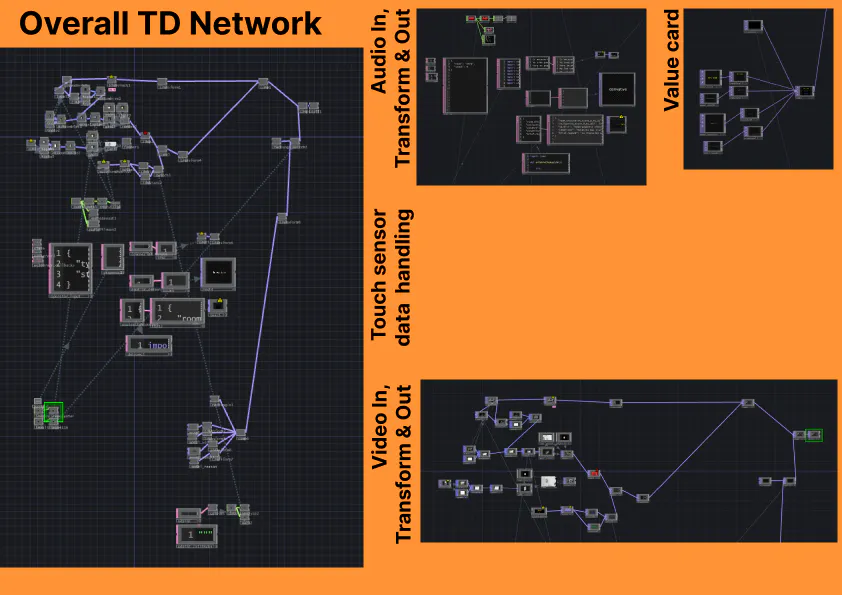
During the viewing, three data streams feed simultaneously into TouchDesigner:
Article I // Spatial negotiation. The operator, acting as the real estate agent, counts the participant's steps through the space using a custom-built mobile console. Movement through space becomes a measurable act of negotiation.
Article II // Non-human cohabitation. A touch sensor embedded in a soil container with live worms detects whether the participant makes physical contact with the living matter. The sensor is connected wirelessly via an ESP32 microcontroller, sending touch events in real time over UDP to TouchDesigner.
Article III // Algorithmic presence. Voice detection captures what the participant says during the viewing. What you speak and how you speak, and what you withhold are read as data. These three streams are visualised live on one half of a split screen projection as an abstract, real-time representation of the negotiation happening between the three entities: the space, the non-humans, and the technology. On the other half, live video from the operator's device is projected, showing the viewing as it unfolds. When the viewing ends, the operator hits "give verdict" on the console. The live video feed is replaced by a scoring card — generated from the accumulated data — that declares whether the participant has been "Accepted", "Conditionally Accepted", or "Rejected" by the interspecies assembly.
How it was going
The project emerged from three overlapping research areas brought together for the Cognitive Orgies III challenge at Fab Lab Barcelona. One of us is researching homing practices, in regards that home is not a static place but an ongoing negotiation enacted through rituals and daily practices. Another is researching non-human inhabitation, compost communities, and the agencies of organisms we share space with but rarely acknowledge. The third is researching AI and the question of what we are willing to give up in exchange for the benefits of living with intelligent systems.
During the ideation session and the first day and a half we struggled with the pressures of incorporating a physical prototype to the project. Ideas around building a tamagotchi like gadget were discussed. But we were not sure what value that would add over just using a phone already incapsulating a microphone, screen and internet connection. We decided to push this issue aside for the sake of getting the logical systems and infrastructure up running and then adding user experience props.
The connective tissue across all three was the notion of collective care and the political question of who gets to decide the conditions of inhabitation. We developed the Space Inhabitancy Agreement first, working through the language of a rental contract but rewriting it so that the issuing party is not a human landlord but an assembly of non-human and computational agents. Every clause is written from their perspective. The operator console was built as a mobile-first web interface that sends data via WebSocket to TouchDesigner in real time. The soil sensor circuit uses aluminium foil wrapped around wire and inserted into living soil, read by an ESP32 microcontroller that transmits touch events wirelessly over the local network. The evaluation card is an HTML document rendered inside TouchDesigner's Web Render TOP, updated live as data arrives and stamped with the final verdict when the operator triggers it.
We coined the term “operator“ for a person who is behind the camera and marking through the html in order to generate the score. This is there because we recognize the gap in technology/skills of the AI that we had, but also fulfilling the projects requirements.
There are two operators: one who starts the evaluation from the laptop and the other who uses the html scoring system and also plays the prerecorded script of the questions.
During the performance, we encountered several technical difficulties that affected the overall experience. The audio connection via the Camo app, used to stream live video and sound from the viewing room to the operator's device in the adjacent space, proved unreliable under the conditions of the live setting. Simultaneously, the Bluetooth speaker responsible for playing the AI real estate agent's voice dropped connection at critical moments, disrupting the scripted narrative flow we had carefully constructed.
Beyond the technical issues, the spatial setup itself presented constraints we had not fully anticipated. With several groups setting up simultaneously and occupying rooms that would have been significantly more suitable for our concept, we had to compromise on the environment in which the experience took place. The narrative logic of Interspecies Home Viewing depends heavily on the participant genuinely reading the space as a potential home, a threshold they are being evaluated against, not a classroom or workshop. The space we ended up with made that suspension of disbelief harder to achieve.
The space itself needs to be secured in advance and ideally dressed to read convincingly as a domestic interior. Even minimal interventions, such as a lamp, a chair or a plant would significantly strengthen the narrative and close the gap between the concept and the participant's experience of it. Further, for future iterations it would be nice to create the AI real estate agent script a bit more interactive with the participant, instead of a reading that felt a bit too long without being able to interact (feedback of participant). Also it would be interesting to prolong the experience and not squeeze it into a 5 minute timeframe as to enact more "real-life" conditions. What would it mean to leave a participant in the space for ten minutes, twenty or an hour with the worms and the sensors? The compression to a few minutes was a constraint of the challenge format. But the concept requires more time by nature. Inhabitation is not something that happens in two minutes. Neither, perhaps, is evaluation.


Comments