STM32 Interactive Display & GPIO Controller

Built a bare-metal STM32 interface using FSMC to map real-time joystick inputs to discrete LEDs and a 16-bit LCD for dynamic UI feedback.

IntermediateShowcase (no instructions)4 hours11
STM32 Interactive Display & GPIO Controller

Things used in this project

Hardware components

PTS 645 Series Switch
C&K Switches PTS 645 Series Switch
×5
Jumper wires (generic)
×13
LED (generic)
LED (generic)
×3
Breadboard (generic)
×1
RT-Spark (Spark-1) RT-Thread Development Board name
STM32F407ZGT6 microcontroller
×1
Resistor 220 ohm
Resistor 220 ohm
×7

Software apps and online services

STM32CUBEIDE

Story

Read more

Schematics

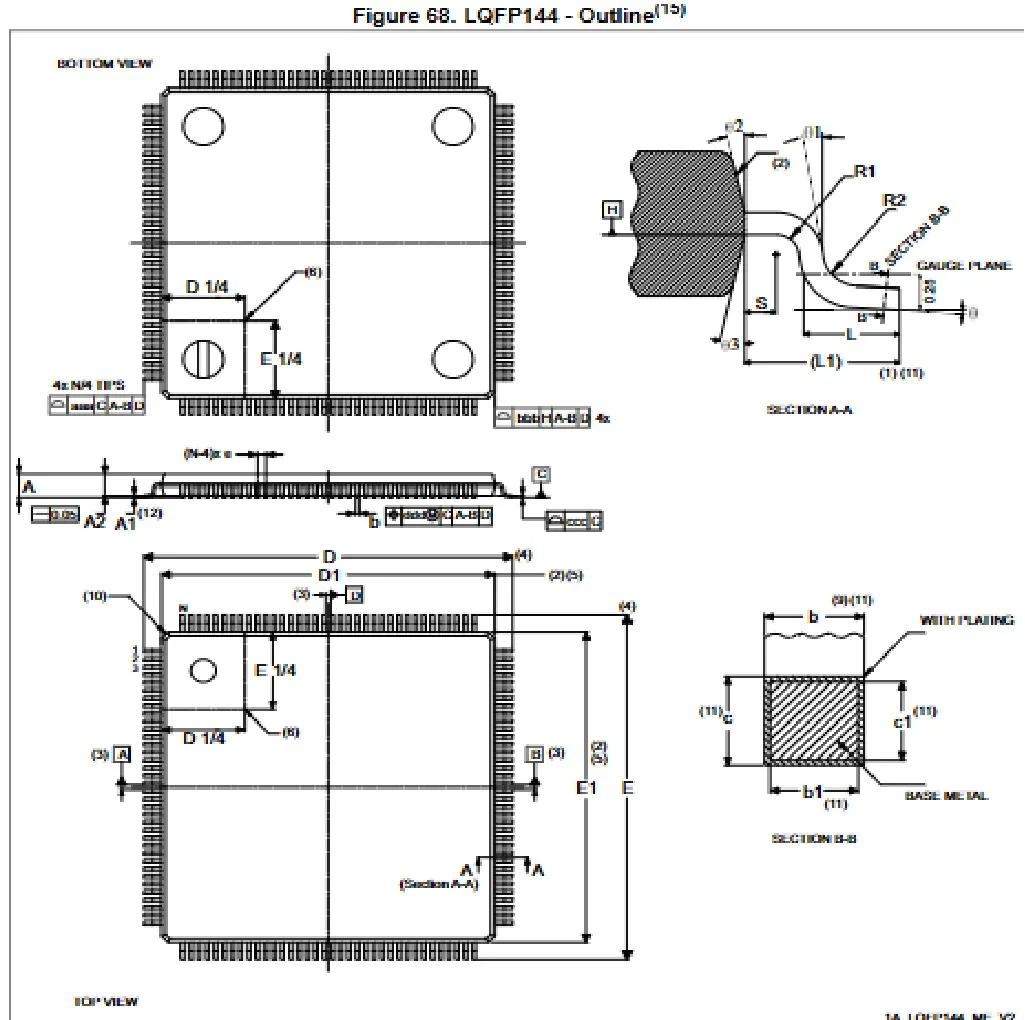
LQFP144 package information (1A)

This LQFP is a 144-pin, 20 x 20 mm low-profile quad flat package

Code

main.c

C Header File
/* USER CODE BEGIN Header */
/**
  ******************************************************************************
  * @file           : main.c
  * @brief          : Main program body
  ******************************************************************************
  */
/* USER CODE END Header */
/* Includes ------------------------------------------------------------------*/
#include "main.h"

/* Private includes ----------------------------------------------------------*/
/* USER CODE BEGIN Includes */
#include "drv_lcd.h"

/* USER CODE END Includes */

/* Private typedef -----------------------------------------------------------*/
/* USER CODE BEGIN PTD */

/* USER CODE END PTD */

/* Private define ------------------------------------------------------------*/
/* USER CODE BEGIN PD */

/* USER CODE END PD */

/* Private macro -------------------------------------------------------------*/
/* USER CODE BEGIN PM */

/* USER CODE END PM */

/* Private variables ---------------------------------------------------------*/
SRAM_HandleTypeDef hsram1;

/* USER CODE BEGIN PV */

/* USER CODE END PV */

/* Private function prototypes -----------------------------------------------*/
void SystemClock_Config(void);
static void MX_GPIO_Init(void);
static void MX_FSMC_Init(void);
/* USER CODE BEGIN PFP */

/* USER CODE END PFP */

/* Private user code ---------------------------------------------------------*/
/* USER CODE BEGIN 0 */
// --- SWITCH READING FUNCTIONS ---
uint8_t switch_Up() { return HAL_GPIO_ReadPin(GPIOG, GPIO_PIN_0) == GPIO_PIN_RESET; }
uint8_t switch_Down() { return HAL_GPIO_ReadPin(GPIOG, GPIO_PIN_1) == GPIO_PIN_RESET; }
uint8_t switch_Left() { return HAL_GPIO_ReadPin(GPIOG, GPIO_PIN_2) == GPIO_PIN_RESET; }
uint8_t switch_Right() { return HAL_GPIO_ReadPin(GPIOG, GPIO_PIN_5) == GPIO_PIN_RESET; }
uint8_t switch_Center() { return HAL_GPIO_ReadPin(GPIOG, GPIO_PIN_6) == GPIO_PIN_RESET; }

// --- MAIN UI LOGIC ---
void Handle_UI(void) {
  // 1. Turn all LEDs OFF by default (Active Low: SET = OFF)
  HAL_GPIO_WritePin(GPIOA, GPIO_PIN_0 | GPIO_PIN_2 | GPIO_PIN_3, GPIO_PIN_SET);

  // 2. Check LED Switches (Active Low: RESET = ON)
  if (switch_Up()) {
    HAL_GPIO_WritePin(GPIOA, GPIO_PIN_2, GPIO_PIN_RESET); // Turn ON Red
  }
  if (switch_Down()) {
    HAL_GPIO_WritePin(GPIOA, GPIO_PIN_3, GPIO_PIN_RESET); // Turn ON Green
  }
  if (switch_Center()) {
    HAL_GPIO_WritePin(GPIOA, GPIO_PIN_0, GPIO_PIN_RESET); // Turn ON Blue
  }

  // 3. Check LCD Switches & Update Screen
  // Notice the extra spaces padding the strings? This ensures we completely
  // overwrite the previous text without leaving leftover letters on the screen!
  if (switch_Left()) {
    lcd_show_string(10, 45, 16, "Button right is pressed  ");
  } else if (switch_Right()) {
    lcd_show_string(10, 45, 16, "Button left is pressed ");
  } else {
    lcd_show_string(10, 45, 16, "                        "); // Clear text when released
  }
}
/* USER CODE END 0 */
/**
  * @brief  The application entry point.
  * @retval int
  */
int main(void)
{

  /* USER CODE BEGIN 1 */

  /* USER CODE END 1 */

  /* MCU Configuration--------------------------------------------------------*/

  /* Reset of all peripherals, Initializes the Flash interface and the Systick. */
  HAL_Init();

  /* USER CODE BEGIN Init */

  /* USER CODE END Init */

  /* Configure the system clock */
  SystemClock_Config();

  /* USER CODE BEGIN SysInit */

  /* USER CODE END SysInit */

  /* Initialize all configured peripherals */
  MX_GPIO_Init();
  MX_FSMC_Init();
  /* USER CODE BEGIN 2 */
    // --- 1. ENABLE CLOCKS ---
    __HAL_RCC_GPIOA_CLK_ENABLE();
    __HAL_RCC_GPIOD_CLK_ENABLE(); // For Reset Pin (PD3)
    __HAL_RCC_GPIOF_CLK_ENABLE(); // For Backlight Pin (PF9)
    __HAL_RCC_GPIOG_CLK_ENABLE();

    GPIO_InitTypeDef GPIO_InitStruct = {0};

    // --- 2. CONFIGURE PINS ---
    // LCD Backlight (PF9) as Output
    GPIO_InitStruct.Pin = GPIO_PIN_9;
    GPIO_InitStruct.Mode = GPIO_MODE_OUTPUT_PP;
    GPIO_InitStruct.Pull = GPIO_NOPULL;
    GPIO_InitStruct.Speed = GPIO_SPEED_FREQ_LOW;
    HAL_GPIO_Init(GPIOF, &GPIO_InitStruct);

    // LCD Reset (PD3) as Output
    GPIO_InitStruct.Pin = GPIO_PIN_3;
    GPIO_InitStruct.Mode = GPIO_MODE_OUTPUT_PP;
    GPIO_InitStruct.Pull = GPIO_NOPULL;
    GPIO_InitStruct.Speed = GPIO_SPEED_FREQ_LOW;
    HAL_GPIO_Init(GPIOD, &GPIO_InitStruct);

    // --- 3. WAKE UP THE HARDWARE ---
    // Turn Backlight ON (PF9)
    HAL_GPIO_WritePin(GPIOF, GPIO_PIN_9, GPIO_PIN_SET);
    HAL_Delay(50);

    // Hardware Reset Sequence on PD3 (Low -> Delay -> High -> Delay)
    HAL_GPIO_WritePin(GPIOD, GPIO_PIN_3, GPIO_PIN_RESET);
    HAL_Delay(50);
    HAL_GPIO_WritePin(GPIOD, GPIO_PIN_3, GPIO_PIN_SET);
    HAL_Delay(150);

    // --- 4. INITIALIZE AND DRAW ---
    drv_lcd_init();

    // 1. Clear screen to RAW BLACK (0x0000)
      lcd_clear(0x0000);

      // 2. Text = RAW WHITE (0xFFFF), Background = RAW BLACK (0x0000)
        lcd_set_color(0x0000, 0xFFFF);

    // Print using the safe font size 16
    lcd_show_string(10, 20, 16, "Hello World!");
    /* USER CODE END 2 */

  /* Infinite loop */
  /* USER CODE BEGIN WHILE */
  while (1)
  {
    /* USER CODE END WHILE */

    /* USER CODE BEGIN 3 */
  Handle_UI();
  HAL_Delay(100);
  }
  /* USER CODE END 3 */
}

/**
  * @brief System Clock Configuration
  * @retval None
  */
void SystemClock_Config(void)
{
  RCC_OscInitTypeDef RCC_OscInitStruct = {0};
  RCC_ClkInitTypeDef RCC_ClkInitStruct = {0};

  /** Configure the main internal regulator output voltage
  */
  __HAL_RCC_PWR_CLK_ENABLE();
  __HAL_PWR_VOLTAGESCALING_CONFIG(PWR_REGULATOR_VOLTAGE_SCALE1);

  /** Initializes the RCC Oscillators according to the specified parameters
  * in the RCC_OscInitTypeDef structure.
  */
  RCC_OscInitStruct.OscillatorType = RCC_OSCILLATORTYPE_HSI;
  RCC_OscInitStruct.HSIState = RCC_HSI_ON;
  RCC_OscInitStruct.HSICalibrationValue = RCC_HSICALIBRATION_DEFAULT;
  RCC_OscInitStruct.PLL.PLLState = RCC_PLL_NONE;
  if (HAL_RCC_OscConfig(&RCC_OscInitStruct) != HAL_OK)
  {
    Error_Handler();
  }

  /** Initializes the CPU, AHB and APB buses clocks
  */
  RCC_ClkInitStruct.ClockType = RCC_CLOCKTYPE_HCLK|RCC_CLOCKTYPE_SYSCLK
                              |RCC_CLOCKTYPE_PCLK1|RCC_CLOCKTYPE_PCLK2;
  RCC_ClkInitStruct.SYSCLKSource = RCC_SYSCLKSOURCE_HSI;
  RCC_ClkInitStruct.AHBCLKDivider = RCC_SYSCLK_DIV1;
  RCC_ClkInitStruct.APB1CLKDivider = RCC_HCLK_DIV1;
  RCC_ClkInitStruct.APB2CLKDivider = RCC_HCLK_DIV1;

  if (HAL_RCC_ClockConfig(&RCC_ClkInitStruct, FLASH_LATENCY_0) != HAL_OK)
  {
    Error_Handler();
  }
}

/**
  * @brief GPIO Initialization Function
  * @param None
  * @retval None
  */
static void MX_GPIO_Init(void)
{
  GPIO_InitTypeDef GPIO_InitStruct = {0};
  /* USER CODE BEGIN MX_GPIO_Init_1 */

  /* USER CODE END MX_GPIO_Init_1 */

  /* GPIO Ports Clock Enable */
  __HAL_RCC_GPIOF_CLK_ENABLE();
  __HAL_RCC_GPIOA_CLK_ENABLE();
  __HAL_RCC_GPIOG_CLK_ENABLE();
  __HAL_RCC_GPIOE_CLK_ENABLE();
  __HAL_RCC_GPIOD_CLK_ENABLE();

  /*Configure GPIO pin Output Level */
  HAL_GPIO_WritePin(GPIOF, GPIO_PIN_9, GPIO_PIN_RESET);

  /*Configure GPIO pin Output Level */
  HAL_GPIO_WritePin(GPIOA, GPIO_PIN_0|GPIO_PIN_2|GPIO_PIN_3, GPIO_PIN_RESET);

  /*Configure GPIO pin : PF9 */
  GPIO_InitStruct.Pin = GPIO_PIN_9;
  GPIO_InitStruct.Mode = GPIO_MODE_OUTPUT_PP;
  GPIO_InitStruct.Pull = GPIO_NOPULL;
  GPIO_InitStruct.Speed = GPIO_SPEED_FREQ_LOW;
  HAL_GPIO_Init(GPIOF, &GPIO_InitStruct);

  /*Configure GPIO pins : PA0 PA2 PA3 */
  GPIO_InitStruct.Pin = GPIO_PIN_0|GPIO_PIN_2|GPIO_PIN_3;
  GPIO_InitStruct.Mode = GPIO_MODE_OUTPUT_PP;
  GPIO_InitStruct.Pull = GPIO_NOPULL;
  GPIO_InitStruct.Speed = GPIO_SPEED_FREQ_LOW;
  HAL_GPIO_Init(GPIOA, &GPIO_InitStruct);

  /*Configure GPIO pins : PG0 PG1 PG2 PG5
                           PG6 */
  GPIO_InitStruct.Pin = GPIO_PIN_0|GPIO_PIN_1|GPIO_PIN_2|GPIO_PIN_5
                          |GPIO_PIN_6;
  GPIO_InitStruct.Mode = GPIO_MODE_INPUT;
  GPIO_InitStruct.Pull = GPIO_PULLUP;
  HAL_GPIO_Init(GPIOG, &GPIO_InitStruct);

  /* USER CODE BEGIN MX_GPIO_Init_2 */

  /* USER CODE END MX_GPIO_Init_2 */
}

/* FSMC initialization function */
static void MX_FSMC_Init(void)
{

  /* USER CODE BEGIN FSMC_Init 0 */

  /* USER CODE END FSMC_Init 0 */

  FSMC_NORSRAM_TimingTypeDef Timing = {0};

  /* USER CODE BEGIN FSMC_Init 1 */

  /* USER CODE END FSMC_Init 1 */

  /** Perform the SRAM1 memory initialization sequence
  */
  hsram1.Instance = FSMC_NORSRAM_DEVICE;
  hsram1.Extended = FSMC_NORSRAM_EXTENDED_DEVICE;
  /* hsram1.Init */
  hsram1.Init.NSBank = FSMC_NORSRAM_BANK3;
  hsram1.Init.DataAddressMux = FSMC_DATA_ADDRESS_MUX_DISABLE;
  hsram1.Init.MemoryType = FSMC_MEMORY_TYPE_SRAM;
  hsram1.Init.MemoryDataWidth = FSMC_NORSRAM_MEM_BUS_WIDTH_16;
  hsram1.Init.BurstAccessMode = FSMC_BURST_ACCESS_MODE_DISABLE;
  hsram1.Init.WaitSignalPolarity = FSMC_WAIT_SIGNAL_POLARITY_LOW;
  hsram1.Init.WrapMode = FSMC_WRAP_MODE_DISABLE;
  hsram1.Init.WaitSignalActive = FSMC_WAIT_TIMING_BEFORE_WS;
  hsram1.Init.WriteOperation = FSMC_WRITE_OPERATION_ENABLE;
  hsram1.Init.WaitSignal = FSMC_WAIT_SIGNAL_DISABLE;
  hsram1.Init.ExtendedMode = FSMC_EXTENDED_MODE_DISABLE;
  hsram1.Init.AsynchronousWait = FSMC_ASYNCHRONOUS_WAIT_DISABLE;
  hsram1.Init.WriteBurst = FSMC_WRITE_BURST_DISABLE;
  hsram1.Init.PageSize = FSMC_PAGE_SIZE_NONE;
  /* Timing */
  Timing.AddressSetupTime = 15;
  Timing.AddressHoldTime = 15;
  Timing.DataSetupTime = 255;
  Timing.BusTurnAroundDuration = 15;
  Timing.CLKDivision = 16;
  Timing.DataLatency = 17;
  Timing.AccessMode = FSMC_ACCESS_MODE_A;
  /* ExtTiming */

  if (HAL_SRAM_Init(&hsram1, &Timing, NULL) != HAL_OK)
  {
    Error_Handler( );
  }

  /* USER CODE BEGIN FSMC_Init 2 */

  /* USER CODE END FSMC_Init 2 */
}

/* USER CODE BEGIN 4 */

/* USER CODE END 4 */

/**
  * @brief  This function is executed in case of error occurrence.
  * @retval None
  */
void Error_Handler(void)
{
  /* USER CODE BEGIN Error_Handler_Debug */
  /* User can add his own implementation to report the HAL error return state */
  __disable_irq();
  while (1)
  {
  }
  /* USER CODE END Error_Handler_Debug */
}
#ifdef USE_FULL_ASSERT
/**
  * @brief  Reports the name of the source file and the source line number
  *         where the assert_param error has occurred.
  * @param  file: pointer to the source file name
  * @param  line: assert_param error line source number
  * @retval None
  */
void assert_failed(uint8_t *file, uint32_t line)
{
  /* USER CODE BEGIN 6 */
  /* User can add his own implementation to report the file name and line number,
     ex: printf("Wrong parameters value: file %s on line %d\r\n", file, line) */
  /* USER CODE END 6 */
}
#endif /* USE_FULL_ASSERT */

Exploring-GPIO-on-RT-Spark-with-LCD-and-Switches

Built a bare-metal STM32 interface using FSMC to map real-time joystick inputs to discrete LEDs and a 16-bit LCD for dynamic UI feedback.

Credits

Khris Mykhiel T. Busa
2 projects • 0 followers
Paul Rodolf P. Castor
18 projects • 9 followers

Comments