Joshua MagamaLast GaraizaDr. Umesh Dutta
Published © GPL3+

Smart Energy Meter

Smart Energy Meter uses ESP32 for data collection and WiFi, and Raspberry Pi Pico for calculations, with LCD display and Blynk app access.

IntermediateFull instructions provided3 hours13
Smart Energy Meter

Things used in this project

Hardware components

ESP32
Espressif ESP32
Reads the analogue voltage and current signals from the sensors and manages Wi-Fi communication to send data to the Blynk cloud.
×1
ACS712 Current Sensor
×1
Raspberry Pi Pico
Raspberry Pi Pico
Receives the raw voltage and current data from the ESP32 via UART and performs the calculations for energy.
×1
RGB Backlight LCD - 16x2
Adafruit RGB Backlight LCD - 16x2
×1

Software apps and online services

Arduino IDE
Arduino IDE

Story

Read more

Schematics

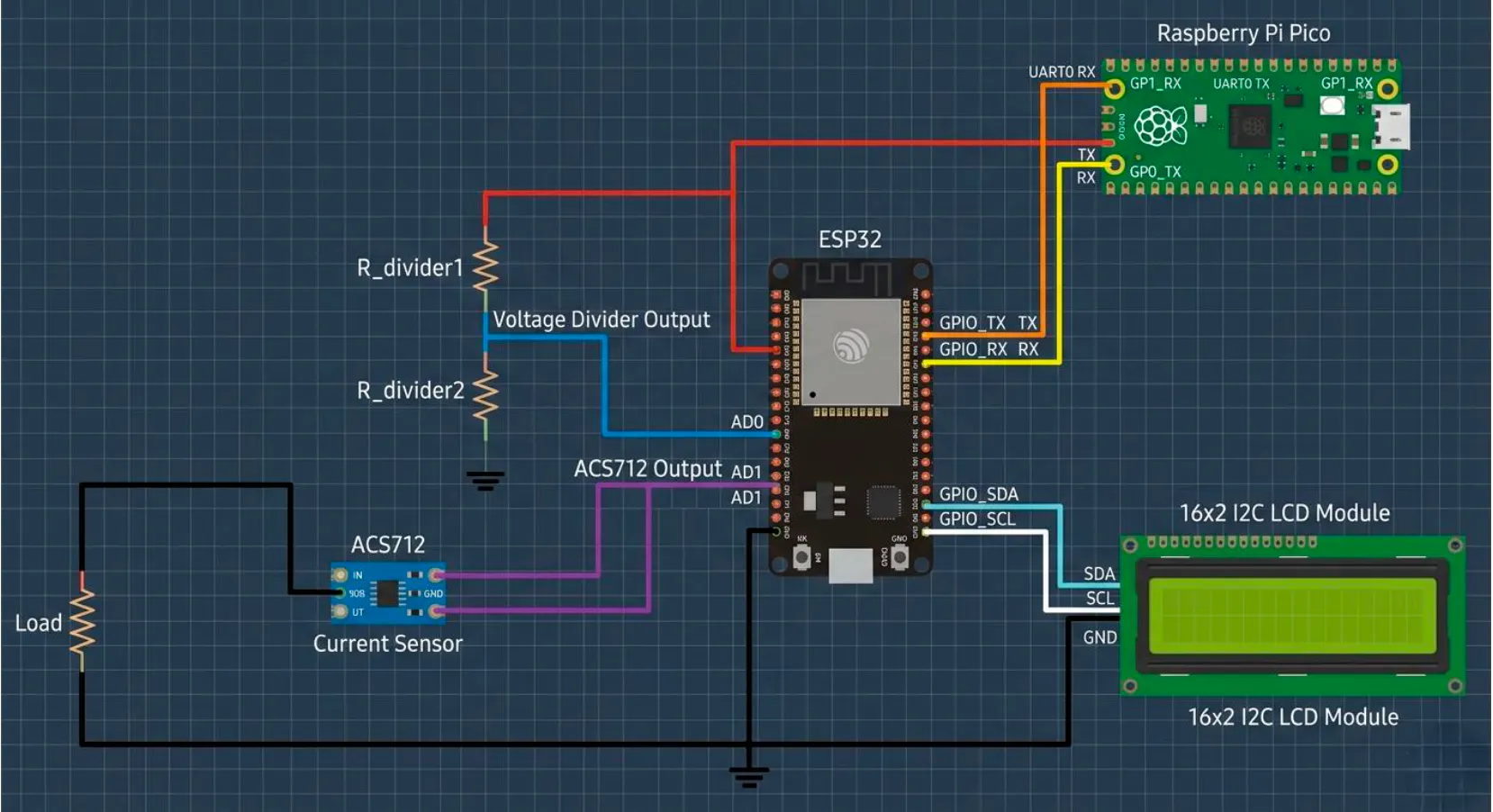
Circuit Diagram of Smart Energy Meter using ESP32 and Raspberry Pi Pico with ACS712 Sensor and I2C L

The connections between components are as follows:
1. Sensors to ESP32: The output of the voltage divider and
the ACS712 sensor are connected to two separate analogue
input pins on the ESP32.
2. ESP32 to Pico (UART):
o ESP32 TX (GPIO Pin) → Pico RX (UART0 Pin)
o ESP32 RX (GPIO Pin) → Pico TX (UART0 Pin)
o Common GND is established between the two
microcontrollers.
3. ESP32 to LCD: The I2C pins of the ESP32 (SDA, SCL)
are connected to the corresponding pins on the 16x2 LCD
module.
4. Load: The resistive load is connected in series with the
ACS712 sensor to complete the circuit.
Code

Smart Energy Meter Using ESP32 and IoT (Blynk Integration)

C/C++
It is Arduino C++ code written for an ESP32 microcontroller that reads voltage and current from sensors, calculates power and energy, displays the results on an LCD screen, and sends the data over WiFi to the Blynk app for real-time monitoring on a phone.
#define BLYNK_TEMPLATE_ID "TMPL3yAB0NCai"
#define BLYNK_TEMPLATE_NAME "Smart Energy Meter"
#define BLYNK_AUTH_TOKEN "z49QQ1StrgNb2F2ogQIeF-6y3TwBMWTp"
#define BLYNK_PRINT Serial
#include <Wire.h>
#include <LiquidCrystal_I2C.h>
#include <WiFi.h>
#include <BlynkSimpleEsp32.h>
// WiFi
Page | 6
Smart Energy Meter
char ssid[] = "2Sixty3";
char pass[] = "Last5050!";
// LCD
LiquidCrystal_I2C lcd(0x27, 16, 2);
// Sensor Pins
#define VOLTAGE_PIN 34
#define CURRENT_PIN 35
// Variables
float voltage = 0;
float current = 0;
float power = 0;
float totalEnergy = 0;
float avgVoltage = 0;
float peakCurrent = 0;
float cost = 0;
int overload = 0;
void setup() {
Serial.begin(115200);
Serial2.begin(9600, SERIAL_8N1, 16, 17); // RX=16 TX=17
Wire.begin(21, 22);
lcd.init();
lcd.backlight();
lcd.setCursor(0,0);
lcd.print("Connecting...");
Blynk.begin(BLYNK_AUTH_TOKEN, ssid, pass);
lcd.clear();
lcd.setCursor(0,0);
lcd.print("Smart Energy");
lcd.setCursor(0,1);
lcd.print("Meter Ready");
delay(2000);
lcd.clear();
}
void loop() {
Blynk.run();
// 🔹 Read Sensors
Page | 7
Smart Energy Meter
int rawVoltage = analogRead(VOLTAGE_PIN);
int rawCurrent = analogRead(CURRENT_PIN);
voltage = (rawVoltage * 3.3) / 4095.0;
current = (rawCurrent * 3.3) / 4095.0;
// 🔹 Send to Pico
Serial2.print(voltage);
Serial2.print(",");
Serial2.println(current);
// 🔹 Receive from Pico
if (Serial2.available()) {
String data = Serial2.readStringUntil('\n');
int p1 = data.indexOf(',');
int p2 = data.indexOf(',', p1+1);
int p3 = data.indexOf(',', p2+1);
int p4 = data.indexOf(',', p3+1);
int p5 = data.indexOf(',', p4+1);
if (p5 > 0) {
power = data.substring(0, p1).toFloat();
totalEnergy = data.substring(p1+1, p2).toFloat();
avgVoltage = data.substring(p2+1, p3).toFloat();
peakCurrent = data.substring(p3+1, p4).toFloat();
cost = data.substring(p4+1, p5).toFloat();
overload = data.substring(p5+1).toInt();
}
}
// 🔹 LCD DISPLAY (UPDATED ONLY THIS PART)
static int screen = 0;
lcd.clear();
if (screen == 0) {
lcd.setCursor(0,0);
lcd.print("Voltage:");
lcd.print(voltage,2);
lcd.print("V");
lcd.setCursor(0,1);
lcd.print("Current:");
lcd.print(current,2);
lcd.print("A");
Page | 8
Smart Energy Meter
}
else if (screen == 1) {
lcd.setCursor(0,0);
lcd.print("Power:");
lcd.print(power,2);
lcd.print("W");
lcd.setCursor(0,1);
lcd.print("Energy:");
lcd.print(totalEnergy,3);
lcd.print("Wh");
}
screen++;
if (screen > 1) screen = 0;
// 🔹 Send to Blynk
Blynk.virtualWrite(V0, voltage);
Blynk.virtualWrite(V1, current);
Blynk.virtualWrite(V2, power);
Blynk.virtualWrite(V3, totalEnergy);
Blynk.virtualWrite(V4, avgVoltage);
Blynk.virtualWrite(V5, peakCurrent);
Blynk.virtualWrite(V6, cost);
Blynk.virtualWrite(V7, overload);
delay(1000);
}

Credits

Joshua Magama
1 project • 0 followers
Last Garaiza
0 projects • 1 follower
Dr. Umesh Dutta
60 projects • 84 followers
Working as Director of Innovation Centre at Manav Rachna, India. I am into development for the last 12 years.

Comments