#include <Bluepad32.h>
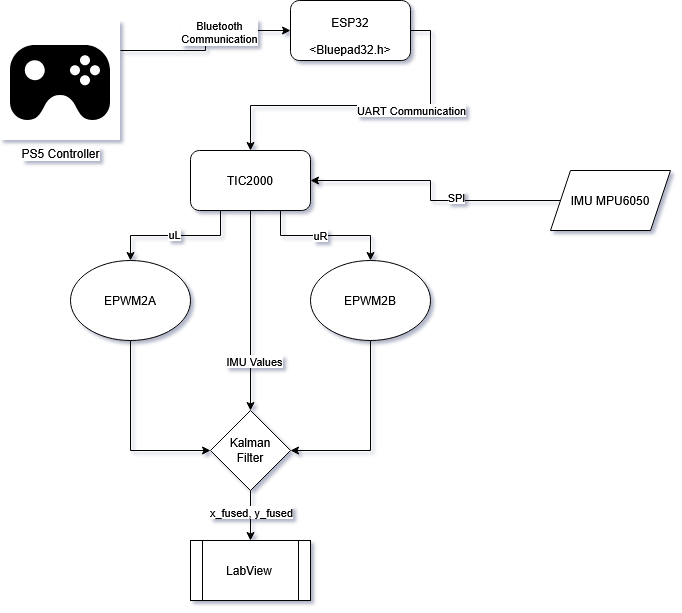
#include <HardwareSerial.h> // GR: This is for Serial sending to TI C2000

ControllerPtr myControllers[BP32_MAX_GAMEPADS];

// GR: This is for Serial sending to TI C2000
HardwareSerial SerialToC2000(2);  // use UART2

// GR: function to send ps5 data
static void send_ps5_state(int16_t lx, int16_t ly, int16_t rx, int16_t ry, int16_t br, int16_t th, uint16_t btn)
{
  // headers for state machine
  const uint8_t header[2] = {0xAA, 0x55}; // Start bit
  // packet will be 12 bytes
  int16_t joystick[6] = {0};
  uint16_t buttons[1] = {0};
  // lx (2 bytes)
  joystick[0] = lx;
  // ly (2 bytes)
  joystick[1] = ly;
  // rx (2 bytes)
  joystick[2] = rx;
  // ry (2 bytes)
  joystick[3] = ry;
  // br (2 bytes)
  joystick[4] = br;
  // th (2 bytes)
  joystick[5] = th;
  // btn (2 bytes)
  buttons[0] = btn; // bit mask

  SerialToC2000.write(header[0]); // send start bit
  SerialToC2000.write(header[1]); // send second bit
  SerialToC2000.write((uint8_t*)joystick, sizeof(joystick)); // send joystick data
  SerialToC2000.write((uint8_t*)buttons, sizeof(buttons)); // send controller button data
}

// This callback gets called any time a new gamepad is connected.
// Up to 4 gamepads can be connected at the same time.
void onConnectedController(ControllerPtr ctl) {
    bool foundEmptySlot = false;
    for (int i = 0; i < BP32_MAX_GAMEPADS; i++) {
        if (myControllers[i] == nullptr) {
            Serial.printf("CALLBACK: Controller is connected, index=%d\n", i);
            // Additionally, you can get certain gamepad properties like:
            // Model, VID, PID, BTAddr, flags, etc.
            ControllerProperties properties = ctl->getProperties();
            Serial.printf("Controller model: %s, VID=0x%04x, PID=0x%04x\n", ctl->getModelName().c_str(), properties.vendor_id,
                           properties.product_id);
            myControllers[i] = ctl;
            foundEmptySlot = true;
            break;
        }
    }
    if (!foundEmptySlot) {
        Serial.println("CALLBACK: Controller connected, but could not found empty slot");
    }
}

void onDisconnectedController(ControllerPtr ctl) {
    bool foundController = false;

    for (int i = 0; i < BP32_MAX_GAMEPADS; i++) {
        if (myControllers[i] == ctl) {
            Serial.printf("CALLBACK: Controller disconnected from index=%d\n", i);
            myControllers[i] = nullptr;
            foundController = true;
            break;
        }
    }

    if (!foundController) {
        Serial.println("CALLBACK: Controller disconnected, but not found in myControllers");
    }
}

void dumpGamepad(ControllerPtr ctl) {
    Serial.printf(
        "idx=%d, dpad: 0x%02x, buttons: 0x%04x, axis L: %4d, %4d, axis R: %4d, %4d, brake: %4d, throttle: %4d, "
        "misc: 0x%02x, gyro x:%6d y:%6d z:%6d, accel x:%6d y:%6d z:%6d\n",
        ctl->index(),        // Controller Index
        ctl->dpad(),         // D-pad
        ctl->buttons(),      // bitmask of pressed buttons
        ctl->axisX(),        // (-511 - 512) left X Axis
        ctl->axisY(),        // (-511 - 512) left Y axis
        ctl->axisRX(),       // (-511 - 512) right X axis
        ctl->axisRY(),       // (-511 - 512) right Y axis
        ctl->brake(),        // (0 - 1023): brake button
        ctl->throttle(),     // (0 - 1023): throttle (AKA gas) button
        ctl->miscButtons(),  // bitmask of pressed "misc" buttons
        ctl->gyroX(),        // Gyro X
        ctl->gyroY(),        // Gyro Y
        ctl->gyroZ(),        // Gyro Z
        ctl->accelX(),       // Accelerometer X
        ctl->accelY(),       // Accelerometer Y
        ctl->accelZ()        // Accelerometer Z
    );
}

void dumpMouse(ControllerPtr ctl) {
    Serial.printf("idx=%d, buttons: 0x%04x, scrollWheel=0x%04x, delta X: %4d, delta Y: %4d\n",
                   ctl->index(),        // Controller Index
                   ctl->buttons(),      // bitmask of pressed buttons
                   ctl->scrollWheel(),  // Scroll Wheel
                   ctl->deltaX(),       // (-511 - 512) left X Axis
                   ctl->deltaY()        // (-511 - 512) left Y axis
    );
}

void dumpKeyboard(ControllerPtr ctl) {
    static const char* key_names[] = {
        // clang-format off
        // To avoid having too much noise in this file, only a few keys are mapped to strings.
        // Starts with "A", which is offset 4.
        "A", "B", "C", "D", "E", "F", "G", "H", "I", "J", "K", "L", "M", "N", "O", "P", "Q", "R", "S", "T", "U", "V",
        "W", "X", "Y", "Z", "1", "2", "3", "4", "5", "6", "7", "8", "9", "0",
        // Special keys
        "Enter", "Escape", "Backspace", "Tab", "Spacebar", "Underscore", "Equal", "OpenBracket", "CloseBracket",
        "Backslash", "Tilde", "SemiColon", "Quote", "GraveAccent", "Comma", "Dot", "Slash", "CapsLock",
        // Function keys
        "F1", "F2", "F3", "F4", "F5", "F6", "F7", "F8", "F9", "F10", "F11", "F12",
        // Cursors and others
        "PrintScreen", "ScrollLock", "Pause", "Insert", "Home", "PageUp", "Delete", "End", "PageDown",
        "RightArrow", "LeftArrow", "DownArrow", "UpArrow",
        // clang-format on
    };
    static const char* modifier_names[] = {
        // clang-format off
        // From 0xe0 to 0xe7
        "Left Control", "Left Shift", "Left Alt", "Left Meta",
        "Right Control", "Right Shift", "Right Alt", "Right Meta",
        // clang-format on
    };
    Serial.printf("idx=%d, Pressed keys: ", ctl->index());
    for (int key = Keyboard_A; key <= Keyboard_UpArrow; key++) {
        if (ctl->isKeyPressed(static_cast<KeyboardKey>(key))) {
            const char* keyName = key_names[key-4];
            Serial.printf("%s,", keyName);
       }
    }
    for (int key = Keyboard_LeftControl; key <= Keyboard_RightMeta; key++) {
        if (ctl->isKeyPressed(static_cast<KeyboardKey>(key))) {
            const char* keyName = modifier_names[key-0xe0];
            Serial.printf("%s,", keyName);
        }
    }
    Console.printf("\n");
}

void dumpBalanceBoard(ControllerPtr ctl) {
    Serial.printf("idx=%d,  TL=%u, TR=%u, BL=%u, BR=%u, temperature=%d\n",
                   ctl->index(),        // Controller Index
                   ctl->topLeft(),      // top-left scale
                   ctl->topRight(),     // top-right scale
                   ctl->bottomLeft(),   // bottom-left scale
                   ctl->bottomRight(),  // bottom-right scale
                   ctl->temperature()   // temperature: used to adjust the scale value's precision
    );
}

void processGamepad(ControllerPtr ctl) {
    // There are different ways to query whether a button is pressed.
    // By query each button individually:
    //  a(), b(), x(), y(), l1(), etc...
    if (ctl->a()) {
        static int colorIdx = 0;
        // Some gamepads like DS4 and DualSense support changing the color LED.
        // It is possible to change it by calling:
        switch (colorIdx % 3) {
            case 0:
                // Red
                ctl->setColorLED(255, 0, 0);
                break;
            case 1:
                // Green
                ctl->setColorLED(0, 255, 0);
                break;
            case 2:
                // Blue
                ctl->setColorLED(0, 0, 255);
                break;
        }
        colorIdx++;
    }

    if (ctl->b()) {
        // Turn on the 4 LED. Each bit represents one LED.
        static int led = 0;
        led++;
        // Some gamepads like the DS3, DualSense, Nintendo Wii, Nintendo Switch
        // support changing the "Player LEDs": those 4 LEDs that usually indicate
        // the "gamepad seat".
        // It is possible to change them by calling:
        ctl->setPlayerLEDs(led & 0x0f);
    }

    if (ctl->x()) {
        // Some gamepads like DS3, DS4, DualSense, Switch, Xbox One S, Stadia support rumble.
        // It is possible to set it by calling:
        // Some controllers have two motors: "strong motor", "weak motor".
        // It is possible to control them independently.
        ctl->playDualRumble(0 /* delayedStartMs */, 250 /* durationMs */, 0x80 /* weakMagnitude */,
                            0x40 /* strongMagnitude */);
    }

    // Another way to query controller data is by getting the buttons() function.
    // See how the different "dump*" functions dump the Controller info.
    dumpGamepad(ctl);

    // Basic fields we care about
    int16_t lx  = ctl->axisX();     // Left stick X (-511..512)
    int16_t ly  = ctl->axisY();     // Left stick Y (-511..512)
    int16_t rx  = ctl->axisRX();     // Right stick X (-511..512)
    int16_t ry  = ctl->axisRY();     // Right stick Y (-511..512)
    int16_t br  = ctl->brake();     // 0..1023
    int16_t th  = ctl->throttle();  // 0..1023
    uint16_t btn = ctl->buttons();  // bitmask


    // Send a simple CSV line starting with 'J' and ending with '\n'
    send_ps5_state(lx, ly, rx, ry, br, th, btn);

    // SerialToC2000.printf("J,%d,%d,%d,%d,%u\n", ax, ay, br, th, btn);
}

void processMouse(ControllerPtr ctl) {
    // This is just an example.
    if (ctl->scrollWheel() > 0) {
        // Do Something
    } else if (ctl->scrollWheel() < 0) {
        // Do something else
    }

    // See "dumpMouse" for possible things to query.
    dumpMouse(ctl);
}

void processKeyboard(ControllerPtr ctl) {
    if (!ctl->isAnyKeyPressed())
        return;

    // This is just an example.
    if (ctl->isKeyPressed(Keyboard_A)) {
        // Do Something
        Serial.println("Key 'A' pressed");
    }

    // Don't do "else" here.
    // Multiple keys can be pressed at the same time.
    if (ctl->isKeyPressed(Keyboard_LeftShift)) {
        // Do something else
        Serial.println("Key 'LEFT SHIFT' pressed");
    }

    // Don't do "else" here.
    // Multiple keys can be pressed at the same time.
    if (ctl->isKeyPressed(Keyboard_LeftArrow)) {
        // Do something else
        Serial.println("Key 'Left Arrow' pressed");
    }

    // See "dumpKeyboard" for possible things to query.
    dumpKeyboard(ctl);
}

void processBalanceBoard(ControllerPtr ctl) {
    // This is just an example.
    if (ctl->topLeft() > 10000) {
        // Do Something
    }

    // See "dumpBalanceBoard" for possible things to query.
    dumpBalanceBoard(ctl);
}

void processControllers() {
    for (auto myController : myControllers) {
        if (myController && myController->isConnected() && myController->hasData()) {
            if (myController->isGamepad()) {
                processGamepad(myController);
            } else if (myController->isMouse()) {
                processMouse(myController);
            } else if (myController->isKeyboard()) {
                processKeyboard(myController);
            } else if (myController->isBalanceBoard()) {
                processBalanceBoard(myController);
            } else {
                Serial.println("Unsupported controller");
            }
        }
    }
}

// Arduino setup function. Runs in CPU 1
void setup() {
    Serial.begin(115200);
    Serial.printf("Firmware: %s\n", BP32.firmwareVersion());
    const uint8_t* addr = BP32.localBdAddress();
    Serial.printf("BD Addr: %2X:%2X:%2X:%2X:%2X:%2X\n", addr[0], addr[1], addr[2], addr[3], addr[4], addr[5]);

    // UART to C2000: RX on GPIO13 (optional), TX on GPIO15
    SerialToC2000.begin(115200, SERIAL_8N1, 13 /*rx*/, 15 /*tx*/);

    // Setup the Bluepad32 callbacks
    BP32.setup(&onConnectedController, &onDisconnectedController);

    // "forgetBluetoothKeys()" should be called when the user performs
    // a "device factory reset", or similar.
    // Calling "forgetBluetoothKeys" in setup() just as an example.
    // Forgetting Bluetooth keys prevents "paired" gamepads to reconnect.
    // But it might also fix some connection / re-connection issues.
    BP32.forgetBluetoothKeys();

    // Enables mouse / touchpad support for gamepads that support them.
    // When enabled, controllers like DualSense and DualShock4 generate two connected devices:
    // - First one: the gamepad
    // - Second one, which is a "virtual device", is a mouse.
    // By default, it is disabled.
    BP32.enableVirtualDevice(false);
}

// Arduino loop function. Runs in CPU 1.
void loop() {
    // This call fetches all the controllers' data.
    // Call this function in your main loop.
    bool dataUpdated = BP32.update();
    if (dataUpdated)
        processControllers();

    // The main loop must have some kind of "yield to lower priority task" event.
    // Otherwise, the watchdog will get triggered.
    // If your main loop doesn't have one, just add a simple `vTaskDelay(1)`.
    // Detailed info here:
    // https://stackoverflow.com/questions/66278271/task-watchdog-got-triggered-the-tasks-did-not-reset-the-watchdog-in-time

    //     vTaskDelay(1);
    delay(150);
}






_t9PF3orMPd.png?auto=compress%2Cformat&w=40&h=40&fit=fillmax&bg=fff&dpr=2)


_3u05Tpwasz.png?auto=compress%2Cformat&w=40&h=40&fit=fillmax&bg=fff&dpr=2)

Comments