


Hardware components | ||||||
| × | 1 | ||||
Software apps and online services | ||||||
 |
| |||||
In a world inundated with complex interfaces, simplicity is often overlooked. This project introduces an HMI (Human-Machine Interface) design that embodies the essence of simplicity without compromising functionality. The HMI T-T-T (Tic-Tac-Toe) system demonstrates how embedded controls can be seamlessly integrated into a clean, minimalist interface using RT-Thread RTOS, providing users with effortless control at their fingertips. This workshop project showcases the practical application of real-time operating systems in creating responsive, user-friendly embedded interfaces. Through the classic game of Tic-Tac-Toe, we demonstrate key principles of embedded GUI design, touch interaction, and efficient resource management.
2. Project Overview2.1 Project ScopeThe HMI T-T-T project is an embedded system implementation that combines hardware interface design with software development using RT-Thread RTOS. The project focuses on creating an intuitive, touch-based Tic-Tac-Toe game that demonstrates fundamental concepts in embedded GUI development, including:
• Touch-screen interface with responsive controls
• Real-time game state management
• Clean, minimalist user interface design
• Efficient resource utilization with RT-Thread
• Embedded control logic for game mechanics
• Visual feedback and user interaction patterns
2.2 Target AudienceThis project is designed for embedded systems engineers, students, and enthusiasts interested in HMI development, RT-Thread application development, and GUI design principles. It serves as an educational reference for building touch-enabled interfaces on embedded platforms.
3. Rationale and Motivation3.1 The Embedded Control ConceptAt the heart of our GUI design lies the concept of embedded controls. Rather than cluttering the interface with a multitude of buttons and menus, we strategically embed controls directly within relevant elements, allowing users to interact seamlessly without distractions.
3.2 Why Tic-Tac-Toe?Tic-Tac-Toe was chosen as the demonstration application for several key reasons:
• Simplicity: The game has straightforward rules that everyone understands, allowing focus on interface design rather than complex game logic
• State Management: The 3x3 grid provides an excellent example of managing discrete states in an embedded system
• Touch Interaction: The grid-based layout is ideal for demonstrating touch screen responsiveness and visual feedback
4. System Design Philosophy4.1 Design PrinciplesThe HMI T-T-T system is built on four core design principles:
Principle Description ImplementationSimplicity Minimize cognitive load on users Clean 3x3 grid with clear X/O symbols Consistency Uniform behavior across all interactions Standardized touch patterns and visual feedback Efficiency Optimal resource utilization Minimal memory footprint using RT-Thread
4.2 User Experience GoalsThe interface is designed to achieve the following user experience goals:
• Zero learning curve: Users should understand how to play immediately
• Visual clarity: Game state should be obvious at a glance
• Tactile satisfaction: Touch interactions should feel responsive and satisfying
• Error prevention: Invalid moves should be prevented at the interface level
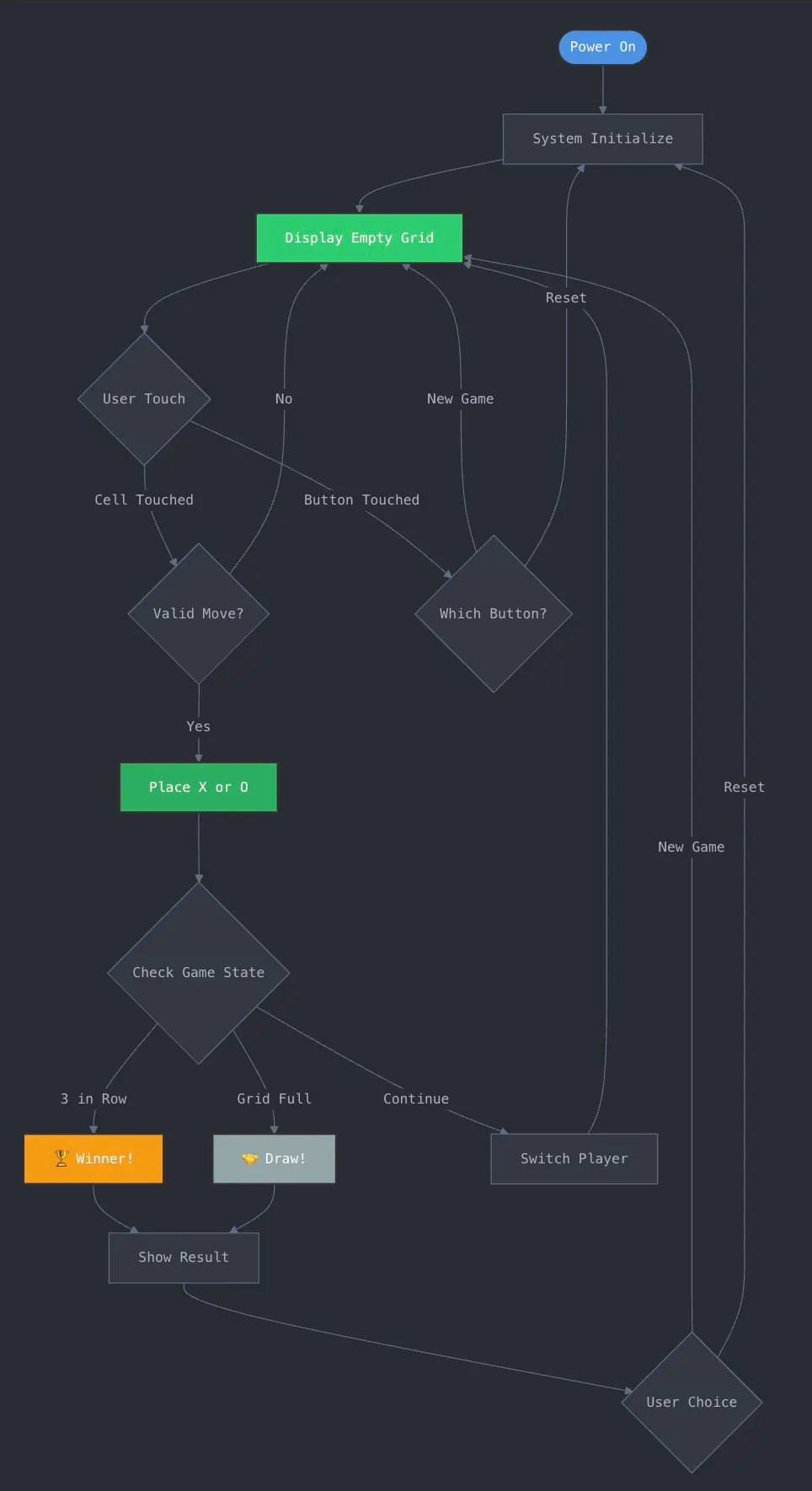
7. GUI Design and Implementation7.1 Screen LayoutThe interface is designed with a focus on clarity and simplicity:
• Game Grid: Central 3x3 grid occupying 70% of the screen
• Status Bar: Top bar showing current player (X or O)
• Score Display: Shows wins for Player X, Player O, and draws
• Control Buttons: New Game and Reset buttons at the bottom
• Visual Feedback: Highlighted cells on hover, animations on win
7.1Interaction Patterns
User interactions are designed to be intuitive and responsive:
• Cell Selection: Tap any empty cell to place your mark (X or O)
• Visual Feedback: Cell highlights on touch, immediate mark placement
• Invalid Move Prevention: Occupied cells are not selectable
• Win Animation: Winning line is highlighted with animation
• New Game: Tap 'New Game' button to start fresh (score preserved)
• Reset: Tap 'Reset' to clear scores and start over


Comments