



Hardware components | ||||||
_wzec989qrF.jpg?auto=compress%2Cformat&w=48&h=48&fit=fill&bg=ffffff) |
| × | 1 | |||
 |
| × | 1 | |||
 |
| × | 1 | |||
 |
| × | 1 | |||
 |
| × | 1 | |||
 |
| × | 1 | |||
 |
| × | 1 | |||
| × | 1 | ||||
 |
| × | 1 | |||
| × | 1 | ||||
 |
| × | 1 | |||
 |
| × | 1 | |||
 |
| × | 1 | |||
| × | 1 | ||||
Software apps and online services | ||||||
| ||||||
 |
| |||||
 |
| |||||
 |
| |||||
 |
| |||||
Hand tools and fabrication machines | ||||||
| ||||||
| ||||||
| ||||||
Small-scale smart farms and agricultural research facilities face increasing demands for data-driven precision management, yet they struggle with 24/7 on-site monitoring and fail to convert collected data into real-time actionable decisions.
SodaFarm is an integrated smart farming system built around the oneM2M standard platform (tinyIoT), combining sensor monitoring, AI-based plant health analysis, remote control, and real-time video streaming. Through a Mobile app and Unity Digital Twin, farm managers can monitor and control their farms anytime, anywhere. When unhealthy plants are detected, the system sends instant alerts and enables remote control of fans, LEDs, water pumps, and more.
Key Differentiator: TR-0071 Dynamic Model DeploymentOur core innovation is a TR-0071 (AI Service support Standard) compliant dynamic model deployment architecture. Traditional edge AI systems require physical access to Raspberry Pi devices for firmware updates when upgrading models.
In contrast, SodaFarm leverages oneM2M's modelRepo and modelDeploymentList resources to manage model paths and deployment configurations centrally on the server. AI edge nodes automatically load the latest configuration on boot, eliminating the need for on-site maintenance and enabling centralized AI model management across multiple farms.
2. problem & Motivation2-1. What's a problemCurrent StateSouth Korea's smart farm market grew 25% year-over-year in 2023, yet small-scale farms and research facilities still rely on traditional management practices. University labs and maker spaces often collect sensor data but fail to integrate it with real-time analysis and control systems.
Three Core Problems1. Absence of Remote Management
Farm managers cannot be on-site 24/7, making it impossible to respond immediately to critical events (temperature spikes, plant health deterioration) occurring at night or on weekends.
2. Data Isolation and Underutilization
Sensors measure temperature, humidity, and soil moisture, but this data merely accumulates in the cloud without triggering AI analysis or automated control. Managers must manually review graphs and physically visit the site to adjust valves.
3. AI Model Update Complexity
AI models are hardcoded on edge devices (Raspberry Pi), requiring SD card removal or SSH access for manual file transfers every time models are improved. In research environments with 1-2 model updates per week, this process takes an average of 30 minutes per update, severely hindering development efficiency.
2-2. How We Solve the ProblemWe integrated all components around the oneM2M standard and introduced a TR-0071-based dynamic AI model deployment architecture to address these problems. Through the Mobile app and Unity Digital Twin, combined with real-time monitoring, remote control, AI-based plant health analysis, and continuous video streaming, we created a smart farm that can be "managed anytime, anywhere."
3. Scenario OverviewSodaFarm's operation consists of real-time monitoring, scheduled AI analysis, and immediate response to anomalies. Managers can monitor and control the farm from home or office via Mobile app and Unity Digital Twin.
3-1. 24/7 Real-time MonitoringSensor Data Collection & Visualization
Environmental sensors upload data to tinyIoT server periodically. The monitoring interface subscribes to sensor containers and automatically updates displays when new data arrives.
Real-time Video Streaming
The AI edge node provides continuous camera monitoring for visual farm inspection.
The mobile app provides real-time video streaming from the AI edge camera for remote visual farm inspection.
08:00 - First Analysis
The AI edge node captures high-resolution (4608×3456) images of plants. The YOLOv8 model (last.pt) simultaneously detects both species and health status: healthy_basil, unhealthy_poinsettia, etc.
Inference results are post-processed into two JSON datasets:
- species_data: Deduplicated species list
Example: {"0": "basil", "1": "poinsettia"} - health_data: Individual plant health status
Example: {"0": "healthy_basil", "1": "healthy_basil", "2": "healthy_poinsettia", "3": "unhealthy_poinsettia"}
These datasets are POSTed to tinyIoT's /inference/species and /inference/health containers, appearing instantly in the app and Unity Digital Twin.
09:00 - Second Analysis & Anomaly Detection
The second AI analysis reveals that unhealthy_poinsettia has increased to 2 plants. When new inference results are uploaded, the monitoring system detects the unhealthy status and triggers an alert.
Plant Health Alert!
2 Unhealthy Poinsettia detected
09:05 - Remote Control Execution
The manager activates the water pump through the control interface, which creates a CIN in tinyIoT's /Actuators/Water container:
json
{
  "command": "ON",
  "timestamp": "2025-01-15T13:05:22Z"
}
10:00 - Third Analysis
After 1 hours and water pump operation, the third analysis shows that unhealthy_poinsettia has decreased to 1 plant, confirming the effectiveness of the intervention.
3-3. Key Features Summary- Real-time Monitoring: Continuous sensor data collection and video streaming
- AI Precision Analysis: daily high-resolution analyses, simultaneous species + health detection
- Immediate Response: Unhealthy detection triggers automatic alerts and enables remote control
- Integrated Control: Fan, LED, water pump, door - all controllable via unified interface
- Farmers
- Researchers/Laboratory Users
- Educational Users (Engineering/Makers)
- Core Values Provided to Each User
Mobile App
Built on top of modern android architecture:
- UI: Jetpack Compose
- Architecture: MVVM (Model-View-ViewModel)
- State Management: Reactive state handling with ViewModel and kotlinx.coroutines.StateFlow
- Local Storage: Room (caching the tinyIoT resource tree), DataStore (persisting the list of user-registered AEs)
- Networking (Hybrid):
OkHttp: Initial data loading (HTTP GET) and resource discovery when entering the app
HiveMQ MQTT Client: All real-time data reception (SUB) and actuator control (PUB) - Visualization:
MPAndroidChart (customized): Trend graphs on the sensor detail screen
OSMdroid: Real-time map rendering based on GPS coordinates
WebView: Loading the Raspberry Pi camera streaming page
Unity WebGL
- Web Build Compiler built-in unity 2022.3.61f
- Networking :
UnityWebRequest library For Http Network
NativeWebSocekt library For Websocket Network - UI :
Customized Unity UI Canvas
HARDWARE
Arduino Mega2560 and an ESP32 board are mounted inside the acrylic mini farm.
- The Mega2560 reads all environmental sensors (temperature, humidity, CO₂, soil moisture, light) and drives the actuators (door servo, ventilation fan, water pump, RGB LED, GPS).
- The ESP32 acts as a Wi-Fi gateway. It receives sensor values from the Mega over UART and periodically uploads them to the tinyIoT CSE over HTTP.
- Raspberry Pi with a camera runs the plant-health detection model and hosts the notification/bridge software. It periodically POSTs AI inference results (species and health status) to the tinyIoT server and listens for oneM2M notifications.
To communicate efficiently with the tinyIoT (oneM2M CSE), the mobile app uses a hybrid of HTTP and MQTT on top of a structured resource tree.
Resource structure
- Sensors: /TinyIoT/{AE}/Sensors/{sensorName}/cin
- Actuators: /TinyIoT/{AE}/Actuators/{actuatorName}/cin
- AI inference: /TinyIoT/{AE}/inference/{resourceName}/cin This follows the AE / CNT / CIN hierarchy of oneM2M and is aligned with TR-0071-style resource naming.
Mobile App
Step 1. HTTP (initial load & Discovery)
When the user opens a Smart Farm detail screen, the ViewModel calls fetchResourceTree(ae) and forceRefreshOnce(...).
- fetchResourceTree uses HTTP ?fu=1&ty=3/4 queries to list all CNTs under Sensors, Actuators, and inference.
- forceRefreshOnce then fetches the latest CIN for each resource to populate the first screen immediately.
Step 2. MQTT (continuous real-time updates)
After the initial HTTP load, the ViewModel registers MQTT subscriptions for all discovered resources.
- All data changes (new CINs) are delivered as oneM2M NOTIFY messages.
- All control commands to actuators are sent as oneM2M APOC messages (CREATE over MQTT).
Unity WebGL
When you connect to the hosted web domain,
Unity checks the TinyIoT IP address.
It reads the IP from the URL parameter (?ip=<your_TinyIoT_IP>),
and if the URL has no IP, it uses a default one.
After Unity finishes the connection test and it succeeds,
Unity switches to online mode and starts a Coroutine
that updates data regularly (polling).
While the client is connected,
the Coroutine keeps asking the server for new data again and again.
TR-0071 Compliant
Our system implements the oneM2M TR-0071 AI service standard through a carefully designed resource hierarchy on the tinyIoT server.
A. modelRepo (AI Model Repository)
Implementation of <mlModel> resources. Centrally manages all AI model metadata. Actual model files (.pt) reside on the Raspberry Pi, but their paths and version information are stored here.
Structure:
/TinyIoT/modelRepo/
├── mlModel-species/      # Species detection model
│   └── (CIN) Latest version
│       {
│         "name": "species-detector",
│         "version": "v1.0",
│         "platform": "Ultralytics/PyTorch",
│         "mlModelPath": "/home/seslab/minifarm/best.pt"
│       }
├── mlModel-health/       # Health status model
│   └── (CIN) Latest version
│       {
│         "name": "health-species-detector",
│         "version": "v2.1",
│         "platform": "Ultralytics/PyTorch",
│         "mlModelPath": "/home/seslab/minifarm/last.pt"
│       }
Key Features:
- Centralized version control
- Model metadata separation from binary files
- Easy rollback to previous versions (change CIN content)
B. AE: SodaFarm (Application Entity)
All farm resources are organized under this root entity.
Structure:
/TinyIoT/SodaFarm/
├── Sensors/              # Sensor data (managed by hardware team)
├── Actuators/            # Actuator control (managed by hardware team)
├── inference/            # AI inference results
│   ├── species/          # Species list (AI output)
│   └── health/           # Health status (AI output)
└── modelDeploymentList/  # AI deployment configuration
    ├── modelDeploy_species/
    └── modelDeploy_healthy/
C. modelDeploymentList (Deployment Management)
Implementation of <modelDeployment> resources. Stores binding information: "which model (modelID) deploys to which path (outputResource)".
Example CIN (modelDeploy_healthy):
json
{
  "modelID": "/TinyIoT/modelRepo/mlModel-health",
  "inputResource": "/TinyIoT/SodaFarm/Camera/Images",
  "outputResource": "/TinyIoT/SodaFarm/inference/health",
  "modelStatus": "deployed"
}
How It Works:
Based on this configuration, the AI edge node:
- Reads modelID and navigates to /modelRepo/mlModel-health
- Retrieves mlModelPath to load the YOLO model
- POSTs inference results to the outputResource path
Benefits:
- Change model without touching edge device code
- Support A/B testing (deploy two models, switch via 'modelStatus')
- Track deployment history through CIN versioning
D. ACP (Access Control Policy)
For security, we create the 'acp_pi_full_access' policy, granting full permissions (acop: 63) only to the 'SRaspberryPi_AI' ID.
json
{
  "m2m:acp": {
    "rn": "acp_pi_full_access",
    "pv": {
      "acr": [{
        "acop": 63,
        "acor": ["SRaspberryPi_AI"]
      }]
    }
  }
}
Security Features:
- All containers link to this ACP's
ri(Resource ID) via theacpifield - Blocks unauthorized device access
- Fine-grained permission control (Create, Retrieve, Update, Delete, Notify, Discover)
Typical edge AI systems hardcode model paths in code:
python
# Traditional approach
model = YOLO("/home/seslab/minifarm/model_v1.pt") # Fixed pathProblem: To upgrade to 'model_v2.pt', you must:
- Remove SD card or SSH into Raspberry Pi
- Modify code
- Reboot device
- Repeat for every device in multi-farm deployment
Our Solution: Complete automation through TR-0071 dynamic configuration.
Operation PrincipleThe AI edge node (minifarm_ai_main.py) executes the '_load_config_from_cse()' function on boot, performing these 4 steps:
Step 1. Retrieve Deployment Configuration
python
deploy_url = f"{TINYIOT_URL}/TinyIoT/SodaFarm/modelDeploymentList/modelDeploy_healthy"
deploy_data = get_latest_cin_json(deploy_url + "/la", RASPI_ORIGIN)
# Returns: {"modelID": "/TinyIoT/modelRepo/mlModel-health",
#           "outputResource": "/TinyIoT/SodaFarm/inference/health"}
Step 2. Query Model Metadata by ID
python
model_id = deploy_data.get("modelID")  # "/TinyIoT/modelRepo/mlModel-health"
model_data = get_latest_cin_json(f"{TINYIOT_URL}{model_id}/la", RASPI_ORIGIN)
# Returns: {"mlModelPath": "/home/seslab/minifarm/last.pt",
#           "version": "v2.1"}
Step 3. Create Config Object
python
self.config = {
    "model_health_path": model_data.get("mlModelPath"),
    "url_health": f"{TINYIOT_URL}{deploy_data.get('outputResource')}"
}
Step 4. Load Model Dynamically
python
self.model_main = YOLO(self.config['model_health_path'])
print(f"[SUCCESS] Loaded: {self.config['model_health_path']}")
Workflow Diagram:
Boot → _load_config_from_cse()
         ↓
    GET /modelDeploymentList/modelDeploy_healthy/la
         ↓
    Extract modelID: "/TinyIoT/modelRepo/mlModel-health"
         ↓
    GET /modelRepo/mlModel-health/la
         ↓
    Extract mlModelPath: "/home/.../last.pt"
         ↓
    YOLO(mlModelPath)
         ↓
Model Ready ✓Our system implements a two-phase detection pipeline:
The system performs hourly scheduled detection where the Pi Camera captures high-resolution images (4608×3456) processed by the AI Node running YOLOv8 inference. The model outputs species and health assessment results as POST requests to the oneM2M CSE, creating a new Content Instance (CIN).
The Unity dashboard periodically polls the oneM2M CSE to retrieve the latest crop health data and updates visualization objects in real-time. The Mobile App retrieves health data via polling and receives push notifications through NOTIFY events when unhealthy conditions are detected. This architecture ensures synchronization between edge processing and client applications while maintaining TR-0071 compliance.
6-3. Smart Farm (AE) Management and Automatic Resource DiscoveryAdd Smart Farm:
- The app calls `TinyIoTApi.fetchAvailableAEs` (HTTP) to dynamically discover all AEs (ty=2) registered on the tinyIoT CSE, and stores the selected AE list in DataStore for persistent management.
Automatic resource discovery:
- When the user enters the 'DeviceDetailScreen', 'TinyIoTApi.fetchResourceTree' automatically scans all CNTs (ty=3, 4) under 'Sensors', 'Actuators', and 'inference', and caches the resulting 'ResourceTree' in the Room database.
- The Add Items button allows the user to manually trigger this discovery process to refresh the resource list.
The 'DeviceDetailScreen' is a unified dashboard composed of five sections: Sensor, Camera, Inference, Actuator, and Location.
The ViewModel’s 'setOnNotify' listener parses NOTIFY messages received via MQTT in real time and dispatches the data into three separate 'StateFlow's:
- Float ('_sensorValues'): when the 'con' value is numeric (e.g., temperature, CO₂, soil moisture, humidity)
- String ('_sensorStringValues'): when the 'con' value is non-numeric (e.g., GPS coordinates: '"37.55...,127.0..."')
- Pair ('_inferenceValues'): when the 'lbl' field contains JSON for AI inference (stored as 'Pair<Timestamp, List<String>>')
When the user interacts with the actuator cards (Fan, Door, Water) or adjusts the LED brightness slider, the UI calls 'vm.commandActuatorViaMqtt'.
This function sends a CREATE '<cin>' request over MQTT and starts RTT (Round-Trip Time) measurement at the same time.
RTT measurement logic:
- Generate an 'rqi' (request ID) and store '(remote, startTime)' in the 'pendingAct' map.
- Publish the MQTT message (APOC CREATE '<cin>').
- The 'setOnResponse' listener receives the server’s success response ('rsc = 2001').
- Using 'rqi' as the key, it retrieves 'startTime' and computes 'RTT = endTime - startTime'.
- It updates the '_actLatency' 'StateFlow', which allows the UI to immediately show feedback such as 'Last action: ✔ 416 ms'.
The app subscribes to the 'inference/species' and 'inference/health' containers via MQTT.
It parses the nested JSON payload in the 'lbl' field (e.g., '{"timestamp": "...", "data": {"0": "...", "1": "..."}}').
UI summary:
Based on the list of species (e.g., basil, poinsettia), the app counts the corresponding health labels and displays a summary such as
'basil (2 total) / Healthy: 2 / Unhealthy: 0'.
Emergency alert:
The 'processInferenceData' function inspects the 'health' list and, as soon as it finds an entry starting with '"unhealthy_"', it updates the '_unhealthyAlert' 'StateFlow'.
This triggers an 'AlertDialog' in the UI to warn the user about an unhealthy plant.
- Trends & statistics:
When the user opens the SensorDetailScreen, vm.backfillHistory loads historical data via HTTP and feeds it to:
SensorLineChart for time-series visualization
vm.statsOf for basic statistics (average / max / min)
- Camera:
When the user taps the Live Camera Feed card, the app navigates to the CameraStream screen.
A WebView component loads the Raspberry Pi camera streaming URL and displays the live video inside the mobile app.
- Map:
The DeviceMapOSM component (OSMdroid) subscribes to GPS coordinates from vm.sensorStringValues and updates the map marker position in real time.
The LocationLine text uses Geocoder(Locale.ENGLISH) to convert these coordinates into a human-readable English address and shows it alongside the map.
There are four Sensor Parameters (Temperature, Humidity, CO2, Soil) and four Actuator Parameters (LED, Fan, Water, Door).
Each one matches one enum value in EFarmParameter.
In Unity, each sensor’s UI subscribes to a listener in a singleton object that handles the network connection.
At every polling interval, the network object loads each parameter that matches an EFarmParameter value from the network.
Then it calls the listeners the sensors subscribed to, and the UI updates.
When the UI updates, the Unity models also change based on their states.
- The light on the farm changes brightness based on the LED value.
- The greenhouse door opens based on the Door value.
- The greenhouse fan works based on the Fan value.
- The sprinkler works based on the Water value.
The online Unity WebGL loads the value of inference(cnt) and uses it.
It reads data in the "<health_status>_<species_name>" format and makes a model object for each species.
Then, depending on the health status, it multiplies the model’s texture by purple to show plants that are not healthy.
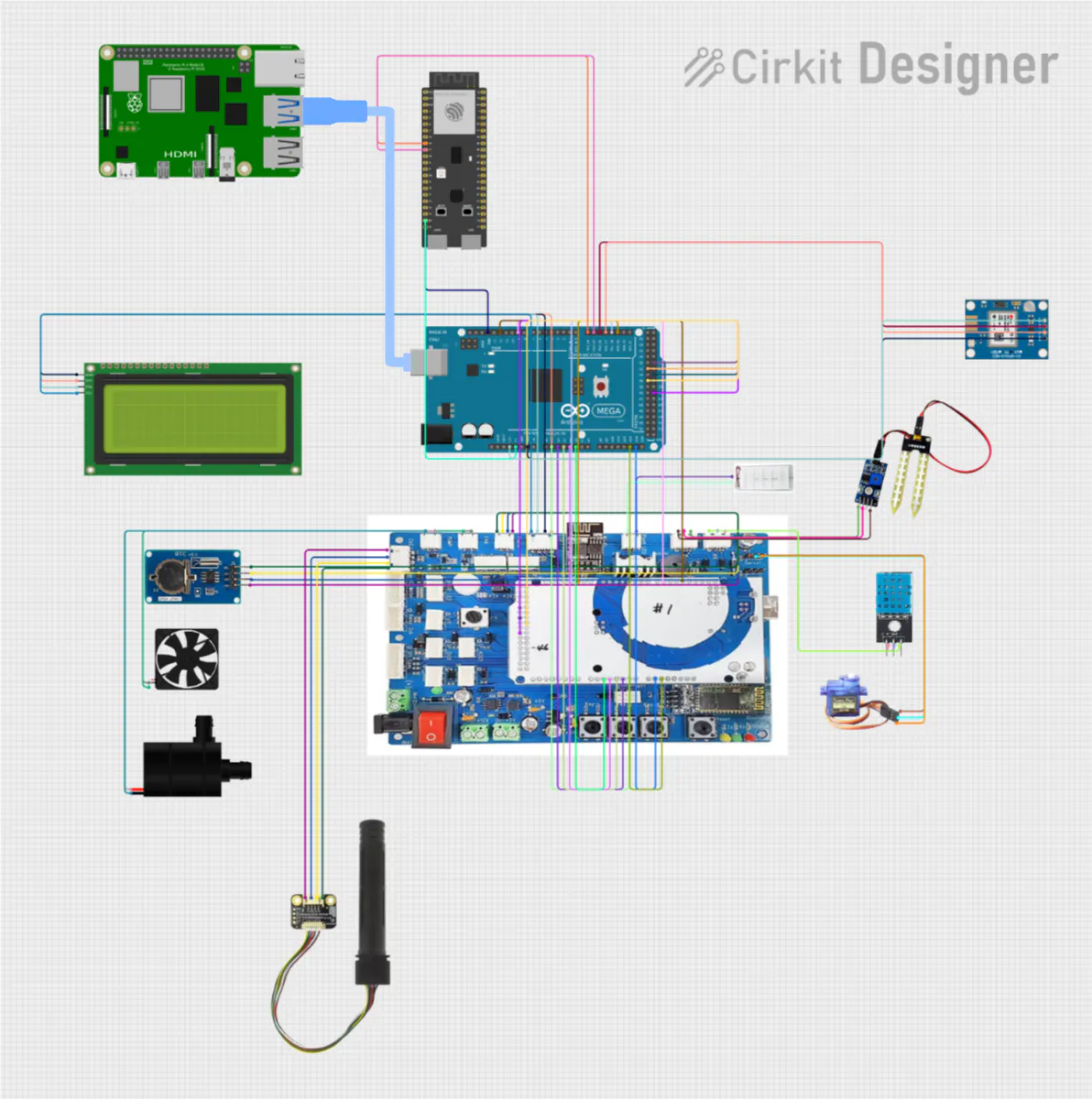
7. Sequence Diagram7-1. Sensor > tinyIoT > Dashboard/UnityThis section summarizes the hardware used in the prototype and the role of each component. The wiring diagram below shows how the boards, sensors, and actuators are connected.
Boards
Arduino Mega2560
Main low-level controller inside the mini farm
- Main low-level controller inside the mini farm
Reads:
- DHT11 temperature & humidity sensor (digital pin 12)
- RX-9 CO₂ sensor (EMF + thermistor on analog pins A2 and A3)
- Analog soil-moisture sensor (A1)
- Light sensor (photoresistor) and additional analog inputs as needed
Drives:
- Servo motor on pin 9 (opens/closes the acrylic “door”
- Ventilation fan on pin 3
- Water pump on pin 3
- RGB LED / LED strip on PWM pins (4, 35, 35, 36 in our prototype)
Displays the current sensor values on a 16×2 I²C LCD (address 0x27)
ESP32 Development Board
- Acts as a Wi-Fi gateway and oneM2M client towards tinyIoT
- Connected to the Mega2560 via a UART link (SoftwareSerial on pins 16 and 17)
- Receives sensor values as simple text lines such as Hum :45, Temp :23, CO2 :800, Soil :60
- Runs several FreeRTOS tasks that periodically POST the latest values to TinyIoT as <cin> resources under /Sensors/*.
Raspberry Pi (AI & notification bridge)
Host for:
- the AI plant-health inference service (YOLOv8-based model)
- the HTTP Notify server (Flask) and MQTT bridge scripts
Connected to the Mega2560 over USB seria
Listens for oneM2M notifications either:
- directly from TinyIoT (HTTP NOTIFY), or
- via EMQX Cloud (MQTT), using mosquitto_sub and jq
Converts each notification into a simple serial command such as LEDsub1:5, Fansub1:ON, Doorsub1:OFF, which the Mega2560 uses to drive the actuators.
Sensors and actuators
Sensors
- DHT11 – ambient temperature and relative humidity
- RX-9 CO₂ sensor – CO₂ concentration in ppm, with temperature compensation via internal thermistor
- Analog soil-moisture sensor – soil water level around the plant root
- Photoresistor – light level inside the mini farm
Actuators
- SG90 or similar micro-servo – opens and closes the mini farm door
- DC ventilation fan – improves air circulation and reduces CO₂ / humidity spikes
- Water pump – irrigates the plants via a small hos
- RGB LED / LED bar – simulates growing light and can be dimmed based on the command value
Together, these components form a complete “sensor → TinyIoT → app/unity → TinyIoT → actuator” loop that can be replicated for other small farms and research setups.
8-2. Software ComponentstinyIoT:
- Act as datahub
- IN-CSE of the system
- Retrieve data of farm and control actuators
- Statistical presentation of sensor data
Unity Digital Twin:
- Retrieve data of farm and control actuators
- Simulate and show the real farm
Mobile App:
Loads the current state of all sensors, actuators, and inference data once (see Section 5-1.)
fun forceRefreshOnce(ae: String, sensors: List<String>, acts: List<String>, infs: List<Sting>) {
    viewModelScope.launch {
        sensors.forEach { r ->
            val path = "TinyIoT/$ae/Sensors/$r"
            val conString = TinyIoTApi.fetchLatestCin(path)

            if (conString != null) {
                val f = conString.toFloatOrNull()
                if (f != null) {
                    _sensorValues.update { it + (r to f) }
                    onSensorSample(r, f)
                } else {
                    _sensorStringValues.update { it + (r to conString) }
                }
            }
        }
        acts.forEach { r ->
            val path = "TinyIoT/$ae/Actuators/$r"
            val s = TinyIoTApi.fetchLatestCin(path)
            if (s != null) _actuatorValues.update { it + (r to s) }
        }
        infs.forEach { r ->
            val path = "TinyIoT/$ae/inference/$r"
            val dataPair = TinyIoTApi.fetchLatestCinLabelData(path)
            processInferenceData(r, dataPair)
        }
    }
}
Discovering all resources via fetchResourceTree (see Section 5-1.)
suspend fun fetchResourceTree(ae: String): ResourceTree {
    val sensorCnts = getCntNamesWithFallback("TinyIoT/$ae/Sensors")
    val actCnts    = getCntNamesWithFallback("TinyIoT/$ae/Actuators")

    val infCnts    = getCntNamesWithFallback("TinyIoT/$ae/inference")

    val sensors = sensorCnts.map { SensorDef(canonical = canonOf(it), remote = it, intervalMs = 60_000L) }
    val acts    = actCnts.map    { ActDef   (canonical = canonOf(it), remote = it) }

    val infs    = infCnts.map    { ActDef   (canonical = canonOf(it), remote = it) }

    Log.d(
        "TREE",
        "fresh sensors=${sensors.map { it.remote }} acts=${acts.map { it.remote }} infs=${infs.map { it.remote }}"
    )
    return ResourceTree(sensors = sensors, actuators = acts, inference = infs)
}
MQTT-based actuator command (commandActuatorViaMqtt) and callback registration (setOnNotify, setOnResponse) (see Section 6-4, 6-5.)
fun commandActuatorViaMqtt(ae: String, remote: String, value: String) {
    _actBusy.update { it + remote }
    val toPath = "TinyIoT/$ae/Actuators/$remote"

    val rqi = "req-${java.util.UUID.randomUUID()}"
    val start = System.currentTimeMillis()

    pendingAct[rqi] = remote to start

    mqtt.publishCreateCin(toPath, value, rqi)
}

init {
    mqtt.setOnNotify { container, con, lblList ->
        ...
    }
    mqtt.setOnResponse { rqi, rsc, _ ->
        ...
    }
    mqtt.connect(onConnected = {
        ...
    })
}
Unity WebGL:
Set it up so that the required parameter variables match the order of the enum values, and each one corresponds to the correct path in TinyIoT.
public enum EFarmParameter
{
    Temperature,
    Humidity,
    CO2,
    Soil,

    Water,
    LED,
    Fan,
    Door,

    health
}

class FarmParameter
{
    public string[] parameterString = {
       ...
    };

    public string[] ResourcePathString = {
        "Sensors/Temperature",
        "Sensors/Humidity",
        "Sensors/CO2",
        "Sensors/Soil",

        "Actuators/Water",
        "Actuators/LED",
        "Actuators/Fan",
        "Actuators/Door",

        "inference/health"
    };
}
Convert the EFarmParameter variable to an int, use it as an index to update the parameter variables, and then run the listener.
for (int i = 0; i < Enum.GetValues(typeof(EFarmParameter)).Length; i++)
{
    if (result.Contains(_instance.farmParameter.ResourcePathString[i]))
    {
        token = token["nev"]["rep"]["m2m:cin"];

        if (token != null)
        {
            string content = token["con"].ToString();
            if(content == "data")
            {
                //inference exception case
                content = token["lbl"][0].ToString();
            }
            _instance.farmParameter.parameterString[i] = content;
            _instance.refreshEvent?.Invoke();
        }
        break;
    }
}
Use the same method to manage the paths as well.
["to"] = "/TinyIoT/TinyFarm/" + _instance.farmParameter.ResourcePathString[(int)type] + "/la"Training curves show consistent convergence across all loss functions, with train/box_loss, train/cls_loss, and train/dfl_loss all decreasing smoothly throughout 100 epochs. Classification performance metrics indicate strong model quality, with precision, recall, mAP50, and mAP50-95 values converging to approximately 0.9-1.0 for the test set, demonstrating effective plant health classification performance.
The YOLOv8 model successfully performs dual-stage inference on the captured image, detecting both plant species and health status. Two healthy basil plants (0.92, 0.86 confidence) and two poinsettias are identified, with one showing unhealthy status (0.81 confidence) while the other maintains healthy status (0.89 confidence). The model demonstrates reliable species classification and health assessment capabilities for the SodaFarm system.
10. Limitations & Points to be Supplemented, Future Work10-1. Current LimitationsAI/ML Constraints
- Single YOLOv8 model couples species and health detection; separate models could improve accuracy
- Limited training dataset; generalization to diverse plant varieties unvalidated
Real-time Performance
- Hourly inference scheduling may conflict with control commands; no priority queue implemented
Security Gaps
- Static ACP grants full permissions; fine-grained RBAC not implemented
- Credentials stored in config files; no secure credential management
- MQTT communication lacks guaranteed TLS/SSL encryption
Model Optimization
- Add model ensemble and A/B testing capability via TR-0071
Scalability
- Deploy InfluxDB or TimescaleDB for efficient time-series data queries
- Expand the number of smart farms to scale up model training
Security & Privacy
- Role-Based Access Control (RBAC) with OAuth 2.0 authentication
- End-to-end encryption (TLS 1.3) for all communication
- Audit logging and compliance support
Advanced Features
- Multi-crop support with crop-specific control rules
- Weather API integration for predictive adjustments
- Physics-based digital twin simulation for command validation
- Mobile app offline mode with command queueing
Months 1-3: Robustness & Scaling
- Migrate to centralized model registry and InfluxDB
- Implement distributed inference scheduler
Months 3-6: AI/ML Advancement
- Deploy anomaly detection and active learning
- Implement transfer learning for new crop varieties
- Pilot federated learning across farms
Months 6-9: Advanced Automation
- Develop autonomous control engine (rule-based or RL)
- Add formal verification for safety guarantees
- Multi-objective optimization (energy, health, water usage)





Comments