


Hardware components | ||||||
| × | 1 | ||||
 |
| × | 1 | |||
 |
| × | 1 | |||
 |
| × | 1 | |||
| × | 1 | ||||
 |
| × | 1 | |||
 |
| × | 1 | |||
 |
| × | 1 | |||
 |
| × | 1 | |||
 |
| × | 1 | |||
 |
| × | 1 | |||
| × | 1 | ||||
 |
| × | 2 | |||
Software apps and online services | ||||||
 |
| |||||
| ||||||
| ||||||
| ||||||
Safe and efficient operation of wind turbines is essential, but their manual monitoring is impractical. This project creates a Smart Wind Turbine Monitoring System that automatically controls the servo position for the wind turbine depending on the wind conditions, senses environmental hazards such as storms, wildlife, vibrations and notifies you in real time by emailing you from your phone.
The sensors are connected to an Arduino Nano 33 IoT to be read by the system, a Raspberry Pi is used to show a live monitoring dashboard, and the communication between the two is done using the protocol MQTT. If something goes wrong, IFTTT will automatically send you an e-mail notification.
How It WorksThere are two parts to the system:
In the code, Arduino Nano 33 IoT reads four sensors every 500ms and publishes the data as json to an mqtt topic. It comes in two modes AUTO and MANUAL, in which the angle of the servo is controlled either by the potentiometer (acting as the wind speed) or by the user directly from the dashboard.
Raspberry Pi listens to the same MQTT topic, updates a Tkinter dashboard with all the received data, activates a buzzer and LED if an alert is received and calls the IFTTT webhook to send an email notification.
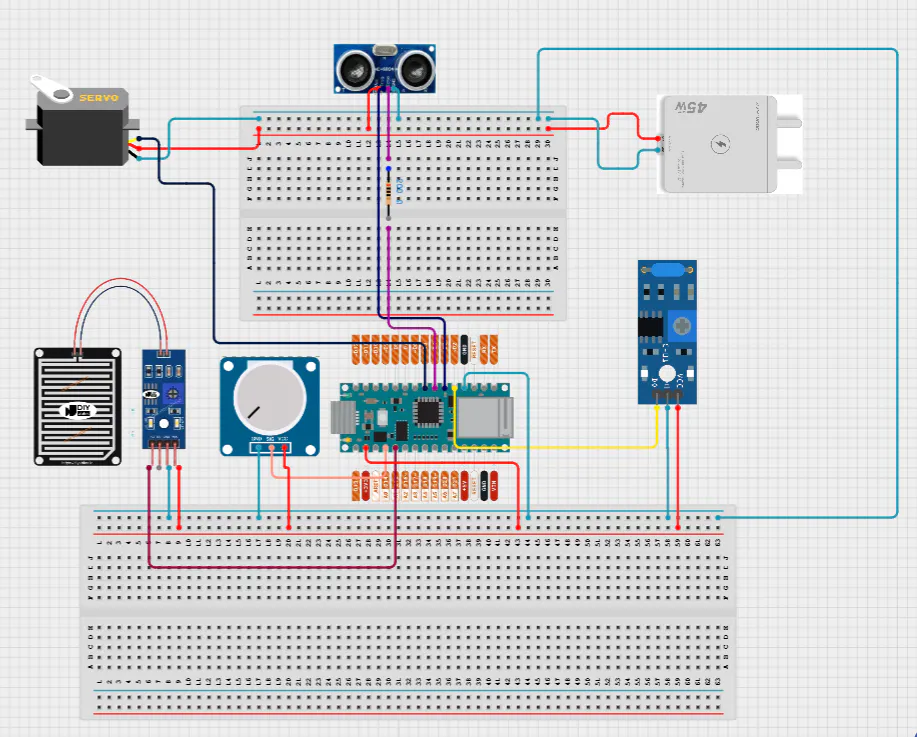
Hardware SetupConnect the sensors to the Arduino Nano 33 IoT as follows:
Potentiometer (wind) → A0
Rain sensor → A1
Vibration sensor → D2
Ultrasonic TRIG → D3
Ultrasonic ECHO → Resistor → D4
Servo motor → D5
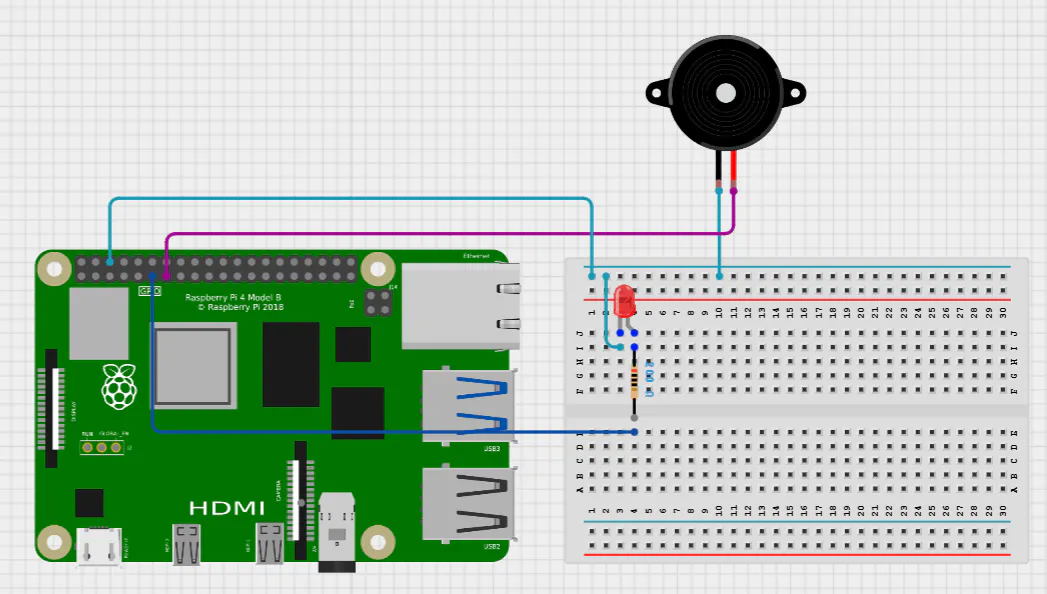
On the Raspberry side:
LED → GPIO 17
Buzzer → GPIO 27
In Arduino IDE, install these libraries via Library Manager:
- WiFiNINA - for WiFi connectivity
- PubSubClient - for MQTT
- Servo - for servo motor control
On Raspberry Pi, install Python dependencies:
pip install paho-mqtt requestsThe full source code for this project is available on GitHub:
The repository includes:
sketch_turbine.ino- Arduino Nano 33 IoT firmwaredashboard.py- Raspberry Pi monitoring dashboard
In the Arduino code, update your credentials:
const char WIFI_SSID[] = "your_wifi_name";
const char WIFI_PASS[] = "your_wifi_password";
const char MQTT_BROKER[] = "broker.hivemq.com";
const int  MQTT_PORT = 1883;
The Arduino connects to WiFi on startup. If WiFi drops, it automatically reconnects without stopping the turbine — the servo keeps running in AUTO mode regardless of connection status.
Sensor Logic and Alert SystemThe Arduino reads all four sensors and triggers alerts based on these thresholds:
// Wildlife detected if object is closer than 15cm
if (distance < 15) → wildlifeAlert = true

// Storm warning if rain sensor reads below 400
if (rainValue < 400) → stormAlert = true

// Vibration alert if sensor reads HIGH
if (vibrationValue == HIGH) → vibrationAlert = true

// Ultrasonic fault if sensor fails 5 times in a row
if (failCount >= 5) → ultrasonicFault = true
When any alert triggers in AUTO mode, the servo immediately returns to center (90°) to protect the turbine.
MQTT CommunicationThe Arduino publishes a JSON status message every 500ms:
{
  "mode": "AUTO",
  "servo": 86,
  "wind": 490,
  "rain": 1023,
  "vibration": 0,
  "distance": 121.5,
  "wildlife": 0,
  "storm": 0,
  "vibrationAlert": 0,
  "ultrasonicFault": 0,
  "wifi": "CONNECTED",
  "mqtt": "CONNECTED",
  "lastCommand": "NONE"
}
The Raspberry Pi subscribes to this topic and updates the dashboard in real time. Commands are sent back from the dashboard to the Arduino through a separate command topic.
Raspberry Pi DashboardThe dashboard is built with Python Tkinter and shows all sensor values live. It also has manual control buttons:
- AUTO MODE - lets the turbine run automatically based on wind
- CENTER (90°) - returns servo to center then goes back to AUTO
- Servo slider - drag to set a specific angle in MANUAL mode
- Quick Direction buttons - jump to 0°, 45°, 90°, 135°, 180° instantly
If the Arduino loses connection for more than 10 seconds, the dashboard shows a warning. If the Arduino was in MANUAL mode and loses MQTT connection for more than 10 seconds, it automatically switches back to AUTO mode for safety.
IFTTT Email NotificationsWhen an alert is detected, the system sends an HTTP request to IFTTT Webhooks which triggers an email notification.
To set this up:
- Go to ifttt.com and create a new Applet
- If This → Webhooks → "Receive a web request" → event name:
turbine_alert
Choose "Webhooks"
Choose "Receive a web request"
- Then That → Email → set subject and body using
{{Value1}},{{Value2}},{{Value3}}
I recommend to choose email or gmail base on the mail of IFTTT account.
Fill your subject and Body.
- Go to ifttt.com/maker_webhooks/settings and copy your API key
Choose your trigger and then scroll down and click in "Documentation" and take your key
- Paste the key into the Arduino code:
const char IFTTT_KEY[] = "your_key_here";The system has a 60-second cooldown between alerts to avoid spamming your inbox. It only sends when a new alert appears, not continuously while the alert is active.
The system successfully:
- Adjusts servo position in real time based on wind sensor input
- Detects and responds to storm, wildlife, vibration, and sensor fault conditions
- Reconnects automatically after WiFi or MQTT drops without interrupting turbine operation
- Sends email alerts within seconds of a hazard being detected
- Allows full remote manual control through the dashboard
You can see how it work here in my video:
https://drive.google.com/drive/folders/1Vism4hcjthWG2CnkHrlZMDv1g7WhINoZ?usp=sharing
Thanks so much for all the help and for sticking with me through this whole project, really appreciate it. I love you all <3
This project is part of an assignment submitted to Deakin University, School of IT, Unit SIT210 - Embedded Systems Development.


Comments