



FixMix
FixMix is an application designed for the cat-loving user that wants to keep their cat healthy with a customized diet plan, but is often away from the home. With FixMix, an automated feeder dispenses food on a daily schedule, although users can also trigger feedings remotely if desired. Through FixMix, users can also gauge how much their kitty likes the current brand of food and how much they are eating. Users can customize settings on the app to set a plan for their cat’s size and personality, with tweaks for a weight loss plan and different frequencies of meals throughout the day. Through Health tips, users can check how close their cat is to their goal weight, dangers such as unusual weight gain or tapeworms.
Device:
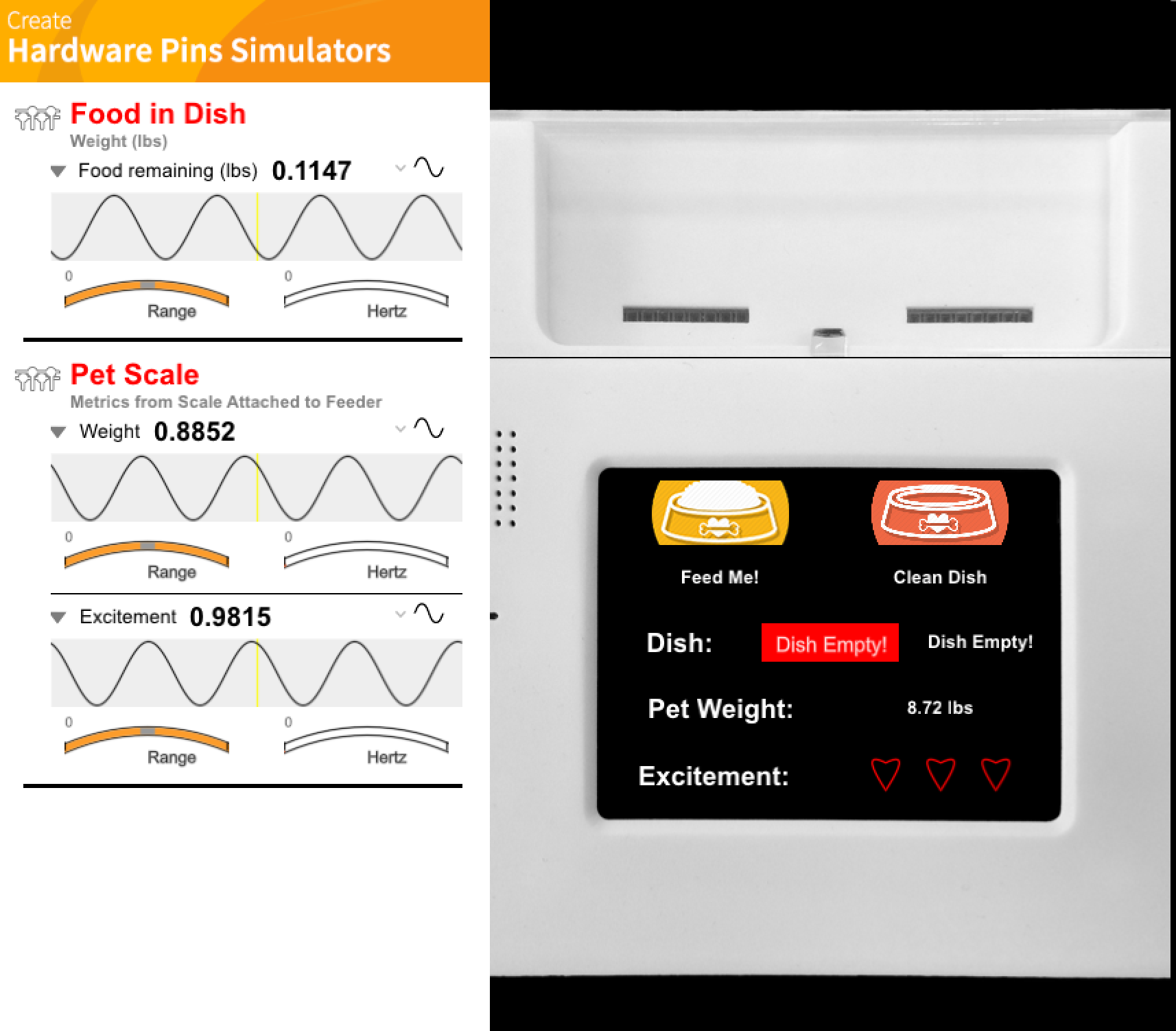
Screen:
§ Dish: Contains both percentage full and the amount of food in the dish (in grams). The progress bar shows the percentage full to minimize cognitive load. If the dish is fully empty, the bar will turn red as an additional warning.
§ Pet Weight: Shows the pet’s weight on the scale.
§ Excitement: Shows the level of enthusiasm of the pet when eating food. This is supposed to be analogous to the force that the pet is placing on the dish, ie: a high level of excitement corresponding to a cat eating quickly and messily and moving the dish around in its excitement. Can be used by the owner to tell how much the pet likes the food.
Sensors:
§ Sensor Group 1 (in dish): Updates amount of food from sensor in dish.
§ Sensor Group 2 (scale): Updates excitement and pet weight based on the pressure on the main part of the scale and pressure where the dish touches the scale.
Updates: The device will gain updates when connected to the mobile app, which allows the user to customize information about the planned meal size (which is the amount to place in the dish), and how many times the feeder will automatically dispense food into the dish. The user also has the option to feed the pet ahead of schedule by manually pressing the feed buttons on the device (it is assumed that the screen is out of reach of the cat so it cannot press the feed buttons on its own!). The clean dish button will all remove food from the dish (can be used to stop overeating as well).
Mobile:
The mobile device has 3 different screens, which are controlled by the menu at the bottom.
Home Screen Screen:
The look and feel is the same as the corresponding screen on the device in order to preserve intra-operability. All controls and visuals on the device are mirrored in the home screen, and the dish can be filled and emptied by pressing the buttons on the mobile app. There is some latency in passing information between the app and the device so the animations are slightly slower on the mobile app, but unless the two screens are placed side by side, this is unlikely to be noticed.
Health Facts Screen:
Health facts are based on:
§ 1. Data input by the owner in the profile (which contributes to mealsize)
§ 2. Pet data (weight, excitement, etc) retrieved from the device.
§ The formulas are updated from values in real time, but do not correspond to any actual scientific formulas and are just there to prototype:
Litter Box Time: Updates estimated time until the pet uses the litter box so that user knows when they need to clean it. Since the user may be away from home the entire day, they may want to adjust the meal size and frequency so that the litter box is not dirty all day.
Days until Goal Weight: Estimates how long the current diet plan will take until the pet is a healthy weight. Not necessary if the pet is at a good weight, but may be used to control underweight or overweight cats.
Energy Level: Shows the energy level of the pet based on the size of the meal and predicted lethargy. Some owners might want to know when the pet is likely to take a nap and when they are ready to be played with.
Meal Settings Screen:
§ Meal settings allow the user to input information about their pet for a customized diet plan. By default, the app will assume the cat is of a normal body frame size and level of activity. This is the least prominent screen in the menu, since it will likely be used less than the other screens.
§ Size: Cats can be different body sizes due to age (kittens) or breed (ie Maine Coons can be the size of dogs). Different body sizes will require differing amounts of food.
§ Activity Level: Cats that nap a lot are sedentary and cats that are very playful or prone to hunting are active. This is partly based on personality and age. If the owner knows their cat is always on the go, they may need more food for energy.
§ Goal Weight: Adjust to make the cat gain or lose weight. Current weight can be gained from either the device home screen or the IOT feeder. This step will not be performed without some thought on the part of the owner (and consideration of their pet’s current weight), so I did not display the current weight on this screen to avoid cluttering.
§ Feeding Frequency: More frequent meals mean smaller portions. Could be used to keep energy levels balanced or avoid unfortunate litter box timings (ie before guests coming over).

Comments