




Hardware components | ||||||
 |
| × | 1 | |||
 |
| × | 1 | |||
 |
| × | 1 | |||
 |
| × | 2 | |||
Software apps and online services | ||||||
 |
| |||||
 |
| |||||
This system is very useful using Bolt IoT module which helps to calculate the particular intensity of light (LED) and convert it in a manner so that the intensity of LED can be controlled according to the required intensity.
Intensity of the LED can be conrolled through Internet. We don't need any switch board and it can be accessed from some of the distance also.
So, let's move to the further steps to create such a device for us.
So here is the small video of my project-
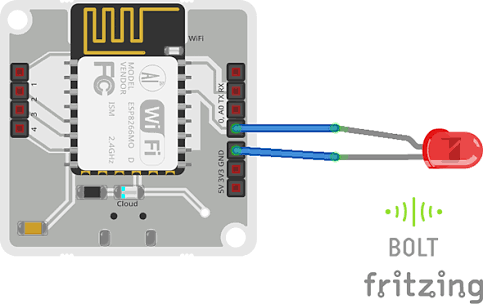
Step 1:The first and most important thing is connection. So I shall tell you step by step how to do the connections.
1.Connect the negative end of Led to ground pin using jumper wire and bread board.
2.Connect the positive end of Led to 0 GPIO pin using jumper wire and bread board.
Step 2: A unique way of getting the Bolt API Key and Device IDLogin to www.cloud.boltiot.com go to dashboard and then click API there you will get a option called generate key copy the 20 digit API key.
Go to the Dashboard of the Bolt IoT and then click on product. Next go to add product and then give a name of the product you like to connect to your Bolt to input devices and you have to collect the data to GPIO then save it.
Configure your product like this:
Here is the Coding Part:
Connect the Bolt IoT device using USB and power it on.
Here is the image of screen where we can control the intensity of light through smartphone.

Comments