Video
OverviewWanted a simple way of quickly logging on / off my computer without having to typing my password in.
There are various products on the market that would solve this problem from fingerprint readers to proximity dongles but I decided to see what i could knock up with parts I mainly already had.
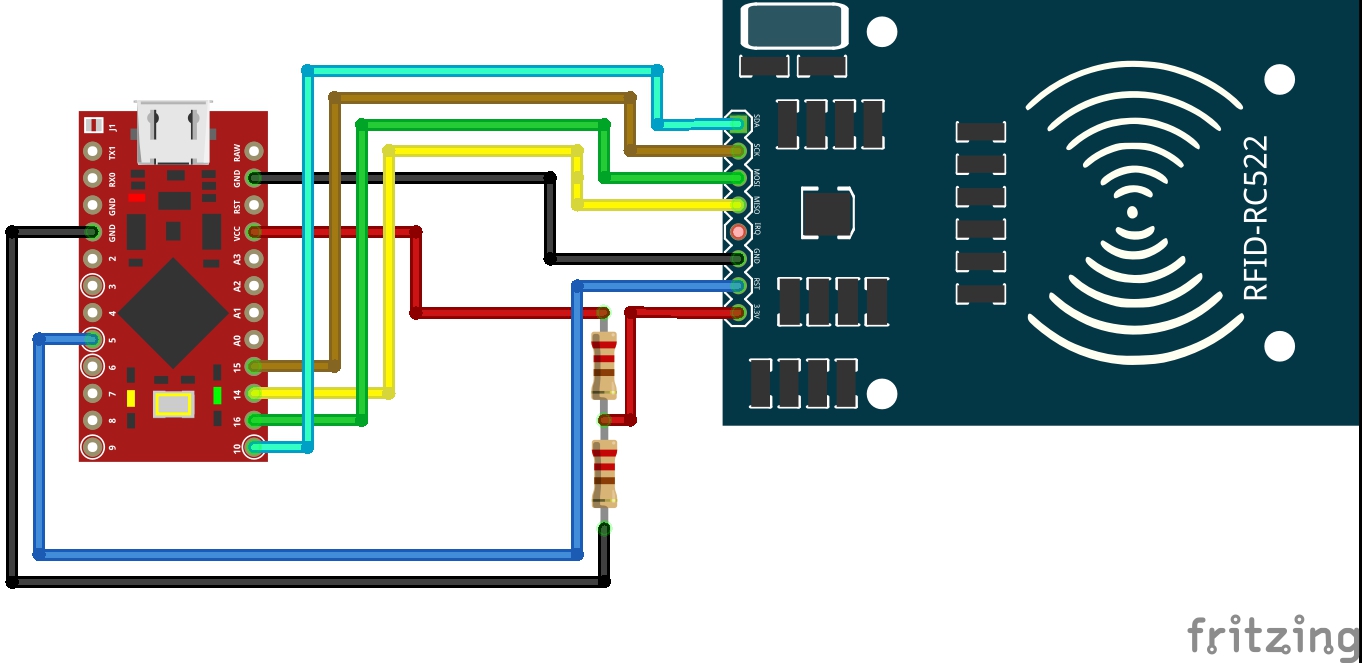
For this project you do use an Arduino/Genuino Leonardo on Pro Micro. The reason is implicit on the project. When you use the rfid tag near the Arduino, it send the letters of your password to your system. Your computer read the atmega32u4 like a keyboard. In the code of Arduino there is your system password. This password will be wrote on screen when you present the TAG. For this reason, the connections to RFID RC-522 of this tutorials are fits for an Arduino Leonardo or Arduino Micro (China). Follow the scheme and see the image. Connect all the pin. Pay more attention to connect the 3.3V pin of RFID shield to voltage regulator. You can burn the shield.
You can use also an Arduino Pro Micro 3.3V, without voltage regulator.
"THE UPDATE OF LOGOUT OPTION TOO HAS BEEN ADDED!"




_AJ41W8pA7A.jpg?auto=compress%2Cformat&w=900&h=675&fit=min)
_PnKPri8a6q.jpg?auto=compress%2Cformat&w=48&h=48&fit=fill&bg=ffffff)


_LjOaZUMHC4.png)



_3u05Tpwasz.png?auto=compress%2Cformat&w=40&h=40&fit=fillmax&bg=fff&dpr=2)
_LjOaZUMHC4.png)

Comments